Business-Friendly Mapping Meets dbt- Virtualizing Logical Building Blocks into SQL
A practical guide to connecting Business Friendly Mapping with dbt materializations, making pipelines both business-readable and performance-optimized.
Summary
BFM defines what happens using logical blocks (
select,filter,aggregate,union).dbt defines how it runs with materialization options (
ephemeral,view,table,incremental).The same logical design can be executed differently without changing business meaning.
Combine BFM + dbt for clarity, flexibility, and scalability.

Introduction
When designing modern data platforms, there’s often a gap between business-friendly design and technical execution.
- Business stakeholders want clarity: “What transformations are being applied to my data?”
- Engineers want control: “How should these transformations run for performance and scalability?”
Business Friendly Mapping (BFM) bridges the first gap by defining transformations in logical building blocks like select, derive, filter, aggregate, and union.
But once you’ve modeled these steps, how do you translate them into efficient, executable SQL pipelines?
That’s where dbt comes in — specifically, its materialization strategies. By combining BFM with dbt, we can create a framework where business logic stays stable, but execution adapts to performance needs.
Logical Blocks vs. Physical Execution
In BFM:
- We describe what happens in plain terms: select, filter, aggregate.
- Each step has properties (columns selected, filters applied, aggregations defined).
In dbt:
- We decide how to execute those steps: ephemeral, view, table, or incremental.
- These choices don’t change the business meaning, only how queries run in the warehouse.
👉 The critical insight: BFM templates generate SQL statements, but dbt materializations decide whether those statements become CTEs, views, or tables.
dbt Materialization Options in Context
As explained in this guide on dbt materializations, dbt supports several ways to run SQL logic:
**ephemeral**→ SQL inlined as a CTE in downstream models (no persistent object).**view**→ logic materialized as a view, recomputed every run.**table**→ logic materialized as a table (full refresh).**incremental**→ table that only processes new data (optimized for big datasets).
These options give us the flexibility to choose execution strategy per logical block.
Example: Mapping Logical Blocks to dbt Execution
Here’s how we might map BFM steps to dbt strategies:
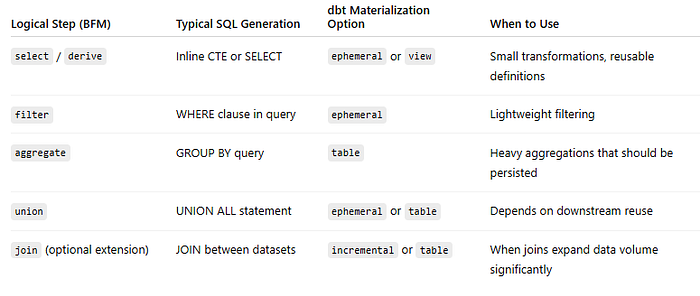
This mapping keeps logical design stable, while letting engineers decide which steps are materialized.
A Step-by-Step Example
Let’s walk through an example.
Step 1: Define BFM Logical Steps
Suppose we want to calculate total revenue per customer.
In BFM, we might define:
selectorders (order_id,customer_id,amount).filterorders wherestatus = 'COMPLETED'.aggregaterevenue bycustomer_id.
Step 2: Generate SQL Templates
BFM templates might generate SQL like this:
-- step 1: select
WITH orders_raw AS (
    SELECT order_id, customer_id, amount, status
    FROM raw.orders
),
-- step 2: filter
orders_completed AS (
    SELECT *
    FROM orders_raw
    WHERE status = 'COMPLETED'
),
-- step 3: aggregate
customer_revenue AS (
    SELECT customer_id, SUM(amount) AS total_revenue
    FROM orders_completed
    GROUP BY customer_id
)
SELECT * FROM customer_revenue;
Step 3: Choose dbt Materializations
Now, dbt determines how each step runs:
-- models/orders_raw.sql
{{ config(materialized='ephemeral') }}
SELECT order_id, customer_id, amount, status
FROM raw.orders;

-- models/orders_completed.sql
{{ config(materialized='view') }}
SELECT *
FROM {{ ref('orders_raw') }}
WHERE status = 'COMPLETED';

-- models/customer_revenue.sql
{{ config(materialized='table') }}
SELECT customer_id, SUM(amount) AS total_revenue
FROM {{ ref('orders_completed') }}
GROUP BY customer_id;
Here’s what happens:
orders_rawis ephemeral → no table created, just inlined in downstream SQL.orders_completedis a view → light transformation, recomputed on query.customer_revenueis a table → persisted for performance, ideal for reporting.
Why This Matters
This combination delivers:
- Flexibility → Switch a block from view to table without changing business logic.
- Transparency → Business stakeholders still see simple logical steps.
- Performance control → Engineers decide where persistence improves speed.
In short: BFM defines the logical blocks, dbt defines the execution.
Advanced Scenarios
- Incremental Loads
Large fact tables (likeorders) can be materialized incrementally:
{{ config(materialized='incremental', unique_key='order_id') }}
SELECT order_id, customer_id, amount, status, created_at
FROM raw.orders
{% if is_incremental() %}
    WHERE created_at > (SELECT MAX(created_at) FROM {{ this }})
{% endif %}
- 👉 Keeps logic identical but optimizes runtime.
- Snapshots vs. SCD2
For historization, ephemeral steps can feed into dbt snapshots or dual SCD2 tables.
Logical design stays the same — execution strategy adapts. - Reusable Blocks
A BFM-definedderivestep (e.g.,tax_amount = amount * 0.2) can live as ephemeral logic reused in multiple downstream models.
Conclusion
By combining Business Friendly Mapping with dbt’s materialization strategies, we unlock:
- Business-readable logic, consistent across steps.
- Execution flexibility tailored for performance.
- Scalable pipelines where design and execution are decoupled.
The properties we set on logical steps guide what the SQL does.
dbt’s materialization options guide how that SQL lives in the warehouse.
Together, they make pipelines clear, adaptable, and efficient.