Turn your metadata and diagrams into living, navigable documentation in Confluence — complete with automated publishing, versioned visuals…
Publishing Metadata and Diagrams to Confluence
Turn your metadata and diagrams into living, navigable documentation in Confluence — complete with automated publishing, versioned visuals, and business-friendly formatting.
Part 5: Making Your Metadata Business-Friendly
This article builds on the concepts introduced in previous parts:
- Part 1: Why Metadata-Driven Design Needs Visual & Text-Based Harmony
- Part 2: Automating draw.io Diagram Generation from Metadata
- Part 3: Parsing draw.io Diagrams Back into Metadata
- Part 4:Organizing Diagrams and Metadata in VSCode
So far, we’ve focused on generating diagrams, parsing them back into metadata, and managing everything in VSCode. In this article, we’ll look at the final step of the workflow : publishing diagrams and mappings to Confluence , so that business stakeholders can easily consume and collaborate on your models.
This turns your metadata infrastructure into a documentation layer — connecting raw data logic to readable, visual, and traceable outputs.

🎯 Why Publish to Confluence?
Confluence remains the go-to place for documentation in many organizations. By integrating your metadata-driven architecture with it, you:
- Provide stakeholders with clear, visual documentation
- Reduce miscommunication between business and IT
- Keep diagrams and models versioned and aligned with code
- Enable asynchronous collaboration and feedback
Your metadata becomes more than technical scaffolding — it becomes a business communication asset.
🛠️ Exporting from draw.io to Confluence
There are two main ways to export draw.io diagrams for use in Confluence:
🔹 1. Manual Export (Basic)
- Open
.drawiofile in VSCode or draw.io desktop - Export as PNG or SVG
- Upload manually into a Confluence page
Pros: Simple and quick
Cons: Manual process and harder to version
🔹 2. Automated Export via Script or CI/CD
Use a CLI tool or Python script to export diagrams and publish them automatically.
Example: Export as PNG with drawio-desktop
drawio - export - format png - output output/diagram.png diagrams/mapping.drawio
Then publish using the Confluence REST API:
import requests
confluence_url = "https://yourdomain.atlassian.net/wiki/rest/api/content/{page_id}/child/attachment"
headers = {"Authorization": "Bearer YOUR_TOKEN"}
files = {"file": open("diagram.png", "rb")}
response = requests.post(confluence_url, headers=headers, files=files)
print(response.status_code)
📑 Combining Visuals with Metadata
To make the most of your diagrams:
- Pair PNG or SVG diagrams with the corresponding YAML mapping
- Use Markdown or code snippets inside Confluence pages
- Generate pages automatically using a script or static site generator
Example layout
## Customer Order Mapping

```yaml
source: crm.orders
transformation: join with customers
...
🔗 Smart Linking and Navigation
Create internal Confluence links between:
– ERD diagrams ↔ domain descriptions – Mapping diagrams ↔ transformation docs – Tables ↔ glossary entries
This enables readers to:
– Follow data flow across pages – Understand transformations at a glance – Navigate from visual to spec to glossary
🧠 Suggested Publishing Workflow
1. Generate or update .drawio files from metadata
2. Export diagrams via script to PNG/SVG
3. Bundle with YAML/SQL snippets
4. Push to Confluence via REST API or CI/CD
5. Notify stakeholders (optional automation)
Use GitHub Actions, GitLab CI, or Azure DevOps for scheduled or triggered publishing.
📦 Bonus: Organize a Living Documentation Space
In Confluence, consider creating structured sections:
📁 Data Architecture ├── 📄 Overview ├── 📄 Entity Relationship Diagrams ├── 📄 Mappings (by domain) └── 📄 Business Glossary
Use labels and page trees to support versioning, traceability, and search.
🧩 Benefits Recap
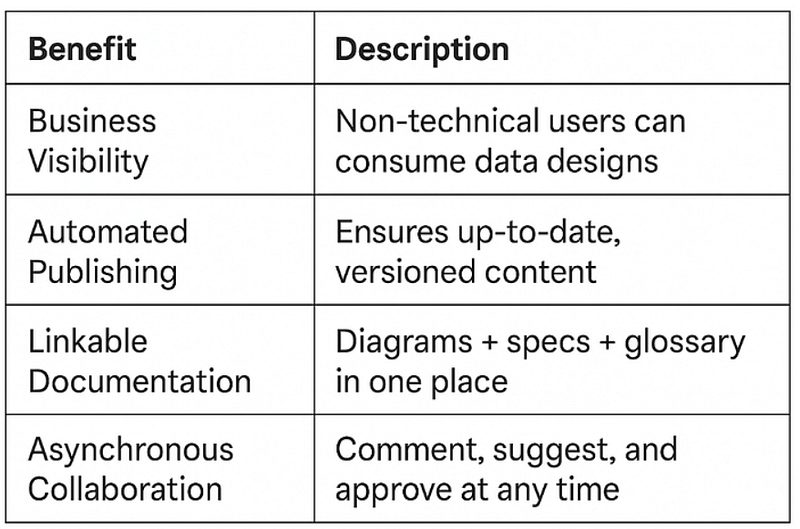
📌 Summary
Publishing your metadata and diagrams to Confluence connects your technical workflow to business reality. It ensures the data models and logic you define are:
🧠 Understandable 📸 Visual 🔗 Navigable ✅ Versioned