From UML and PowerDesigner roots to YAML-based modeling in VSCode
Introduction — The Missing Bridge Between Business Intent and Data Design
Modern data architecture has evolved rapidly. We’ve moved from hand-crafted SQL to metadata-driven frameworks, where YAML files and declarative logic generate the data platform itself.
We’ve learned to describe conceptual, logical, and physical models as metadata-as-code, feeding automated engines that generate tables, pipelines, and tests.
But one crucial layer is often missing: Requirements.
- Where do business requirements live?
- How are they linked to conceptual entities and logical models?
- And how can we trace them — from stakeholder intent to physical implementation?
This is the bridge we’ll rebuild.
Requirement modeling was once native to tools like PowerDesigner and UML; now it deserves a modern home in YAML, Git, and VSCode.
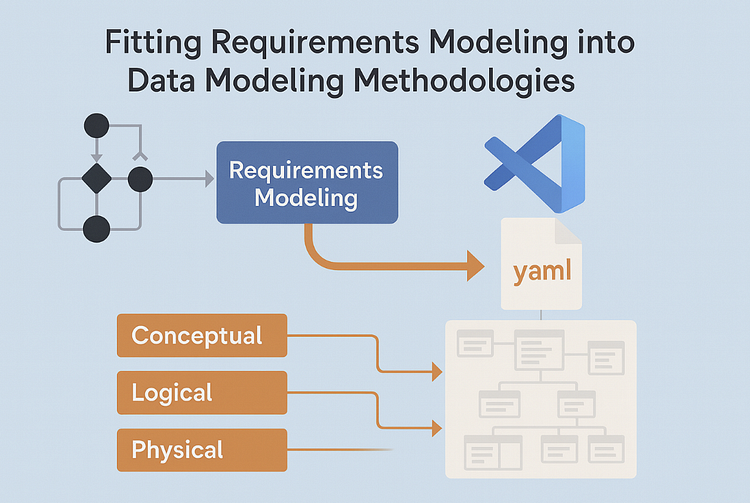
1. How Requirement Modeling Used to Work
Before metadata-as-code, requirements lived in diagrams. UML Use Cases, Activity Diagrams, and PowerDesigner Requirement Models connected business needs to system design.
Each requirement had:
- an ID and type (business, stakeholder, solution, transition)
- a description and acceptance criteria
- and trace links to other elements — like entities, data items, or tables.
PowerDesigner could literally link:
Requirement → Data Item → Column → Implementation
That lineage offered true traceability — from business intent to database schema. But it came at a price: heavy tools, manual updates, and limited collaboration.
Today’s challenge is to restore the traceability, not the tooling overhead.
2. Why We Need Requirement Modeling Again
With the rise of semantic models, data products, and federated ownership, the gap between business intent and technical execution is widening again.
Requirement modeling helps bridge it by:
- Making business context explicit.
- Connecting why a model exists to what it delivers.
- Enabling impact analysis (“if this requirement changes, what breaks?”).
- Driving test generation from acceptance criteria.
Put simply:
Requirement modeling makes your metadata purpose-aware.
3. Modeling Requirements in YAML
Instead of storing requirements in Word documents or Jira tickets, we define them as structured metadata — just like entities or pipelines.
requirements/customer_onboarding.yaml
id: REQ-001
title: Capture Customer Onboarding Data
type: business
description: >
The system must store customer onboarding information
to enable KYC and CRM integration.
linked_entities:
– Customer
– Address
acceptance_criteria:
– All onboarding fields captured and validated.
– Data must be available within 5 minutes of entry.
priority: high
status: approved
trace_to:
– entity.customer
– pipeline.customer_onboarding
Each file is human-readable, versioned, and directly linkable to other model files — making traceability declarative instead of conceptual.
4. Linking Requirements to Data Models
Once in YAML, we can connect requirements across modeling layers:
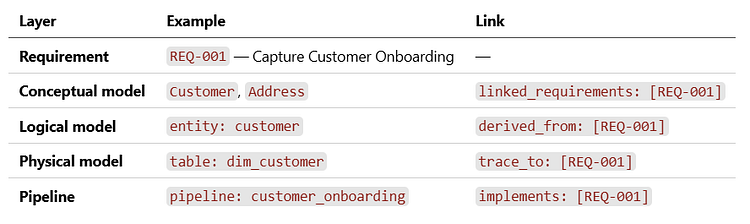
This turns your repository into a graph of intent — one that can be validated and visualized automatically.
5. From UML to Metadata — Visualizing the Flow
Instead of static UML diagrams, we can now generate them directly from metadata.
[Business Requirement] → [Conceptual Model] → [Logical Model] → [Physical Model] → [Pipeline]
Each arrow represents both a refinement and a trace.
With a draw.io or PlantUML template, this can even render automatically — keeping visuals always in sync with YAML files.
6. YAML Schema Template
To make requirements consistent, define a reusable schema (e.g., /schema/requirement.schema.yaml):
$schema: “https://json-schema.org/draft/2020-12/schema”
title: Requirement Schema
type: object
required: [id, title, type, description]
properties:
id:
type: string
pattern: “^REQ-[0-9]{3,}$”
title:
type: string
type:
type: string
enum: [business, stakeholder, solution, transition]
description:
type: string
linked_entities:
type: array
items: { type: string }
acceptance_criteria:
type: array
items: { type: string }
priority:
type: string
enum: [high, medium, low]
status:
type: string
enum: [draft, approved, implemented, validated]
derived_from:
type: array
items: { type: string }
trace_to:
type: array
items: { type: string }
When linked to VSCode’s YAML plugin, every new requirement instantly benefits from autocomplete, validation, and consistent structure.
7. Integrated Repository Structure
Here’s how requirements fit into your existing metadata repo:
/metadata
├── requirements/
│ ├── customer_onboarding.yaml
│ └── kyc_validation.yaml
├── conceptual/
│ └── customer.yaml
├── logical/
│ └── dim_customer.yaml
├── physical/
│ └── table_dim_customer.yaml
└── pipelines/
└── customer_onboarding.yaml
Automation scripts can:
- Validate traceability (no orphaned requirements or models)
- Generate documentation and dependency graphs
- Feed dashboards or Confluence pages
Your repository becomes both model and map.
8. Visual Traceability in Action
┌──────────────────────┐
│ Business Need / │
│ Requirement (YAML) │
└──────────┬───────────┘
│ define
┌──────────▼───────────┐
│ Conceptual Model │
│ (business entities) │
└──────────┬───────────┘
│ structure
┌──────────▼───────────┐
│ Logical Model │
│ (attributes, keys) │
└──────────┬───────────┘
│ refine
┌──────────▼───────────┐
│ Physical Model │
│ (tables, columns) │
└──────────┬───────────┘
│ implement
┌──────────▼───────────┐
│ Pipelines & Tests │
│ (execution layer) │
└──────────────────────┘
This simple diagram captures the spirit of formal modeling — without losing the agility of text-based workflows.
9. Integration with VSCode Workflows
In the VSCode-based methodology:
- Each YAML file is a metadata asset.
- Schema validation enforces structure.
- aw.io and Markdown previews visualize relationships.
- Git provides versioning and collaboration.
VSCode effectively becomes your modern PowerDesigner — lightweight, open, and scriptable.
10. Metadata Quality and Impact Analysis
Once every model and requirement is linked, you can build simple checks or dashboards:
- Which requirements lack implementation?
- Which models have no originating requirement?
- Which acceptance criteria are unverified?
This enables metadata observability — turning governance into automation rather than documentation.
11. Closing the Loop — From Requirement to Delivery
The methodology now looks like this:
- Requirements capture why.
- Conceptual models define what.
- Logical models describe how (independent of tech).
- Physical models and pipelines specify where and by what means.
Everything connected. Everything traceable.
12. Conclusion — Requirements as the Missing Metadata Layer
Requirement modeling isn’t a step backward to UML — it’s a leap forward in metadata literacy. By capturing stakeholder intent in YAML and linking it through every modeling layer, we bring meaning back to automation.
It’s the same principle that powered PowerDesigner and SysML — only this time, it lives in Git, runs in VSCode, and scales across the cloud.
In the end, a truly model-driven architecture doesn’t just know what it builds. It remembers why it was built.
Model-Driven Data Architecture Series
➡️ Read previous article: Declarative Pipelines in Databricks — The Execution Layer of Our Metadata-Driven Data Architecture