Adding developer-friendly text diagrams to modern data engineering stacks
Exploring how PlantUML can complement Draw.io, GraphML, and Mermaid in metadata-driven, model-first data engineering.
Summary
Model-driven data engineering relies heavily on diagrams to communicate architecture, lineage, and models.
Tools such as Draw.io, GraphML, and Mermaid each have strengths — but developer feedback and community suggestions (thanks to Marco Wobben) highlight PlantUML as a compelling addition.
This article explores where PlantUML fits, its strengths and trade-offs, how to generate diagrams directly from metadata, and how to integrate it into a modern developer workflow.
Why PlantUML Matters
When metadata drives data pipelines, diagrams become more than pictures — they are an interface between:
- Developers working in Git and VSCode
- Business stakeholders who review conceptual models
- Automation that validates, generates, and publishes models
PlantUML offers a text-based DSL for diagrams, making it easy to automate, version-control, and integrate into documentation workflows.
Feature Comparison

Recommended Positioning in the Stack
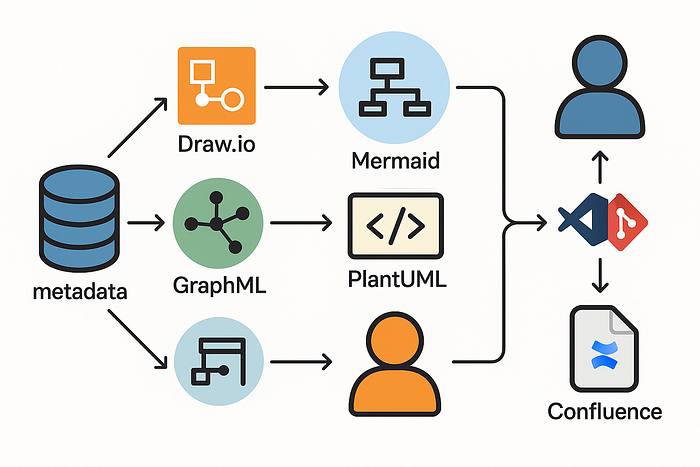
A practical modern stack can look like this:
Metadata → Draw.io XML → (optional) GraphML → yEd layout → SVG/PNG → Confluence
↓
Mermaid for dev docs
↓
PlantUML for dev workflows
- Draw.io — interactive modeling & Confluence publishing
- GraphML + yEd — high-quality layouts for complex ERDs
- Mermaid — lightweight Markdown diagrams
- PlantUML — developer-centric, text-based diagrams under version control
PlantUML strengthens the developer-first side of the stack without disrupting business collaboration.
Quick Python Example — Generating PlantUML ERDs From Metadata
import duckdb
from collections import defaultdict
# Connect to your metadata database
con = duckdb.connect(r"D:\My Drive (jaco1967nl)\Data\DuckDb\pdw\source\google.db")
# Example: mapping table with source_table, target_table, column_name, data_type, is_key
rows = con.execute("""
SELECT source_table, target_table, column_name, data_type, is_key
FROM gdrive.mappings
ORDER BY source_table, column_name
""").fetchall()
tables = defaultdict(list)
relations = set()
for src, tgt, col, dtype, is_key in rows:
    tables[src].append((col, dtype, is_key))
    tables[tgt].append((col, dtype, is_key))
    if src != tgt:
        relations.add((src, tgt))
uml = ["@startuml", "hide circle", "skinparam linetype ortho"]
for tbl, cols in tables.items():
    uml.append(f"class {tbl} {{")
    for col, dtype, key in cols:
        prefix = "*" if key else ""
        uml.append(f"  {prefix}{col}: {dtype}")
    uml.append("}")
for src, tgt in relations:
    uml.append(f"{src} --> {tgt}")
uml.append("@enduml")
with open("metadata_model.puml", "w") as f:
    f.write("\n".join(uml))
print("Generated metadata_model.puml - run `plantuml metadata_model.puml` to render.")
Run: plantuml metadata_model.puml
This creates an ERD-style diagram where:
- Each table is a class
- Key columns are prefixed with
* - Mappings become directional arrows
Getting Started With PlantUML
Install PlantUML CLI
- macOS:
brew install plantuml - Windows:
choco install plantuml - Or download the JAR
Add VSCode Extension
- Install “PlantUML” from VSCode Marketplace
- Open
.pumland preview (Alt + D or via the side panel)
Render Locally
plantuml metadata_model.puml
Optional — Run a Server (CI/CD)
docker run -d -p 8080:8080 plantuml/plantuml-server:jetty
Key Takeaways
- PlantUML is a natural fit for developer workflows: text-based, Git-friendly, previewable in VSCode.
- It doesn’t replace Draw.io: business editing and interactive Confluence still favor Draw.io.
- Use PlantUML as a complement, alongside Draw.io and GraphML, especially if you want diffable diagrams in code reviews.
- Metadata →
.pumlis easy to script and integrates well into CI/CD and documentation portals.
References & Further Reading
- Marco Wobben — for sparking this exploration
- PlantUML Official Site
- Automatically Generating yEd Diagrams from Metadata with Python
- Automating Draw.io Diagram Generation from Metadata
- From Whiteboards to Working Models — How Lawrence Corr Inspired Modern Metadata Modeling