Moving beyond Confluence sprawl to a unified, AI-consumable documentation strategy
Where Should Data Documentation Live? A Modern Architecture for AI-Enabled Teams
Moving beyond Confluence sprawl to a unified, AI-consumable documentation strategy
The Documentation Crisis
Every data team I’ve worked with has the same problem: documentation is everywhere and nowhere.
- Confluence : Data dictionaries, architecture decisions, meeting notes
- SharePoint : Business glossaries, compliance documents, data contracts
- Local drives : ERDs, design documents, “that one Excel with all the mapping rules”
- Wiki : Runbooks, troubleshooting guides, onboarding docs
- Code repos : README files, inline comments, YAML configs
- Slack/Teams : Tribal knowledge, “ask John, he knows”
The result? No one trusts any documentation. It’s easier to ping a colleague than search through five systems for an answer that might be outdated.
Now add AI to this mix. You want Claude or Copilot to help your team, but which documentation should it read? The 2019 data dictionary? The updated-but-not-published SharePoint version? The comments in the SQL that contradict both?
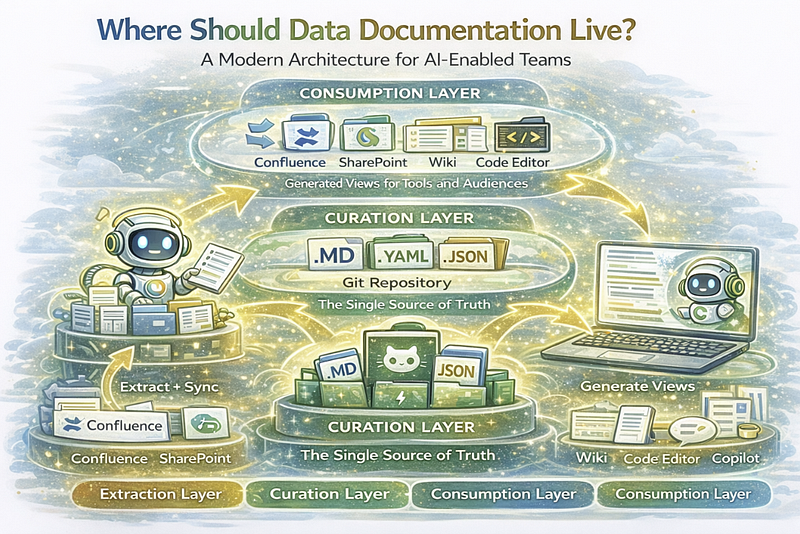
The Three-Layer Documentation Stack
After working with multiple organizations on this problem, a pattern emerges:
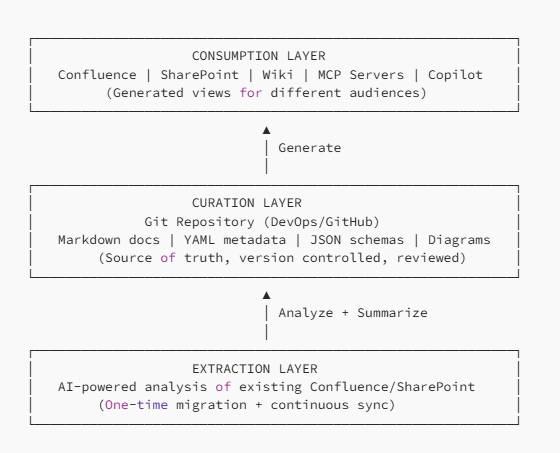
Let’s break this down.
Layer 1: Extraction — Let AI Do the Heavy Lifting
Your existing documentation isn’t worthless — it’s just scattered and inconsistent. Instead of manual migration (which never happens), let AI analyze and summarize it.
The Extraction Pipeline
# extraction-config.yaml
sources:
  - type: confluence
    base_url: https://company.atlassian.net
    spaces: [DATA, ARCH, BI]
    include_attachments: true
  - type: sharepoint
    site: https://company.sharepoint.com/sites/DataTeam
    libraries: [Documents, DataDictionary]
  - type: local
    paths:
      - //fileserver/data-docs/
      - C:/Projects/legacy-docs/
extraction:
  ai_model: claude-3-opus
  tasks:
    - summarize_content
    - extract_entities        # Tables, columns, systems
    - identify_relationships  # What references what
    - detect_staleness       # Last updated, contradictions
    - classify_type          # Glossary, runbook, architecture, etc.
What AI Extracts
For each document, AI produces structured output:
# extracted/confluence/DATA/customer-data-model.yaml
source:
  type: confluence
  space: DATA
  page_id: "12345"
  title: "Customer Data Model v2.1"
  last_updated: 2024-03-15
  author: john.smith@company.com
extraction:
  summary: |
    Describes the customer dimension model including SCD2
    historization. Covers CRM and ERP source mapping.
  entities_mentioned:
    - dim_customer
    - stg_crm_customer
    - stg_erp_customer
  relationships:
    - from: stg_crm_customer
      to: dim_customer
      type: feeds
    - from: stg_erp_customer
      to: dim_customer
      type: feeds
  key_decisions:
    - "SCD2 chosen over SCD1 for audit requirements"
    - "CRM takes precedence over ERP for contact data"
  staleness_indicators:
    - "References deprecated ERP system (migrated 2025)"
    - "Column 'legacy_id' mentioned but not in current model"
  classification: architecture_document
  confidence: 0.85
Human Review Dashboard
AI extraction isn’t perfect. Build a simple review interface:
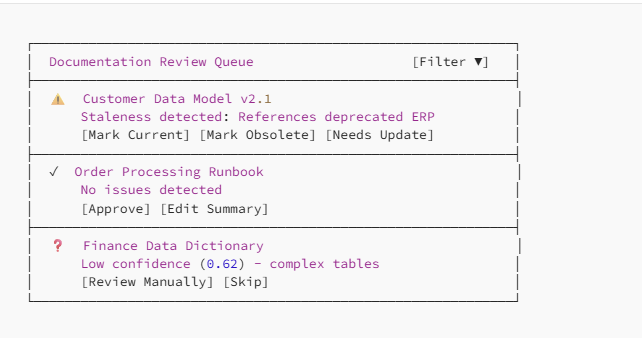
Key insight : Humans curate, AI extracts. Don’t ask humans to migrate — ask them to validate.
Layer 2: Curation — Git as Source of Truth
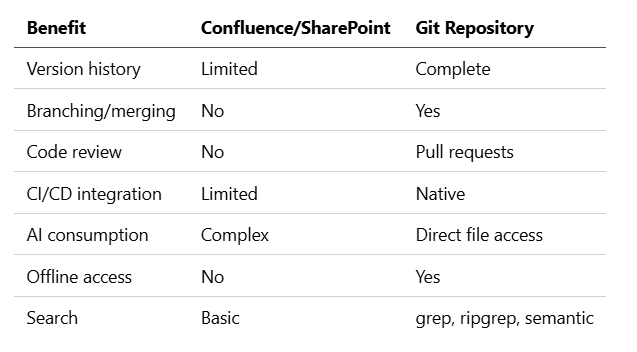
Once extracted and reviewed, documentation lives in Git. Why Git?
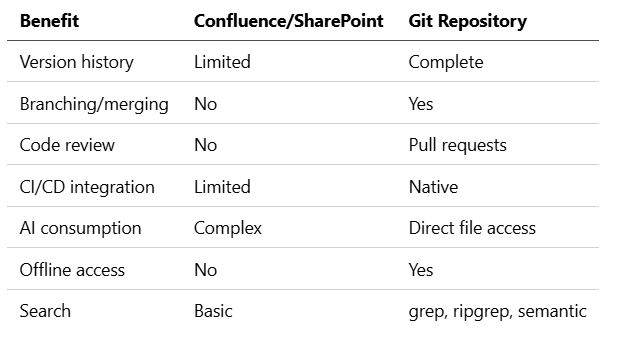
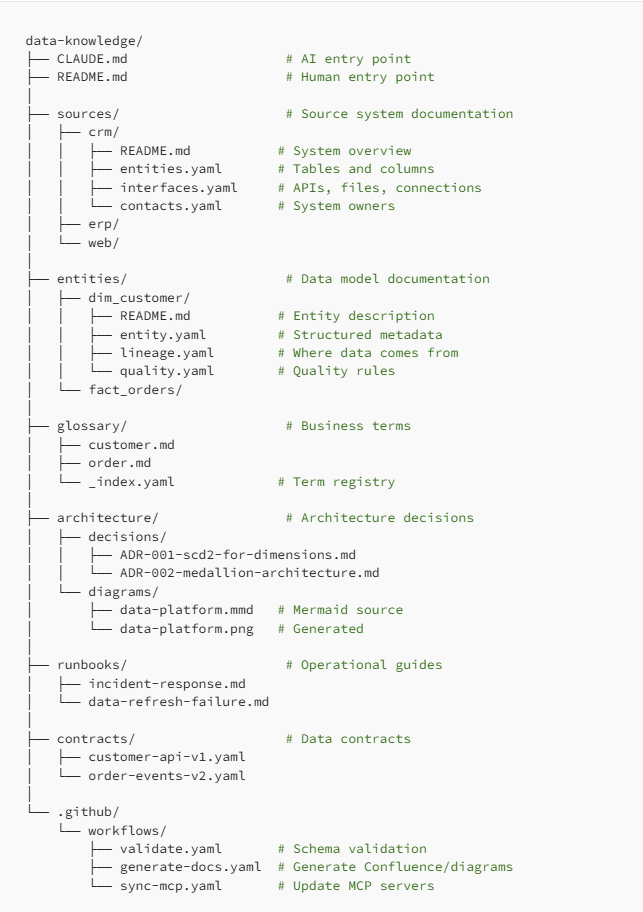
Repository Structure
Format Guidelines
When to use Markdown:
- Narrative documentation (READMEs, runbooks, ADRs)
- Anything humans will read directly
- Content that benefits from formatting (headers, lists, code blocks)
When to use YAML:
- Structured metadata (entities, attributes, relationships)
- Configuration that tools consume
- Data that needs validation against schemas
When to use JSON:
- API contracts (OpenAPI/JSON Schema)
- Tool-specific formats (VS Code settings)
- When YAML multiline strings get awkward
The CLAUDE.md Pattern
Every repository has a CLAUDE.md that serves as an AI entry point:
# Data Knowledge Repository

This repository contains documentation for the Enterprise Data Platform.
## Quick Navigation
- **Looking for a data source?** → `sources/` directory
- **Looking for a business term?** → `glossary/` directory
- **Looking for a table definition?** → `entities/` directory
- **Looking for how to fix something?** → `runbooks/` directory
## Key Conventions
- Entity names follow `layer_domain_name` pattern (e.g., `dim_sales_customer`)
- All dates are UTC unless specified
- PII columns are tagged with `classification: pii` in YAML
## Recent Changes
- 2026-02-28: Added customer churn metrics (entities/fact_customer_churn/)
- 2026-02-25: Updated ERP integration after v3 migration
- 2026-02-20: New data quality rules for order validation
## How to Update
1. Create a branch
2. Edit relevant files
3. Submit PR for review
4. CI validates schemas and generates previews
Layer 3: Consumption — Generate, Don’t Duplicate
The curated repository is the source of truth. But different audiences need different views. Generate them.
Confluence/SharePoint Generation
# .github/workflows/generate-docs.yaml
name: Generate Documentation

on:
  push:
    branches: [main]
    paths: ['entities/**', 'glossary/**', 'architecture/**']
jobs:
  generate:
    runs-on: ubuntu-latest
    steps:
      - uses: actions/checkout@v4
      - name: Generate Confluence pages
        run: |
          python scripts/generate_confluence.py \
            --source entities/ \
            --target-space DATA \
            --template templates/entity-page.html
      - name: Generate data dictionary
        run: |
          python scripts/generate_dictionary.py \
            --source entities/ \
            --output docs/data-dictionary.xlsx
      - name: Upload to SharePoint
        run: |
          python scripts/upload_sharepoint.py \
            --file docs/data-dictionary.xlsx \
            --library "Data Documentation"
What Gets Generated Where
MCP Servers for AI Access
For Claude Code and Copilot, expose documentation via MCP:
# mcp-servers/knowledge/server.py
from mcp.server import Server

server = Server("data-knowledge")
@server.resource("entity/{name}")
async def get_entity(name: str) -> dict:
    """Return entity documentation."""
    path = Path(f"entities/{name}/entity.yaml")
    if path.exists():
        return yaml.safe_load(path.read_text())
    return {"error": f"Entity {name} not found"}
@server.resource("glossary/{term}")
async def get_term(term: str) -> dict:
    """Return business term definition."""
    path = Path(f"glossary/{term}.md")
    if path.exists():
        return {"term": term, "definition": path.read_text()}
    return {"error": f"Term {term} not found"}
@server.tool("search_knowledge")
async def search(query: str) -> list[dict]:
    """Search across all documentation."""
    results = []
    for path in Path(".").rglob("*.md"):
        content = path.read_text()
        if query.lower() in content.lower():
            results.append({
                "path": str(path),
                "snippet": extract_snippet(content, query)
            })
    return results[:10]
@server.tool("get_entity_lineage")
async def lineage(entity: str) -> dict:
    """Get upstream and downstream dependencies."""
    path = Path(f"entities/{entity}/lineage.yaml")
    if path.exists():
        return yaml.safe_load(path.read_text())
    return {"error": f"No lineage for {entity}"}
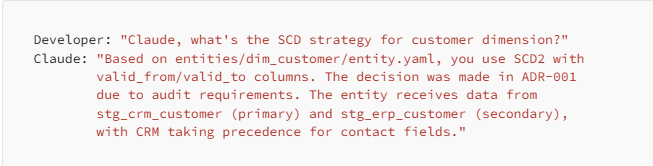
Now developers can ask: “What’s the definition of customer churn?” or “Show me the lineage for dim_customer” directly in their IDE.
The Migration Journey
Phase 1: Extraction (Weeks 1–4)
- Connect to sources : Confluence API, SharePoint Graph API, file shares
- Run AI extraction : Summarize, classify, detect staleness
- Build review queue : Simple UI for human validation
- Initial triage : Mark documents as current, obsolete, or needs-update
Success metric : 80% of documents classified
Phase 2: Curation (Weeks 5–8)
- Set up Git repository : Structure, templates, CI/CD
- Migrate priority content : Start with most-accessed documents
- Establish review process : PR templates, CODEOWNERS
- Train team : How to find, update, and add documentation
Success metric : Top 50 documents migrated and validated
Phase 3: Generation (Weeks 9–12)
- Build generators : Confluence, SharePoint, diagrams
- Set up MCP servers : Entity, glossary, search
- Deprecate old sources : Add banners pointing to new location
- Continuous sync : Changes in Git → regenerate downstream
Success metric : Zero manual Confluence updates needed
Phase 4: Steady State (Ongoing)
- Monitor freshness : Alert on stale documents
- Track usage : Which docs are accessed, which are ignored
- Continuous extraction : New Confluence pages → extraction queue
- Feedback loop : User corrections improve AI extraction
Handling the “But We Need Confluence” Objection
You’ll hear this. Here’s how to respond:
Objection : “Business users expect Confluence.”
Response : Keep Confluence — as a read-only view. Generate beautiful pages from Git. Users get familiar UI; you get version control and AI access.
Objection : “We can’t make everyone learn Git.”
Response : They don’t need to. Most users only read documentation. The 20% who write documentation already use code tools. For others, build a simple web form that creates PRs.
Objection : “What about comments and discussions?”
Response : Two options:
- Keep discussions in Confluence (it’s ephemeral context, not documentation)
- Use GitHub Discussions for technical decisions, link from docs
Objection : “Our compliance team requires SharePoint.”
Response : Generate compliant exports to SharePoint. The audit trail is actually better with Git (every change tracked, attributed, and reversible).
The Payoff: AI That Actually Helps
With this architecture in place:
Before

After
The Real Win
It’s not just about AI. This architecture gives you:
- Single source of truth : One place to update, multiple views generated
- Version control : Who changed what, when, and why
- Review process : No more rogue documentation updates
- Validation : CI catches broken links, missing fields, schema violations
- Searchability : grep > Confluence search, always
- Portability : Leave Confluence? Just regenerate to the new platform
- AI-readiness : Claude, Copilot, or your own tools can consume directly
Practical First Steps
Don’t boil the ocean. Start here:
Week 1: Prove the Concept
- Pick one high-value entity (e.g.,
dim_customer) - Create a Git repo with the structure above
- Write
entity.yamlandREADME.mdmanually - Set up a simple Confluence generator
- Show stakeholders: “This page is generated from Git”
Week 2: Add AI Extraction
- Connect to Confluence API
- Run extraction on 10–20 related pages
- Review AI output, tune prompts
- Migrate extracted content to Git
Week 3: Build the Loop
- Add CI/CD for validation and generation
- Create MCP server with basic search
- Demo to developers: “Ask Claude about dim_customer”
Week 4: Scale
- Prioritize remaining documents by access frequency
- Set up review queue for human curation
- Plan rollout by team/domain
Key Takeaways
- Documentation architecture matters : Random files in random systems = no one trusts anything
- AI extracts, humans curate : Don’t ask people to migrate — ask them to validate AI summaries
- Git is the source of truth : Version control, review process, CI/CD, AI access
- Generate consumption views : Confluence and SharePoint become read-only outputs, not inputs
- MCP enables AI access : Structured documentation in Git = AI assistants that actually know your systems
- Start small, prove value : One entity, one pipeline, one demo. Then scale.
The goal isn’t to eliminate Confluence. It’s to make documentation trustworthy, maintainable, and AI-accessible.
Your future self — and your AI assistants — will thank you.
Further Reading
The best documentation is documentation you can trust. Trust comes from process, not promises.