In my previous article, I explained why high-quality data models form the foundation of business-friendly mapping. We saw how logical and physical models together enable us to connect business meaning with technical reality.
But there’s a practical challenge every data engineer and architect faces: sources rarely hand us business-friendly models.
Instead, we receive datasets optimized for delivery: denormalized tables, cryptic column names, technical metadata sprinkled everywhere. Useful for transfer, but not for mapping.
So how do we get from there to a logical, business-friendly starting point?
The answer: reverse engineering.
What We Get From Sources
Most providers deliver:
- Physical data models: table and column definitions, often designed for efficient delivery.
- Sometimes only flat files (CSV, JSON, Avro, Parquet) without any model at all.
- Metadata that reflects system internals more than business meaning.
Typical issues we see:
- Technical column names (
ACCT_BAL_AMTinstead of Account Balance). - Denormalized “one big table” (OBT) formats.
- Surplus metadata (
_ingest_timestamp,hash_key, audit fields). - Attributes irrelevant to our current use cases.
This raw material is fine for ingestion — but not for mapping to our business model.
Why Reverse Engineer?
Business-friendly mapping requires clarity.
Clarity comes from logical source models.
By reverse engineering, we:
- Translate technical names → business-friendly attributes.
- Reconstruct entities and relationships.
- Strip away irrelevant columns.
- Model only what’s needed for integration (demand-driven).
- Provide a logical lens on top of messy physical delivery.
This becomes the first step of the mapping methodology: before we connect sources to our business model, we need to understand them logically.
The Process Step by Step
- Import the Physical Model
- Load the provided DDL, JSON schema, or file definitions into a modeling tool.
- If none exists, generate a physical model from the delivery files.
- Translate Names
- Replace cryptic codes with meaningful names.
- Example:
CUST_MRTL_STAT_CD→ Marital Status Code.
- Collaborate With Experts
- Source domain experts help validate meanings.
- This ensures our logical model reflects reality, not guesswork.
- Filter What Matters
- Leave out ingestion timestamps, technical hash keys, irrelevant attributes.
- Focus on attributes required for integration and consumption use cases.
- Restructure If Needed
- Break down denormalized tables into logical entities.
- Example: A Party table containing names, addresses, and employment → split into Party, Party Address, Employment Status.
- Model Supertypes and Subtypes
- Supertype: Party.
- Subtypes: Person, Organization.
- Logical models allow subtype views, which are critical for source access views later.
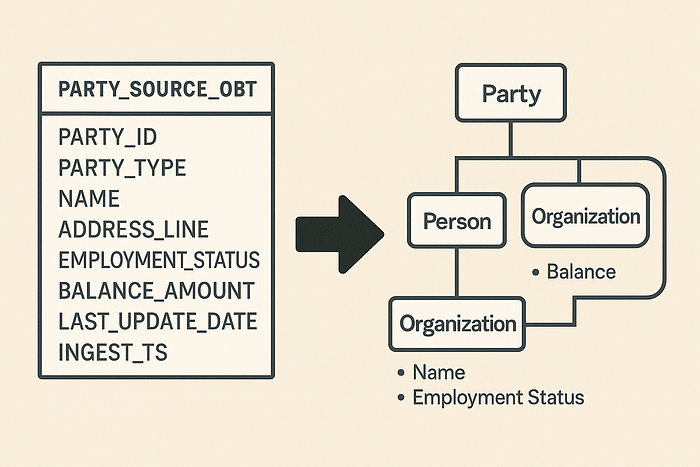
An Example: Party Data
Imagine a source delivers one giant table:
PARTY_SOURCE_OBT
- PARTY_ID
- PARTY_TYPE (Person/Organization)
- NAME
- ADDRESS_LINE
- EMPLOYMENT_STATUS
- BALANCE_AMOUNT
- LAST_UPDATE_DATE
- INGEST_TS
For ingestion, this works.
For mapping, it’s a nightmare.
By reverse engineering, we create a logical source model:
- Party (supertype: ID, Type, Balance)
- Person (subtype: Name, Employment Status)
- Organization (subtype: Name)
- Party Address (separate entity, with relationship to Party)
We strip away INGEST_TS.
We rename attributes to business terms.
We now have a clean, logical starting point for mapping.
Demand-Driven Principle
Remember: we only model what we need.
If a column or table is irrelevant for today’s use cases, we leave it out of the logical model (though it may still exist physically).
This avoids unnecessary complexity and keeps mappings focused on delivering business value.
Why This Matters for Automation
Logical source models are not just “nice to have.” They drive automation:
- Source access views are generated from them.
- They inform mapping metadata.
- They enable impact analysis when source metadata changes.
- They support optimal historization (splitting frequently vs slowly changing attributes).
Without logical models, our mapping and automation layers have to wrestle with raw technical noise. With them, we start clean and business-ready.
Closing Thoughts
Reverse engineering is about more than cleaning up column names. It’s about creating a logical lens through which we can align messy source deliveries with stable business concepts.
It’s the first practical step in the business-friendly mapping methodology — and it transforms sources from obstacles into stepping stones.
In the next article, we’ll explore how to treat metadata as data: loading, versioning, historizing, and validating it, just like any other dataset in the platform. That discipline is what allows us to build truly metadata-driven architectures.