Exploring how Oracle SQL Data Modeler can support business-friendly mapping, metadata-as-data, and historization within a DuckDB + Python + Notion–centric architecture.
Summary
Oracle SQL Data Modeler (free tool from Oracle) is a mature modeling environment for conceptual, logical, and physical database design.
It can play a specialized role in schema reverse engineering, physical modeling, and generating DDL for Oracle and non-Oracle platforms.
In the proposed architecture, its strengths complement DuckDB + Python + Notion by:
Reverse-engineering legacy databases into logical source models.
Providing visual ERDs and rich physical modeling capabilities.
Exporting metadata that can be ingested into DuckDB for governance, mapping, and execution.
Limitations: not collaborative in the cloud, limited historization/temporal modeling, Oracle-centric defaults.
Best fit: Use SQL Data Modeler for reverse engineering and schema design, then feed the metadata into your modern metadata-as-data stack for historization, lineage, and execution.

Introduction
Oracle SQL Developer Data Modeler (SDDM) is a long-standing, robust tool for designing and maintaining data models.
While your architecture emphasizes business-friendly mapping, metadata-as-data, and model-driven execution with DuckDB, Python, and Notion, Oracle SQL Data Modeler can still play an important role in bridging the gap between legacy physical databases and modern metadata-driven engineering.
What Oracle SQL Data Modeler Offers
- Conceptual, logical, and physical modeling with ER diagrams.
- Reverse engineering existing schemas from Oracle, SQL Server, DB2, MySQL, and other RDBMS.
- Forward engineering: generating DDL for target platforms.
- Subtypes/supertypes, domains, and constraints for richer logical models.
- Reporting: exporting diagrams and metadata to HTML, PDF, or Excel.
- Free of charge, included with Oracle SQL Developer.
Fit in the Proposed Architecture
1. Reverse Engineering Source Systems
One of your key practices is creating logical source models to bridge from physical schemas to business-friendly mappings. SQL Data Modeler is excellent for:
- Importing physical schemas from Oracle and other RDBMS.
- Simplifying, renaming, and documenting columns.
- Producing logical source models that can then be exported and ingested into DuckDB metadata tables.
2. Business-Oriented Data Modeling
While not as business-friendly as Notion, SQL Data Modeler supports:
- Conceptual ERDs for communication with analysts.
- Rich documentation fields for columns, entities, and relationships.
This can serve as the visual modeling layer that complements your business-friendly mapping in Notion.
3. Metadata-as-Data
The tool can export models into XML, CSV, or reports. By transforming these exports into DuckDB tables (meta.dataset, meta.column, etc.), you treat them as metadata assets — queryable, governable, and ready for integration with mappings.
4. Historization and Temporal Modeling
SQL Data Modeler does not natively support Dual SCD2 or PIT helper patterns. But you can:
- Use it to model surrogate keys, valid_from/valid_to columns, and constraints.
- Push those models into DuckDB and let your Python generator add historization logic.
5. Execution and Pipelines
Oracle SQL Data Modeler is documentation- and DDL-focused. It won’t execute pipelines. Instead:
- Use it to generate schemas.
- Store them in DuckDB metadata tables.
- Let Python scripts and dbt operationalize transformations and historization.
Benefits vs. Gaps
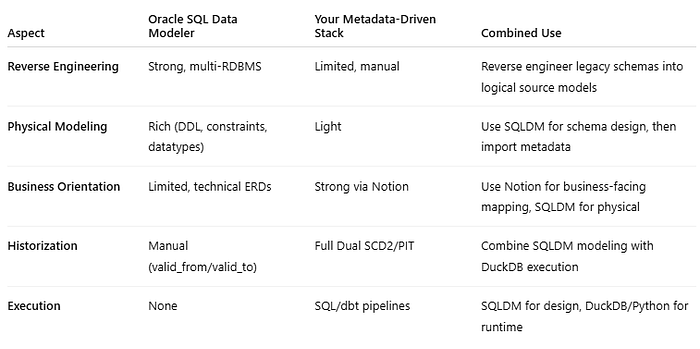
Example Flow: SQL Data Modeler in Action
- Reverse engineer an Oracle schema into SQL Data Modeler.
- Clean up and document entities, columns, and relationships into a logical model.
- Export metadata to XML/CSV.
- Ingest exports into DuckDB (
meta.dataset,meta.column). - Enrich mappings in Notion, linking physical/logical models with business context.
- Generate SQL with Python for historization and exposure views.
- Run pipelines in Databricks/dbt.
When to Use SQL Data Modeler
- Migrating legacy Oracle or SQL Server schemas into your new data platform.
- Designing physical schemas with rich constraints and domains.
- Producing visual ERDs for stakeholders.
- Acting as a metadata source for your DuckDB/Python-driven metadata layer.