Summary
In the previous article, I explained why we treat metadata as data — loading, versioning, historizing, and validating it like any other dataset.
Now it’s time to put that metadata to work.
One of the most powerful ways we do this in a metadata-driven platform is through Source Access Views (SAVs).
SAVs form the bridge between messy, historized physical source data and the clean, logical world of business-friendly integration.
The Challenge
Once raw data is ingested and historized in the platform, it is technically correct but rarely business-friendly:
- Column names are cryptic.
- Denormalized formats don’t reflect logical entities.
- Subtypes and supertypes are mixed in one table.
- Technical metadata (timestamps, hash keys, audit columns) clutters queries.
- Derived or filtered attributes needed for business mapping are missing.
If consumers or integration layers were to query raw historized data directly, complexity would explode.
That’s where SAVs come in.
What Are Source Access Views?
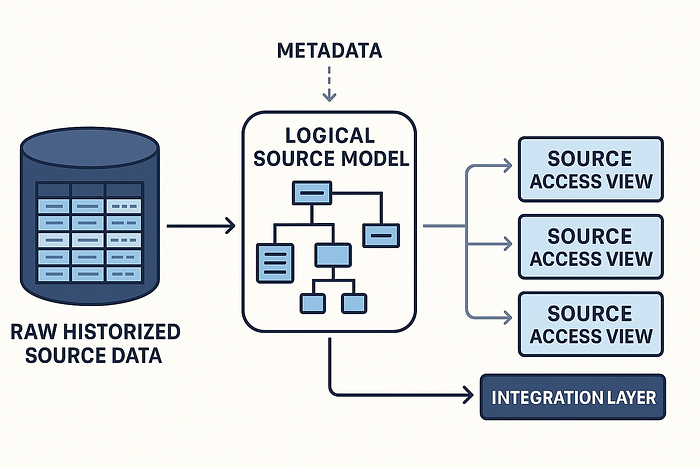
A Source Access View (SAV) is a logical presentation of historized source data, generated from the logical source model.
SAVs:
- Rename columns into business-friendly attributes.
- Expose only relevant attributes (hide technical ones).
- Apply subtype filtering (e.g. Person vs Organization).
- Recombine physical subtypes into supertypes (e.g. Party).
- Add derived attributes (source-specific transformations).
- Apply source-specific filters.
In other words: they make historized source data usable and understandable.
The Flow: From Physical to Logical to SAV
- Physical Source Model
- Logical Source Model
- Source Access Views (SAVs)
- Integration Layer
This keeps concerns separated:
- Historization is purely technical.
- Logical modeling is business-oriented.
- SAVs connect both worlds.
Example: Party Again
Recall the Party example:
The physical model delivers one big table:
PARTY_SOURCE_OBT
- PARTY_ID
- PARTY_TYPE (Person/Organization)
- NAME
- ADDRESS_LINE
- EMPLOYMENT_STATUS
- BALANCE_AMOUNT
- INGEST_TS
After historization, this table is even more complex (dual SCD2 with validity ranges, hash keys, audit metadata).
From the logical source model, we generate SAVs:
SAV_PARTY(supertype view)SAV_PERSON(subtype view)SAV_ORGANIZATION(subtype view)SAV_PARTY_ADDRESS
Consumers no longer see technical clutter. They see clean entities with clear relationships.
Derived Attributes and Filters
SAVs are also the right place for:
- Derived attributes: e.g. full name = concat(first_name, last_name).
- Source-specific filters: e.g. only active customers.
- Reference code lookups: mapping source codes to business codes.
To keep this manageable, we maintain a library of functions and filters, defined logically in metadata, later implemented as SQL macros (e.g. in DBT).
This ensures consistency and automation.
Why SAVs Are Essential
SAVs provide:
- Consistency → all consumers see the same logical representation.
- Abstraction → physical historization is hidden.
- Flexibility → logical model evolves without breaking physical ingestion.
- Reusability → the same SAVs serve both integration and analytics.
They are the contract between ingestion and integration.
Closing Thoughts
Source Access Views are more than technical convenience. They are a crucial architectural pattern in metadata-driven platforms.
They allow us to:
- Bridge historized source data with logical business concepts.
- Keep raw ingestion untouched, yet expose it in a clean, usable way.
- Enable business-friendly mapping without drowning in technical detail.
In the next article, we’ll see how logical source models also guide optimal historization strategies — splitting frequently vs slowly changing attributes to save storage and improve performance.