Make your semantic model AI-ready with systematic checks
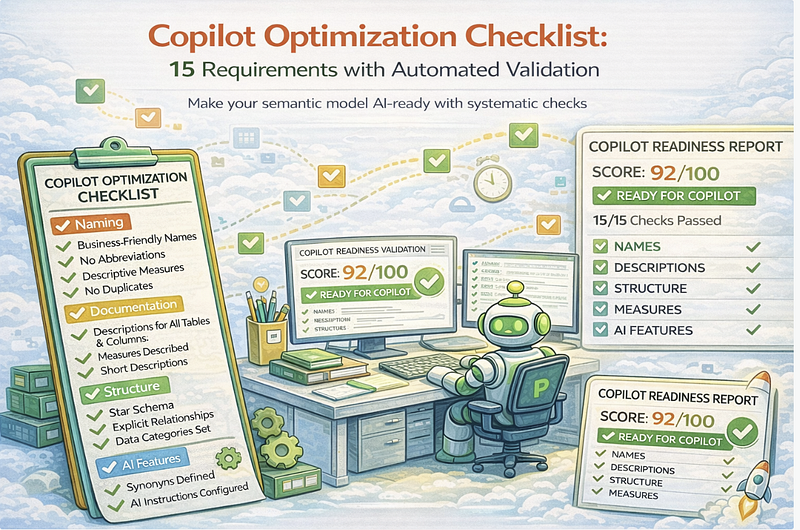
Copilot Optimization Checklist: 15 Requirements with Automated Validation
Make your semantic model AI-ready with systematic checks
Microsoft Copilot in Power BI is only as good as the semantic model it works with. Feed it a poorly documented model with cryptic names and implicit measures, and you’ll get hallucinated DAX and frustrated users.
This article provides a comprehensive checklist of 15 requirements for Copilot-optimized semantic models — and shows how to validate them automatically.
The Copilot Readiness Problem
When Copilot generates a DAX query or answers a natural language question, it relies on:
- Table and column names to understand structure
- Descriptions to understand meaning
- Relationships to understand connections
- Measures to understand metrics
- AI Instructions to understand business rules
If any of these are missing or unclear, Copilot guesses. And guessing fails.
The Manual Approach (Doesn’t Scale)
Teams try to optimize models by:
- Reading Microsoft documentation
- Manually checking each table/column
- Hoping developers remember the rules
- Discovering issues after users complain
This doesn’t work at enterprise scale.
The Automated Approach
Define requirements as validation rules. Run them in CI/CD. Block deployment if requirements aren’t met.
The 15 Requirements
Category 1: Naming (4 Requirements)
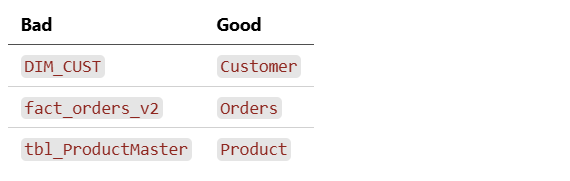
Requirement 1: Business-Friendly Table Names
Tables must use human-readable names, not technical identifiers.
Validation Rule:
 - id: COPILOT_001
  name: "Table names must be business-friendly"
  check:
    type: regex_match
    target: table.name
    pattern: "^[A-Z][a-z]+([A-Z][a-z]+)*$"  # PascalCase, no underscores
  severity: error
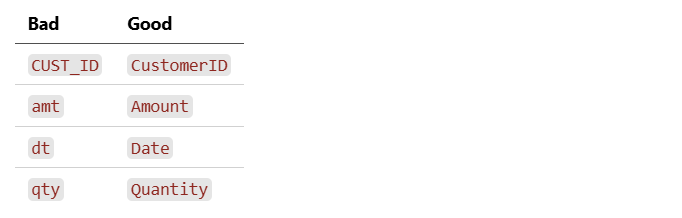
Requirement 2: Business-Friendly Column Names
Columns must use descriptive names without abbreviations.
Validation Rule:
 - id: COPILOT_002
  name: "Column names must be business-friendly"
  check:
    type: no_abbreviations
    target: column.name
    blocked_patterns: ["_id$", "^dt_", "^amt", "^qty", "^num"]
  severity: error
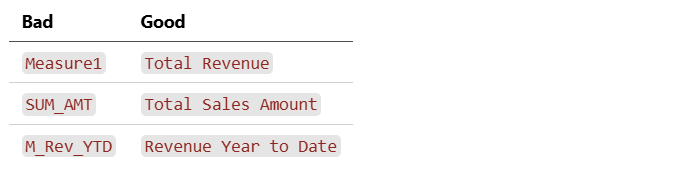
Requirement 3: Measure Names Describe Purpose
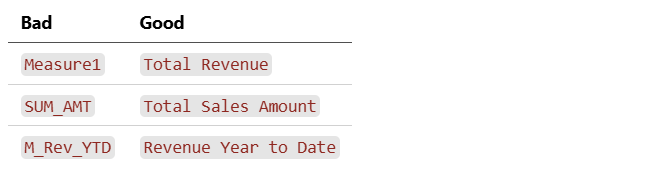
Measures must clearly describe what they calculate.
Validation Rule:
 - id: COPILOT_003
  name: "Measure names must be descriptive"
  check:
    type: regex_not_match
    target: measure.name
    pattern: "^(Measure|M_|SUM_|AVG_|COUNT_)\\d*"
  severity: error
Requirement 4: No Duplicate Names
Measures with overlapping names confuse Copilot.
Validation Rule:
 - id: COPILOT_004
  name: "No duplicate measure names or synonyms"
  check:
    type: unique_names
    target: measure.name
    include_synonyms: true
  severity: error
Category 2: Documentation (4 Requirements)
Requirement 5: All Tables Have Descriptions
Every table must have a description explaining its purpose.
Validation Rule:
 - id: COPILOT_005
  name: "All tables must have descriptions"
  check:
    type: not_empty
    target: table.description
  severity: error
Requirement 6: All Columns Have Descriptions
Every column must have a description explaining its meaning.
Validation Rule:
 - id: COPILOT_006
  name: "All columns must have descriptions"
  check:
    type: not_empty
    target: column.description
  severity: error
Requirement 7: All Measures Have Descriptions
Every measure must have a description explaining what it calculates.
Validation Rule:
 - id: COPILOT_007
  name: "All measures must have descriptions"
  check:
    type: not_empty
    target: measure.description
  severity: error
Requirement 8: Descriptions Under 200 Characters
Descriptions must be concise to fit in Copilot’s context window.
Validation Rule:
 - id: COPILOT_008
  name: "Descriptions must be under 200 characters"
  check:
    type: max_length
    target: "*.description"
    max: 200
  severity: warning
Category 3: Structure (3 Requirements)
Requirement 9: Star Schema Topology
Fact tables must have one-to-many relationships to dimension tables. No snowflake chains, no many-to-many without bridges.
Validation Rule:
 - id: COPILOT_009
  name: "Model must follow star schema"
  check:
    type: star_schema
    fact_tables: ["Sales", "Orders", "Transactions"]
    dimension_tables: ["Customer", "Product", "Date", "Geography"]
  severity: error
Requirement 10: Explicit Relationships
All relationships must be explicitly defined with clear cardinality.
Validation Rule:
 - id: COPILOT_010
  name: "All relationships must be explicit"
  check:
    type: relationships_complete
    require_cardinality: true
    require_cross_filter: true
  severity: error
Requirement 11: Data Categories Set
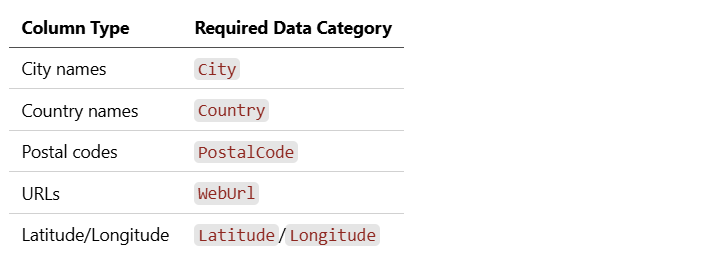
Geographic, date, and URL columns must have appropriate data categories.
Validation Rule:
 - id: COPILOT_011
  name: "Data categories must be set for typed columns"
  check:
    type: data_category_required
    rules:
      - pattern: "city|town"
        category: City
      - pattern: "country|nation"
        category: Country
      - pattern: "zip|postal"
        category: PostalCode
      - pattern: "url|link"
        category: WebUrl
  severity: warning
Category 4: Measures (2 Requirements)
Requirement 12: No Implicit Measures
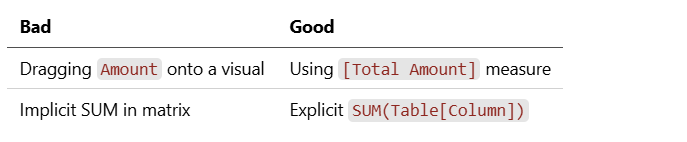
All aggregations must be explicit DAX measures, not implicit sums.
Validation Rule:
 - id: COPILOT_012
  name: "No implicit measures allowed"
  check:
    type: no_implicit_measures
    target: column
    flag_summarizable: true
  severity: error
Requirement 13: Measures Have Format Strings
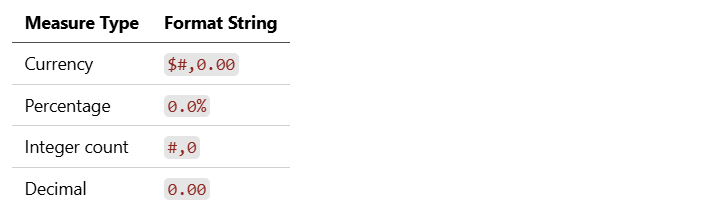
All measures must have appropriate format strings.
Validation Rule:
 - id: COPILOT_013
  name: "All measures must have format strings"
  check:
    type: not_empty
    target: measure.formatString
  severity: warning
Category 5: AI Features (2 Requirements)
Requirement 14: Synonyms Defined
Important tables, columns, and measures should have synonyms for natural language queries.
# Good: Multiple ways to ask for the same thing
synonyms:
  "Total Revenue": ["Sales", "Revenue", "Income", "Total Sales"]
  "Customer Count": ["Number of Customers", "# Customers", "Customers"]
Validation Rule:
 - id: COPILOT_014
  name: "Key measures should have synonyms"
  check:
    type: synonyms_defined
    target: measure
    min_measures_with_synonyms: 0.5  # At least 50% of measures
  severity: warning
Requirement 15: AI Instructions Configured
The model should have AI Instructions defining business rules and guardrails.
# Good: Explicit instructions for Copilot
ai_instructions: |
  - Revenue calculations exclude returns
  - Use Date[Date] for all time intelligence
  - Customer segments: Premium (>$10K annual), Standard (others)
  - Fiscal year starts April 1
Validation Rule:
 - id: COPILOT_015
  name: "AI Instructions should be configured"
  check:
    type: not_empty
    target: model.aiInstructions
  severity: warning
Running Validation
CLI Command
mdde powerbi validate --copilot ./model.tmdl
Output
COPILOT READINESS VALIDATION
============================

Model: Sales Analytics
Checked: 15 requirements
PASSED (11):
  ✓ COPILOT_001: Table names must be business-friendly
  ✓ COPILOT_002: Column names must be business-friendly
  ✓ COPILOT_003: Measure names must be descriptive
  ✓ COPILOT_004: No duplicate measure names
  ✓ COPILOT_005: All tables have descriptions
  ✓ COPILOT_009: Model follows star schema
  ✓ COPILOT_010: All relationships explicit
  ✓ COPILOT_012: No implicit measures
  ✓ COPILOT_013: All measures have format strings
  ✓ COPILOT_014: Synonyms defined
  ✓ COPILOT_015: AI Instructions configured
FAILED (2):
  ✗ COPILOT_006: All columns must have descriptions
    Missing: Product[SKU], Customer[LegacyID], Date[FiscalWeek]
  ✗ COPILOT_011: Data categories must be set
    Missing: Customer[City] (should be City)
             Customer[Country] (should be Country)
WARNINGS (2):
  ⚠ COPILOT_007: 3 measures missing descriptions
    - [Margin %]
    - [Units Sold]
    - [Discount Amount]
  ⚠ COPILOT_008: 2 descriptions over 200 characters
    - Table "Orders" (245 chars)
    - Measure "Complex Calculation" (312 chars)
SCORE: 73/100
STATUS: NOT READY FOR COPILOT
         Fix errors before deployment
CI/CD Integration
GitHub Actions
# .github/workflows/copilot-validation.yml
name: Copilot Readiness Check

on:
  pull_request:
    paths:
      - 'models/**/*.tmdl'
      - 'models/**/*.yaml'
jobs:
  validate:
    runs-on: ubuntu-latest
    steps:
      - uses: actions/checkout@v4
      - name: Install MDDE
        run: pip install mdde
      - name: Validate Copilot Readiness
        run: |
          mdde powerbi validate --copilot ./models/ \
            --fail-on-error \
            --output copilot-report.html
      - name: Upload Report
        uses: actions/upload-artifact@v4
        with:
          name: copilot-readiness-report
          path: copilot-report.html
      - name: Comment on PR
        if: failure()
        uses: actions/github-script@v6
        with:
          script: |
            github.rest.issues.createComment({
              issue_number: context.issue.number,
              owner: context.repo.owner,
              repo: context.repo.repo,
              body: '❌ Copilot readiness validation failed. See report for details.'
            })
Azure DevOps
# azure-pipelines.yml
trigger:
  paths:
    include:
      - models/*

steps:
  - task: UsePythonVersion@0
    inputs:
      versionSpec: '3.11'
  - script: pip install mdde
    displayName: 'Install MDDE'
  - script: |
      mdde powerbi validate --copilot ./models/ \
        --fail-on-error \
        --output $(Build.ArtifactStagingDirectory)/copilot-report.html
    displayName: 'Validate Copilot Readiness'
  - task: PublishBuildArtifacts@1
    inputs:
      pathToPublish: $(Build.ArtifactStagingDirectory)
      artifactName: CopilotReport
Auto-Fix Capability
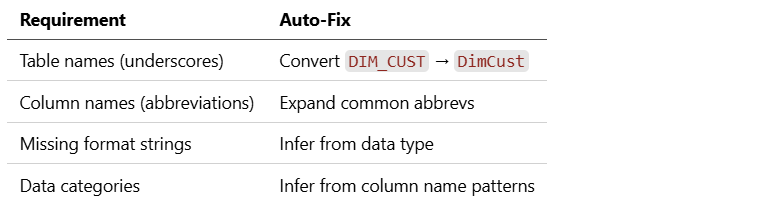
Some requirements can be automatically fixed:
mdde powerbi fix --copilot ./model.tmdl --dry-run
Fixable Issues:
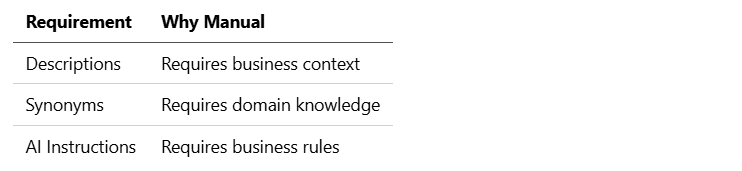
Non-Fixable Issues (require human input):
 # Preview fixes
mdde powerbi fix --copilot ./model.tmdl --dry-run

# Apply fixes
mdde powerbi fix --copilot ./model.tmdl --apply

# Fix only specific categories
mdde powerbi fix --copilot ./model.tmdl --only naming,formatting
Scoring System
Each requirement contributes to an overall score:
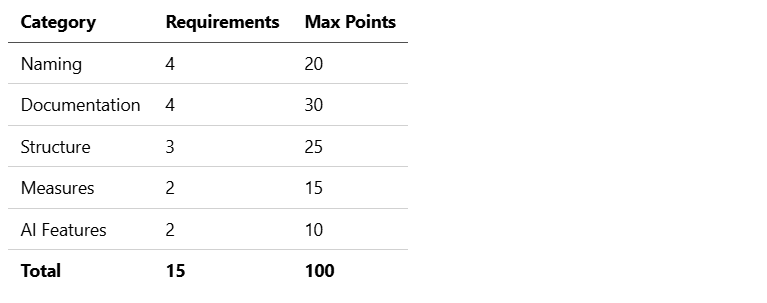
Score Interpretation

Generating Reports
Markdown Report
mdde powerbi validate --copilot ./model.tmdl --output report.md
HTML Report (Visual)
mdde powerbi validate --copilot ./model.tmdl --output report.html
JSON Report (Programmatic)
mdde powerbi validate --copilot ./model.tmdl --output report.json
Integration with Model-Driven Development
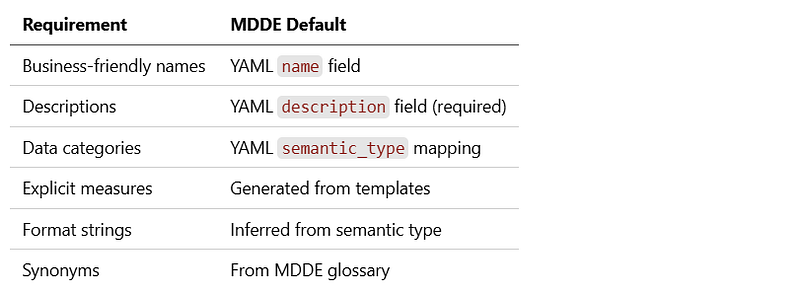
When using MDDE’s metadata-driven approach, many requirements are satisfied by default:
MDDE Configuration:
 # mdde.yaml
powerbi:
  copilot:
    require_descriptions: true
    max_description_length: 200
    auto_synonyms_from_glossary: true
    generate_ai_instructions: true
Key Takeaways
- 15 requirements cover Copilot readiness — Naming, documentation, structure, measures, AI features.
- Automate validation — Run checks in CI/CD, not manually.
- Fail fast — Block deployment if requirements aren’t met.
- Score provides visibility — Track readiness over time.
- Auto-fix where possible — Reduce manual remediation effort.
- Model-driven development helps — Many requirements satisfied by default.
Copilot readiness isn’t a one-time effort. It’s a continuous quality gate that ensures your semantic models remain AI-ready as they evolve.
This is part of the Power BI + MDDE integration series.
Previous: “ From Entity to Measure: Automated DAX Generation ” Next: “Semantic Model DevOps: CI/CD for Power BI” (coming soon)