How to configure VSCode and AI assistants for productive MDDE development
Optimizing Your IDE for Metadata-Driven Data Engineering
How to configure VSCode and AI assistants for productive MDDE development
The Problem: Data Engineering Tooling is Fragmented
Data engineers juggle multiple tools daily: SQL editors, YAML validators, Python IDEs, Git clients, documentation systems. Each tool works in isolation, forcing context switches that kill productivity.
When working with Metadata-Driven Data Engineering (MDDE), this fragmentation becomes acute. You’re constantly moving between:
- Model definitions (YAML/MDDE files)
- Generated SQL (DDL, DML, quality checks)
- Metadata databases (DuckDB, Snowflake catalogs)
- Documentation (lineage diagrams, entity descriptions)
- Version control (tracking metadata changes)
What if your IDE understood all of this? What if it could validate your models, query your metadata, and even sggest improvements — all without leaving your editor?
The Solution: A Purpose-Built Development Environment
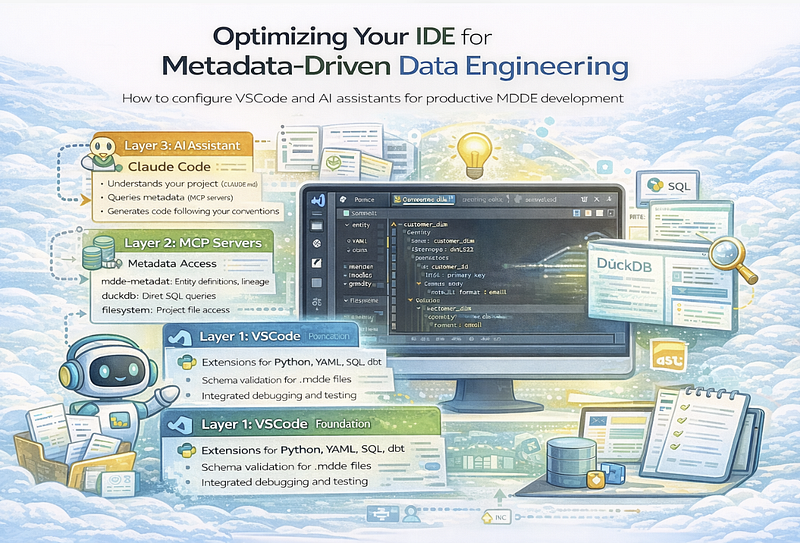
This article shows you how to configure three layers of tooling that work together:
┌─────────────────────────────────────────────────────────┐
│                    Your Workflow                        │
├─────────────────────────────────────────────────────────┤
│  Layer 3: AI Assistant (Claude Code)                    │
│  ├── Understands your project via CLAUDE.md             │
│  ├── Queries metadata via MCP servers                   │
│  └── Generates code following your conventions          │
├─────────────────────────────────────────────────────────┤
│  Layer 2: MCP Servers (Metadata Access)                 │
│  ├── mdde-metadata: Entity definitions, lineage         │
│  ├── duckdb: Direct SQL queries                         │
│  └── filesystem: Project file access                    │
├─────────────────────────────────────────────────────────┤
│  Layer 1: VSCode (Foundation)                           │
│  ├── Extensions for Python, YAML, SQL, dbt              │
│  ├── Schema validation for .mdde files                  │
│  └── Integrated debugging and testing                   │
└─────────────────────────────────────────────────────────┘
Let’s build this from the bottom up.
Layer 1: VSCode Extensions for Data Engineering
The Core Set (Install First)
These extensions form the foundation. Install them before anything else:
Python Development
 ms-python.python          ► MDDE CLI, generators, validators
ms-python.vscode-pylance  ► Fast autocomplete, type checking
YAML and Configuration
redhat.vscode-yaml ► Schema validation for .mdde files
SQL and Database
mtxr.sqltools ► Query DuckDB metadata, test SQL
Git and History
eamodio.gitlens ► "Who changed this entity?"
Inline Feedback
usernamehw.errorlens ► See errors without hovering
YAML Schema Validation
This is where it gets interesting. MDDE uses YAML-based model files (.mdde). With schema validation, VSCode catches errors as you type:
// .vscode/settings.json
{
  "yaml.schemas": {
    "./schemas/mdde-schema.json": "**/*.mdde",
    "./schemas/agreement-schema.json": "**/agreements.yaml"
  },
  "files.associations": {
    "*.mdde": "yaml"
  }
}
Now when you define an entity:
# customer_dim.mdde
entity:
  name: customer_dim
  stereotype: dim_scd2  # ◄─ Autocomplete available!
  attributes:
    - name: customer_id
      type: INT64
      primary_key: true
    - name: email
      type: STRING
      quality:
        - not_null
        - format: email  # ◄─ Schema validates this
VSCode validates against your schema, offers autocomplete for stereotypes, and flags missing required fields.
SQLTools for Metadata Queries
Connect SQLTools directly to your DuckDB metadata database:
{
  "sqltools.connections": [
    {
      "name": "MDDE Metadata",
      "driver": "DuckDB",
      "database": "${workspaceFolder}/databases/meta.duckdb"
    }
  ]
}
Now you can explore your metadata without leaving VSCode:
-- Find all entities with quality rules
SELECT e.name, COUNT(q.rule_id) as rule_count
FROM entities e
JOIN quality_rules q ON e.entity_id = q.entity_id
GROUP BY e.name
ORDER BY rule_count DESC;
dbt Integration (If Applicable)
If you’re using dbt alongside MDDE:
innoverio.vscode-dbt-power-user  ► Lineage, ref() autocomplete
henriblancke.vscode-dbt-formatter ► Jinja-SQL formatting
Productivity Boosters
These aren’t essential but significantly improve daily work:
streetsidesoftware.code-spell-checker  ► Catch typos in descriptions
christian-kohler.path-intellisense     ► Autocomplete file paths
alefragnani.bookmarks                  ► Jump between model sections
mechatroner.rainbow-csv                ► Inspect CSV exports
The Complete Settings File
Here’s a production-ready .vscode/settings.json:
{
  "editor.formatOnSave": true,
  "editor.rulers": [80, 100],
  "editor.bracketPairColorization.enabled": true,
  "files.trimTrailingWhitespace": true,
  "files.insertFinalNewline": true,
  "files.associations": {
    "*.mdde": "yaml",
    "*.sql.j2": "jinja-sql"
  },
  "files.exclude": {
    "**/__pycache__": true,
    "**/.pytest_cache": true,
    "**/dbt_packages": true,
    "**/databases/*.duckdb.wal": true
  },
  "python.testing.pytestEnabled": true,
  "python.testing.pytestArgs": ["tests"],
  "yaml.schemas": {
    "./schemas/mdde-schema.json": "**/*.mdde"
  },
  "cSpell.words": [
    "mdde", "dbt", "Snowflake", "Databricks",
    "DuckDB", "lineage", "stereotypes", "SCD2"
  ]
}
Layer 2: MCP Servers for AI Metadata Access
Model Context Protocol (MCP) servers let AI assistants query your metadata directly. Instead of copying entity definitions into prompts, the AI fetches exactly what it needs.
Architecture
┌─────────────┐     ┌─────────────┐     ┌─────────────────┐
│   Claude    │ ──► │ MCP Server  │ ──► │ MDDE Metadata   │
│   Code      │ ◄── │  (Bridge)   │ ◄── │ (DuckDB/Files)  │
└─────────────┘     └─────────────┘     └─────────────────┘
Configuration
Create ~/.claude/mcp_servers.json:
{
  "servers": [
    {
      "name": "mdde-metadata",
      "command": "python",
      "args": ["-m", "mdde.mcp.server"],
      "env": {
        "MDDE_PROJECT_PATH": "/path/to/project",
        "MDDE_DATABASE": "/path/to/databases/meta.duckdb"
      }
    },
    {
      "name": "filesystem",
      "command": "npx",
      "args": [
        "-y",
        "@anthropic-ai/mcp-server-filesystem",
        "/path/to/project"
      ]
    },
    {
      "name": "duckdb-direct",
      "command": "python",
      "args": ["-m", "mcp_server_duckdb"],
      "env": {
        "DUCKDB_PATH": "/path/to/databases/meta.duckdb",
        "READ_ONLY": "true"
      }
    }
  ]
}
What This Enables
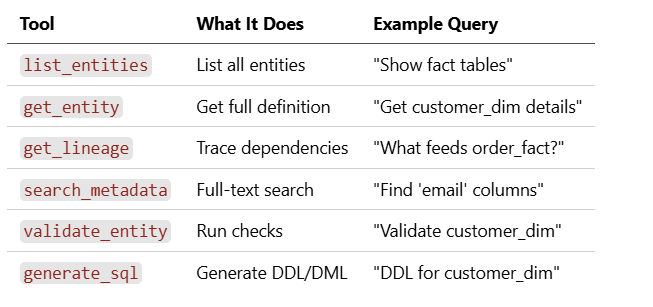
With MCP configured, the AI can:
Security Considerations
For production environments:
{
  "env": {
    "MDDE_READ_ONLY": "true",
    "MDDE_AUDIT_LOG": "/var/log/mdde/mcp-audit.log"
  }
}
Layer 3: Claude Code Configuration
The AI assistant needs context about your project. This comes from CLAUDE.md — a markdown file in your project root that tells the AI what it needs to know.
The CLAUDE.md File
# MDDE Project Context

## Project Overview
This is a Metadata-Driven Data Engineering project for [domain].

## Key Locations
- **Models**: `models/` - MDDE entity definitions (*.mdde files)
- **Sources**: `sources/` - Source system definitions
- **Generated SQL**: `output/sql/` - Generated DDL/DML
- **Quality Rules**: `quality/` - Data quality definitions

## Conventions

### Naming
- Entities: `snake_case` (e.g., `customer_dim`, `order_fact`)
- Attributes: `snake_case` with suffixes
  - `_id` for identifiers
  - `_dt` for dates, `_ts` for timestamps
  - `_amt` for amounts, `_qty` for quantities

### Stereotypes
- `dim_scd2` - Slowly changing dimension type 2
- `dim_fact` - Fact table with measures
- `stg_raw` - Raw staging from source
- `dv_hub`, `dv_satellite`, `dv_link` - Data Vault

### Quality Rules
- `not_null: [column_name]`
- `unique: [column_name]`
- `range: column_name between 0 and 100`
- `relationship: column_name references other_entity.id`

## Commands
“`bash python -m mdde generate sql –entity customer_dim –dialect databricks python -m mdde validate –all python -m mdde quality check –entity customer_dim
Terminal Aliases
Add to your shell profile for quick access:
“`bash
alias cc="claude"
alias cce="claude 'Explain this entity:'"
alias ccg="claude 'Generate SQL for:'"
alias ccv="claude 'Validate and suggest fixes:'"
alias ccl="claude 'Show lineage for:'"
Putting It All Together: Workflow Examples
Example 1: Design a New Entity
Prompt:
 Design a dim_scd2 entity for customer master data from the CRM system.
Include audit columns, track address changes, add quality checks for
email format and phone validation.
The AI:
- Reads your conventions from CLAUDE.md
- Queries existing entities via MCP to match patterns
- Generates a complete
.mddefile following your standards
Example 2: Impact Analysis
Prompt:
What happens if the source_customer table is delayed?
The AI:
- Uses
get_lineageto find downstream dependencies - Identifies affected reports and consumers
- Lists quality checks that would fail
Example 3: Troubleshooting
Prompt:
 This quality check is failing: unique_customer_email
Entity: customer_dim
Error: Found 47 duplicates

Suggest root causes and fixes.
The AI:
- Retrieves entity definition via MCP
- Analyzes the quality rule configuration
- Suggests data cleaning steps or rule adjustments
Team Configuration
Shared Extension Recommendations
Create .vscode/extensions.json so new team members get the right tools:
{
  "recommendations": [
    "ms-python.python",
    "ms-python.vscode-pylance",
    "redhat.vscode-yaml",
    "mtxr.sqltools",
    "eamodio.gitlens",
    "usernamehw.errorlens",
    "streetsidesoftware.code-spell-checker"
  ]
}
Shared Conventions
Create .claude/team-config.json:
{
  "defaultDialect": "databricks",
  "defaultStereotypes": ["dim_scd2", "dim_fact", "stg_raw"],
  "namingPatterns": {
    "entity": "^[a-z][a-z0-9_]*$",
    "attribute": "^[a-z][a-z0-9_]*$"
  },
  "requiredMetadata": ["description", "owner", "source_system"],
  "attribution": {
    "enabled": true,
    "format": "Co-Authored-By: Claude <noreply@anthropic.com>"
  }
}
Quick Start Checklist
Layer 1: VSCode
- Install Python + Pylance
- Install YAML extension, configure schema
- Install GitLens and Error Lens
- Configure SQLTools for DuckDB
- Create
.vscode/settings.json
Layer 2: MCP
- Install mdde[mcp] package
- Configure
~/.claude/mcp_servers.json - Test with
claude mcp status
Layer 3: AI Context
- Create
CLAUDE.mdwith project conventions - Add shell aliases for common prompts
- Set up team configuration files
The Payoff
With this setup, you get:
Faster Development
- Schema validation catches errors before runtime
- Autocomplete for stereotypes and conventions
- Quick metadata queries without switching tools
Better AI Assistance
- The AI understands your specific project
- Direct metadata access means accurate responses
- Generated code follows your patterns
Team Consistency
- Shared extensions and settings
- Documented conventions in CLAUDE.md
- Attribution for AI-generated content
Conclusion
The tools exist to make data engineering significantly more productive. The key is integration — getting your IDE, metadata systems, and AI assistants working together instead of in silos.
Start with Layer 1 (VSCode extensions). Add MCP servers when you want AI access to your metadata. Configure CLAUDE.md when you want AI that truly understands your project.
Each layer builds on the previous one. Start simple, add complexity when you need it.
This article is part of the MDDE series on metadata-driven data engineering.