Series: Choosing the Right Data Modeling Tool in the Era of Metadata Engineering
🏗 From ER Diagrams to Metadata Engineering
For decades, data modeling tools such as ERwin, PowerDesigner, and ER/Studio were at the heart of every data architecture. They offered what we needed at the time — structure, visualization, and control.
But over the years, something changed. Data architectures became distributed, schema evolution accelerated, and most of our logic moved from hand-crafted SQL to metadata-driven pipelines.
Today, data modeling isn’t just about drawing entities and relationships.
It’s about managing semantic intent, transformation logic, and platform-specific optimization across a constantly evolving landscape.Welcome to the era of metadata engineering.
💡 How VS Code Became the Metadata Workbench
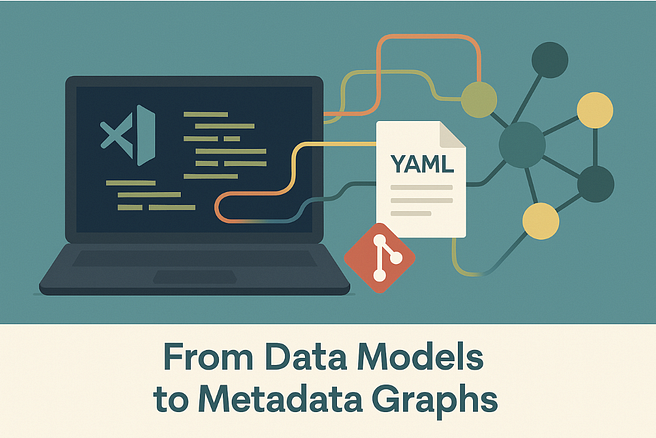
In earlier articles such as 🧱 Self-Describing SQL: Embedding Metadata as YAML Front-Matter and 🌳 From YAML Trees to Metadata Graphs, I showed how modeling can happen directly in VS Code, using YAML files as self-describing metadata.
By combining Python scripts, DuckDB, and Draw.io, we can:
- Define data models as YAML trees.
- Validate relationships and transformations.
- Auto-generate diagrams and documentation.
- Use GitHub Copilot for semantic pattern assistance.
All of this happens in an open and version-controlled environment — no proprietary repository required. This approach redefines modeling as code and metadata management, not as a GUI drawing exercise.
But while VS Code gives us flexibility and automation, it also reveals the boundaries of what code alone can do.
⚙️ What Code-Driven Modeling Still Can’t Solve
Even in the most advanced metadata-driven setups, some challenges remain — areas where a dedicated data modeling tool still adds value.
1. Visual Cognition & Navigation
YAML is perfect for automation, but poor for cognition. When your model grows beyond a few dozen entities, it becomes impossible to “see” the structure.
🔹Humans need curated, layered views — subject areas, domains, and filtered diagrams — not just autogenerated visual dumps.
2. Semantic Validation Across Models
Code can check syntax, keys, or names — but not semantics.
🔹A modeling tool should detect circular dependencies, inconsistent cardinalities, or violations of semantic relationships across models and projects.
3. Change Impact & Model Diffing
Git shows line-level changes. But architects need model-level insight.
🔹We want to see what changed structurally: “this entity lost a relationship” or “this attribute changed datatype.”
🔹That’s governance, not just version control.
4. Business-Level Abstraction
Engineers are comfortable with YAML. Business users aren’t.
🔹A modeling tool should offer accessible, business-friendly visualizations — translating metadata into readable diagrams and definitions.
5. Collaboration & Review Workflow
In larger organizations, multiple architects touch the same model.
🔹We need structured collaboration: comments, approvals, version merges, and traceability.
🔹Git alone doesn’t provide this governance layer.
6. Enterprise Integration & Publishing
Metadata doesn’t live in isolation.
It connects to catalogs, lineage tools, data quality rules, and documentation portals (Confluence, Notion, DataHub, Collibra).
🔹A modern modeling tool must act as the semantic integration point — the bridge between data design and data consumption.
🧠 Redefining the Purpose of a Data Modeling Tool
The next-generation modeling tool is not a drawing canvas.
It’s a semantic navigation and governance layer sitting on top of your metadata repository.
It doesn’t replace VS Code — it extends it.
It should:
- Understand YAML and JSON as first-class citizens.
- Read from and write back to your metadata store (e.g., DuckDB).
- Provide visual, navigable context for business and technical audiences alike.
- Act as a metadata lens — not a metadata silo.
Think of it as a metadata explorer rather than a model editor.
🔁 The Metadata-Centric Architecture
A modern modeling workflow might look like this:
VS Code + YAML + Git
↓
Metadata Repository (DuckDB or similar)
↓
Data Modeling Tool (Visualization, Governance, Lineage)
↓
Documentation & Catalog Integration
Each layer has a clear role:
- VS Code — define and automate.
- Metadata DB — persist and validate.
- Modeling Tool — visualize, govern, and communicate.
- Catalog — publish and share.
This separation of concerns prevents the lock-in of the past while preserving the structure and visibility that enterprises still need.
🧭 Emerging Requirements for Modern Data Modeling Tools
Based on this evolution, here’s what a metadata-era modeling tool must deliver:
Press enter or click to view image in full size
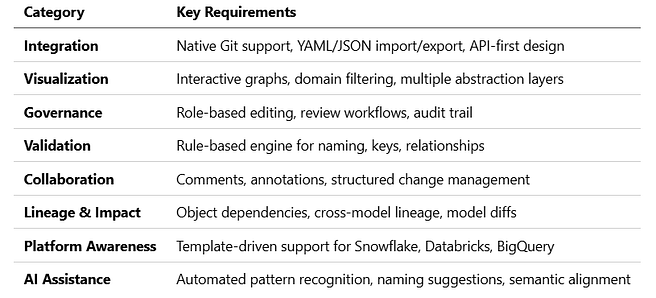
A tool meeting these criteria can complement a VS Code-driven workflow instead of competing with it — becoming the bridge between metadata engineering and enterprise data governance.
🚀 The Road Ahead
In the next article, we’ll turn these requirements into a practical evaluation framework — helping data teams assess which features they truly need and how different tools (from ERwin and Hackolade to SqlDBM and emerging open platforms) compare in 2025.
The goal is not to crown a single winner, but to define what “fit for purpose” means in the era of metadata-driven design.
🧩 Up next: Selecting a Data Modeling Tool for the Metadata Era