From PowerDesigner, erwin, Hackolade and ArchiMate to Modern Metadata Workspaces
Enterprise Model Import — From PowerDesigner & erwin to Modern Metadata Workspaces
MDDE as a Metadata Bridge
Most enterprise data platforms do not start with dbt.
They start with:
- PowerDesigner
- erwin Data Modeler
- ArchiMate repositories
- SSDT database projects
- Industry-specific capability models
These tools represent years — sometimes decades — of modeling investment.
But they often suffer from the same problem:
The model lives in one place.
The implementation lives somewhere else.
And over time, they drift apart.
MDDE addresses this gap by acting as a metadata bridge.
Not a replacement.
Not a new modeling ideology.
A bridge.
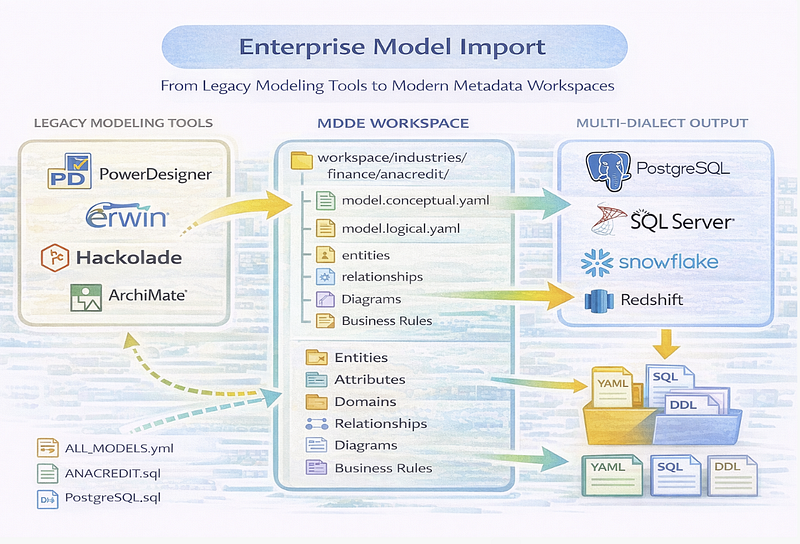
The Enterprise Reality
In large organizations, you often see:
- Logical models in PowerDesigner
- Physical models in erwin
- NoSQL schemas in Hackolade
- Architecture layers in Archi
- SQL implementation in various platforms
- Documentation in SharePoint or Confluence
Each tool is valuable.
But integration between them is manual.
Migration projects reveal this quickly:
- Models are outdated
- Relationships are incomplete
- Business rules are missing
- Lineage must be reconstructed
The problem is not tooling.
It is fragmentation.
The MDDE Import Strategy
MDDE does not ask you to abandon enterprise modeling tools.
It imports them.
Example: PowerDesigner import
python -m mdde.importer.powerdesigner_importer \
    workspace/exchange/in/anacredit/powerdesigner \
    --name anacredit \
    --db databases/meta.duckdb
What gets extracted:
- Entities
- Attributes
- Domains
- Relationships
- Cardinalities
- Business rules
- Diagram structures
These become structured metadata.
Not screenshots.
Not PDFs.
Not static exports.
Structured metadata.
What Changes After Import?
Before:
- Model lives in proprietary repository
- Versioning is tool-specific
- Diffs are difficult
- Collaboration is centralized
After:
workspace/industries/finance/anacredit/
  model.conceptual.yaml
  model.logical.yaml
  entities/
  relationships/
  diagrams/
  scripts/
Now the model is:
- Git-native
- Diffable
- Scriptable
- Optimizable
- Exportable
And most importantly:
Round-trippable.
Vendor-Neutral Metadata Core
MDDE normalizes imports into a common metadata schema.
Whether data comes from:
- PowerDesigner
- erwin
- Hackolade
- ArchiMate
- SSDT
- dbt
It lands in the same logical structure:
- entity
- attribute
- relationship
- function
- filter
- mapping
This creates a shared architectural language.
Independent of vendor tooling.
Modernizing Without Rebuilding
Enterprise migrations often face a painful choice:
- Rebuild models from scratch
- Or freeze legacy tools
MDDE introduces a third option:
Import → Normalize → Enrich → Export.
You can:
- Preserve decades of modeling work
- Add structured lineage
- Generate multi-dialect DDL
- Add compliance scoring
- Integrate data quality
- Align with modern DevOps workflows
Without discarding the past.
Diagram Preservation and Evolution
Imported models can regenerate:
- Mermaid ERDs
- Interactive D3 lineage views
- DrawIO diagrams
- ArchiMate exports
This means:
- Architects keep visual artifacts
- Engineers gain structured metadata
- Documentation stays synchronized
No more static diagrams drifting away from SQL.
Migration Use Case
In regulatory environments, imports are particularly powerful.
For example:
- Regulatory data models defined in PowerDesigner
- Implementation in SQL Server or Snowflake
- Ongoing schema changes
- Compliance requirements for lineage
With MDDE:
- Import authoritative model
- Parse SQL implementation
- Compare logical vs implemented structure
- Detect drift
- Generate alignment reports
Migration becomes measurable.
Enterprise Scale Considerations
At enterprise scale, the benefits multiply:
- Cross-model lineage becomes visible
- Naming conventions can be validated
- Data contracts can be generated
- Compliance can be scored
- Multi-platform DDL becomes automated
This is not about replacing enterprise architecture.
It is about operationalizing it.
VSCode + Git as the New Modeling Surface
Once imported, models live in:
- Git repositories
- YAML files
- Structured folders
- Scripted pipelines
Architecture becomes:
- Reviewable
- Traceable
- Automatable
Without losing its conceptual depth.
Why This Matters
Enterprises rarely struggle with modeling knowledge.
They struggle with keeping models aligned with reality.
MDDE closes that gap by:
- Making models executable
- Making SQL inspectable
- Making lineage structural
- Making governance operational
Next in the Series
In the next article: Observations and Proposals — How MDDE Suggests Improvements Without Forcing Change
We’ll explore:
- The observation engine
- Proposal lifecycle (draft → accepted → applied)
- Before/after previews
- Audit trails
- Safe optimization in production environments
Structure first.
Then improvement.
🔧 Technical Deep Dive — Comparing Imported vs Implemented
After importing PowerDesigner:
python -m mdde.importer.powerdesigner_importer ...
Compare logical vs implemented:
SELECT
    l.entity_name,
    CASE WHEN p.entity_name IS NULL THEN 'Missing in implementation'
         ELSE 'Implemented'
    END AS status
FROM metadata.entity l
LEFT JOIN metadata.entity p
  ON l.entity_name = p.entity_name
 AND p.model_id = 'mdl_sql_implementation'
WHERE l.model_id = 'mdl_powerdesigner';
Model drift becomes visible.
Migration risk becomes measurable.