🧩 Designing a Governed Data Correction & Adjustment Module on Azure Databricks
Enabling business-driven data corrections with Power BI write-back and bi-temporal historization
🔷 Introduction
Even in the most automated data platforms, manual corrections and adjustments are inevitable. Source systems may contain errors, late changes, or missing data — and business users often know best what should be corrected.
Yet, giving users the ability to correct data directly can easily compromise governance, lineage, and auditability — unless carefully designed.
This article outlines a proposed architecture for a governed correction and adjustment module within an Azure Databricks-based Common Data Platform (CDP).
The design allows business users to query, correct, and submit adjustments directly from Power BI, while preserving CDC lineage, SCD2 historization, and metadata governance.
🔷 The Business Context
In large organizations, operational data often flows through standardized ingestion and integration pipelines into the CDP. However, errors can appear in any layer — from source extraction to transformation.
Typical examples include:
- Incorrect or missing master data attributes.
- Transactional mismatches.
- Outdated classifications or mappings.
The challenge is to allow business-driven corrections without breaking:
- Ingestion automation
- Data lineage
- Auditability
- Downstream consistency
🔷 Solution Overview
The Correction & Adjustment Module (CAM) introduces a governed loop between business users and the technical data platform. It allows users to:
- Query integrated data in Power BI.
- Enter corrections (insert, update, delete, or default values).
- Submit corrections back to Databricks Delta tables through a write-back mechanism.
- Treat corrections as a new logical source (SourceID = ‘CORR’) in the ingestion pipeline.
- Apply CDC logic and bi-temporal SCD2 historization to merge corrected data.
- Propagate corrections downstream to dependent layers (integration, data marts, and reports).
Press enter or click to view image in full size
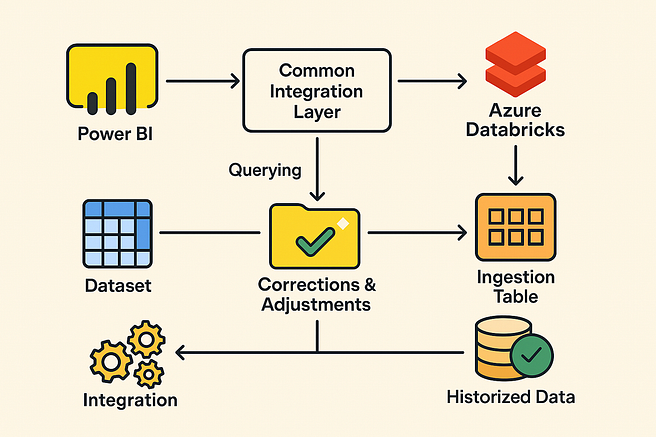
🔷 Architecture Overview
1️⃣ Power BI Correction Interface
- Users access Power BI reports built on the Common Integration Layer in Databricks via the Databricks SQL Warehouse connector.
- A dedicated Correction Mode view is enabled through role-based access.
- Corrections are made via one of the following write-back options:
- Option A — Power Apps integration: Embed a Power Apps form directly in Power BI to capture correction details and push them to Databricks.
- Option B — Power Automate / REST API flow: Trigger a flow that writes corrections into a REST API backed by Databricks.
- Option C — Databricks SQL write-back (preview): If direct write access is granted to a controlled Delta table, Power BI can update data using DML statements.
Each correction record minimally contains:
- Primary Key(s)
- Operation Type (
Insert,Update,Delete,Default) - Column(s) and values to adjust
- Metadata (DQ issue ID, description, owner, sign-off)
2️⃣ Correction Staging Layer (Databricks)
All user-submitted corrections are written into a staging Delta table:
cdp_raw.corrections_staging
Each record includes metadata:
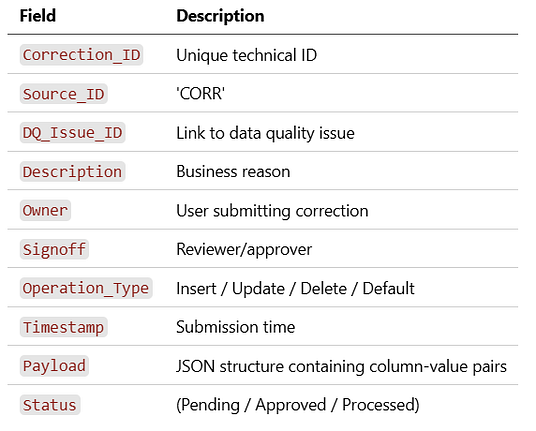
Governance logic in Databricks enforces:
- Schema validation
- Mandatory fields
- Column-level constraints
- Role-based access control (Unity Catalog)
3️⃣ Ingestion and CDC Integration
The correction data is processed in the same ingestion pipeline as other sources — but tagged as SourceID = ‘CORR’.
Steps:
- Parse
Payloadinto structured columns. - Apply CDC semantics (insert/update/delete).
- Convert partial updates into a full snapshot view by combining with the latest historized data.
- Add default values where applicable.
- Forward enriched records into the ingestion table alongside regular source feeds.
4️⃣ Bi-Temporal Historization (SCD2)
The historization process treats corrected data as new change events:
- Compare pre- and post-correction snapshots.
- Close previous record versions (set
Valid_To). - Open new versions (
Valid_From,Valid_To = 9999-12-31). - Mark corrected rows with:
Is_Corrected = TRUECorrection_Ref = DQ_Issue_ID
Two technical PITs (Points in Time) are stored:
- Before correction application.
- After correction application.
This ensures auditability and reproducibility of reporting snapshots.
5️⃣ Metadata and Governance Layer
All corrections are logged in a Data Quality Metadata Hub (e.g., in Unity Catalog or a governance Delta table):
- Each correction links to a DQ Issue.
- Approval workflows (Power Automate) ensure sign-off.
- The lineage graph traces each corrected record back to:
- Original source
- Correction metadata
- Responsible user and approver
🔷 End-to-End Flow Summary
Power BI → Power Apps / Power Automate → Databricks Corrections Staging → Ingestion Pipeline → Historization (SCD2) → Integration Layer → Reports
🔷 Benefits
✅ Seamless business-driven corrections without bypassing governance.
✅ Full CDC lineage and SCD2 historization of corrected data.
✅ Audit trail for every correction (who, when, why).
✅ Consistent propagation through ingestion and integration layers.
✅ Leverages existing Azure Databricks, Power BI, and Power Platform ecosystem.
🔷 Implementation Considerations
- Security: Use Unity Catalog table ACLs for controlled write-back access.
- Approval Workflow: Integrate Power Automate for sign-off before corrections are ingested.
- Validation: Python notebooks or Delta Live Tables validate schema and metadata.
- Automation: Trigger ingestion on correction approval event.
- Scalability: Partition corrections by source, entity, and period.
🔷 Future Enhancements
- Integration with Azure Purview for end-to-end lineage.
- Auto-suggest corrections using anomaly detection models.
- Embedding a Databricks SQL endpoint for real-time write-back once Microsoft formalizes Power BI write-back for non-Fabric sources.
- Extend the pattern to handle bulk correction files uploaded via Power BI or SharePoint.
🔷 Conclusion
The proposed architecture demonstrates how a Databricks-based Common Data Platform can enable governed business corrections within a robust technical framework.
By combining Power BI’s interactive data exploration with controlled Delta Lake write-back, CDC integration, and SCD2 historization, organizations can close the gap between data quality management and operational data governance.
This approach turns Power BI from a passive reporting tool into an active data stewardship interface, empowering users while keeping engineering and governance fully aligned.