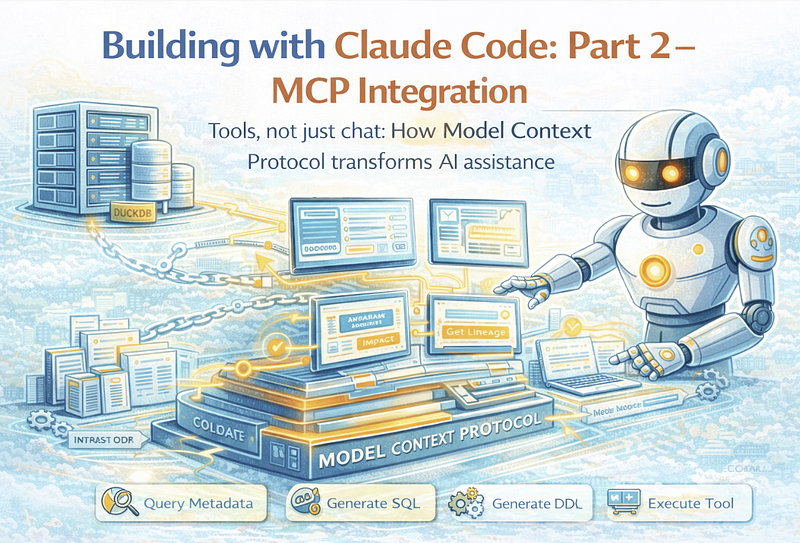
Tools, not just chat: How Model Context Protocol transforms AI assistance
Building with Claude Code: Part 2 — MCP Integration
Tools, not just chat: How Model Context Protocol transforms AI assistance
Series: Building a 6,600+ Test Framework with Claude Code
- Part 1: The Claude-First Architecture
- Part 2: MCP Integration — Tools, Not Just Chat (this article)
- Part 3: Practical Tips for AI-Assisted Development
In Part 1, we built the documentation foundation: CLAUDE.md, ADRs, and self-documenting schemas. That’s table stakes for effective AI collaboration.
Now we’re going to turn Claude from a reader into an operator.
The Limitation of Chat-Only AI
Traditional AI assistance works like this:
You: What tables depend on dim_customer?

Claude: Based on the code I can see, here's what I think...
        [Lists guesses based on file contents]
Claude reads your code and makes educated guesses. Sometimes it’s right. Sometimes it hallucinates. You always have to verify.
With MCP (Model Context Protocol), it works like this:
You: What tables depend on dim_customer?

Claude: [Executes get_entity_lineage tool]
Based on the metadata database, dim_customer has 5 downstream dependencies:
1. fact_orders (FK: customer_key, 3 attribute mappings)
2. fact_returns (FK: customer_key, 2 attribute mappings)
3. rpt_customer_summary (derived, all columns)
4. agg_customer_monthly (aggregation, groups by customer_key)
5. vw_customer_360 (view, joins dim_customer to 3 fact tables)
That’s not a guess. That’s a query result.
What is MCP?
The Model Context Protocol (MCP) is an open standard for giving AI assistants access to external tools and data sources. Think of it as an API that Claude can call.
Instead of:
- Reading code files and inferring meaning
- Guessing at database schemas
- Making assumptions about your system
Claude can:
- Query your actual metadata database
- Generate real SQL for your schema
- Validate against your actual model
- Run impact analysis on live data
The Architecture
┌─────────────────────────────────────────────────────────────┐
│                     Claude Code                             │
├─────────────────────────────────────────────────────────────┤
│                           │                                 │
│                           ▼                                 │
│              MCP Protocol (stdio JSON-RPC)                  │
│                           │                                 │
│                           ▼                                 │
│                  ┌─────────────────┐                        │
│                  │  MDDE MCP Server │                       │
│                  └────────┬────────┘                        │
│                           │                                 │
│         ┌─────────────────┼─────────────────┐               │
│         ▼                 ▼                 ▼               │
│  ┌─────────────┐  ┌─────────────┐  ┌─────────────┐          │
│  │ list_models │  │ get_lineage │  │ generate_ddl│          │
│  │ get_entity  │  │ analyze_... │  │ get_entity_ │          │
│  │ search_...  │  │ validate_.. │  │ _sql        │          │
│  └─────────────┘  └─────────────┘  └─────────────┘          │
│         │                 │                 │               │
│         └─────────────────┼─────────────────┘               │
│                           ▼                                 │
│                  ┌─────────────────┐                        │
│                  │   DuckDB        │                        │
│                  │   meta.duckdb   │                        │
│                  └─────────────────┘                        │
└─────────────────────────────────────────────────────────────┘
Setting Up the MCP Server
Step 1: Create the Server
MDDE’s MCP server lives in src/mdde/mcp/. The key files:
src/mdde/mcp/
├── __init__.py      # Module exports
├── __main__.py      # CLI entry point
├── server.py        # MCP server implementation
├── tools.py         # Tool implementations
└── README.md        # Documentation
Step 2: Configure Claude Code
Add to your Claude Code MCP configuration:
// .claude/mcp.json (project-specific)
{
  "mcpServers": {
    "mdde": {
      "command": "python",
      "args": ["-m", "mdde.mcp", "--db-path", "databases/meta.duckdb"]
    }
  }
}
Or for global configuration:
// ~/.config/claude/mcp.json
{
  "mcpServers": {
    "mdde": {
      "command": "python",
      "args": ["-m", "mdde.mcp", "--db-path", "/path/to/meta.duckdb"]
    }
  }
}
Step 3: Restart Claude Code
After configuration, restart Claude Code. It will spawn the MCP server as a subprocess and have access to all registered tools.
The Tool Library
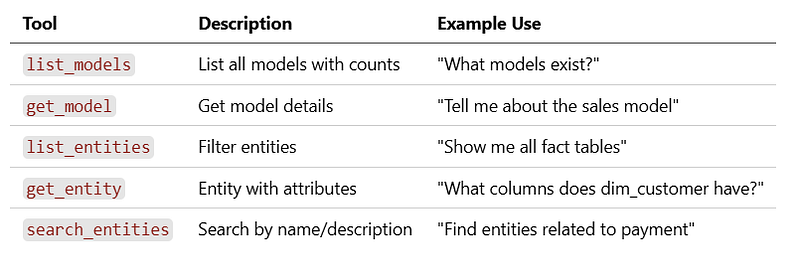
MDDE’s MCP server provides 11+ tools across four categories:
Discovery Tools
Lineage Tools

Generation Tools

Analysis Tools

Real Conversation Examples
Example 1: Impact Analysis
Me: What happens if I remove the legacy_code column from products?

Claude: I'll analyze the downstream dependencies using MDDE.
[Executes get_attribute_lineage("products", "legacy_code")]
Impact Analysis for removing products.legacy_code:
Direct Dependencies (3 entities):
├── product_catalog
│   └── Uses legacy_code in WHERE clause filter
├── inventory_sync
│   └── Maps legacy_code to external_product_id
└── legacy_report
    └── Directly selects legacy_code for display
Indirect Dependencies (1 entity):
└── monthly_summary
    └── Aggregates from legacy_report (would break if legacy_report breaks)
Recommendation:
1. Add product_code as an alternative before removal
2. Update product_catalog filter to use product_code
3. Deprecate legacy_report or migrate to product_code
4. Update inventory_sync mapping
Would you like me to generate the migration SQL for these changes?
Example 2: Cross-Dialect DDL Generation
Me: Generate the DDL for dim_customer for both Databricks and Snowflake

Claude: [Executes generate_ddl("dim_customer", "databricks")]
        [Executes generate_ddl("dim_customer", "snowflake")]
**Databricks:**

```sql
CREATE TABLE IF NOT EXISTS gold.dim_customer (
    customer_key BIGINT GENERATED ALWAYS AS IDENTITY,
    customer_id STRING NOT NULL,
    customer_name STRING,
    email STRING,
    segment STRING,
    valid_from TIMESTAMP NOT NULL,
    valid_to TIMESTAMP,
    is_current BOOLEAN DEFAULT true
)
USING DELTA
TBLPROPERTIES (
    'delta.enableChangeDataFeed' = 'true'
);
Snowflake:
 CREATE TABLE IF NOT EXISTS GOLD.DIM_CUSTOMER (
    CUSTOMER_KEY NUMBER AUTOINCREMENT,
    CUSTOMER_ID VARCHAR(50) NOT NULL,
    CUSTOMER_NAME VARCHAR(200),
    EMAIL VARCHAR(254),
    SEGMENT VARCHAR(50),
    VALID_FROM TIMESTAMP_NTZ NOT NULL,
    VALID_TO TIMESTAMP_NTZ,
    IS_CURRENT BOOLEAN DEFAULT TRUE
);
Key differences handled:
- IDENTITY → AUTOINCREMENT
- STRING → VARCHAR with lengths
- TIMESTAMP → TIMESTAMP_NTZ
-
USING DELTA removed (Snowflake native)
Example 3: Quality Validation
Me: Are there any issues with the finance model?
Claude: [Executes validate_model(“finance_model”)]
Validation Results for finance_model:
❌ Errors (2):
- E001: Missing primary key on staging_transactions → Action: Add transaction_id as PK
- E015: Circular dependency detected → revenue_summary → expense_summary → revenue_summary
⚠️ Warnings (5):
- W003: fact_revenue has 47 columns (threshold: 30) → Consider splitting into multiple facts
- W007: dim_account missing description
- W007: dim_cost_center missing description
- W012: Unused entity: temp_reconciliation → No downstream dependencies, consider removing
- W018: filter_active_only duplicated in 3 entities → Consider using filter_def for reusability
ℹ️ Info (2):
- I001: 3 entities use SELECT * (staging layer — acceptable)
- I005: Model has 89% documentation coverage
Would you like me to help fix the errors first?
---
## Implementing Tools
Here's how a tool is implemented in the MCP server:
### Tool Function (tools.py)
```python

def get_entity_lineage(
    db_path: str,
    entity_id: str,
    direction: str = "both",
    depth: int = 3
) -> Dict[str, Any]:
    """
    Get upstream and/or downstream entity dependencies.
    Args:
        db_path: Path to metadata database
        entity_id: Entity to analyze
        direction: "upstream", "downstream", or "both"
        depth: How many levels to traverse
    Returns:
        Dictionary with lineage information
    """
    conn = _get_connection(db_path)
    try:
        result = {"entity_id": entity_id, "upstream": [], "downstream": []}
        if direction in ("upstream", "both"):
            upstream = conn.execute("""
                WITH RECURSIVE upstream AS (
                    SELECT provider_entity_id, consumer_entity_id, 1 as level
                    FROM entity_mapping
                    WHERE consumer_entity_id = ?
                    UNION ALL
                    SELECT em.provider_entity_id, em.consumer_entity_id, u.level + 1
                    FROM entity_mapping em
                    JOIN upstream u ON em.consumer_entity_id = u.provider_entity_id
                    WHERE u.level < ?
                )
                SELECT DISTINCT e.entity_id, e.entity_name, e.entity_type, u.level
                FROM upstream u
                JOIN entity e ON e.entity_id = u.provider_entity_id
                ORDER BY u.level
            """, [entity_id, depth]).fetchall()
            result["upstream"] = [
                {"id": r[0], "name": r[1], "type": r[2], "level": r[3]}
                for r in upstream
            ]
        if direction in ("downstream", "both"):
            # Similar query for downstream...
            pass
        return result
    finally:
        conn.close()
Tool Registration (server.py)
from mcp.server import MCPServer
from mcp.types import Tool, TextContent
import json
from . import tools

class MDDEMCPServer:
    def __init__(self, db_path: str):
        self.db_path = db_path
        self.server = MCPServer("mdde-mcp")
        self._register_tools()
    def _register_tools(self):
        @self.server.list_tools()
        async def list_tools():
            return [
                Tool(
                    name="get_entity_lineage",
                    description="Get upstream and downstream entity dependencies",
                    inputSchema={
                        "type": "object",
                        "properties": {
                            "entity_id": {
                                "type": "string",
                                "description": "Entity ID to analyze"
                            },
                            "direction": {
                                "type": "string",
                                "enum": ["upstream", "downstream", "both"],
                                "default": "both"
                            },
                            "depth": {
                                "type": "integer",
                                "default": 3,
                                "description": "Levels to traverse"
                            }
                        },
                        "required": ["entity_id"]
                    }
                ),
                # ... more tools
            ]
        @self.server.call_tool()
        async def call_tool(name: str, arguments: dict):
            if name == "get_entity_lineage":
                result = tools.get_entity_lineage(
                    self.db_path,
                    arguments["entity_id"],
                    arguments.get("direction", "both"),
                    arguments.get("depth", 3)
                )
                return [TextContent(type="text", text=json.dumps(result, indent=2))]
            # ... more tool handlers
Beyond Query: AI Agents
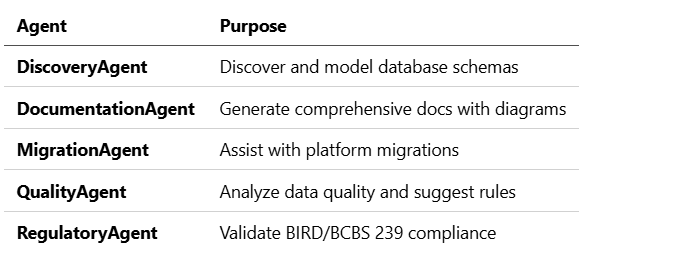
MCP isn’t just for answering questions. With the right tools, Claude can become an autonomous agent that performs multi-step workflows.
The Agent SDK Vision
from mdde.agents import DiscoveryAgent, AgentConfig

config = AgentConfig(
    model="claude-sonnet-4-20250514",
    max_turns=50,
    require_approval=["create_entity", "delete_entity"],
    verbose=True
)
agent = DiscoveryAgent(conn, config=config)
result = await agent.run(
    task="Discover the 'sales' schema and create entities",
    context={
        "connection_string": "postgresql://...",
        "infer_relationships": True,
        "generate_descriptions": True
    }
)
# Agent autonomously:
# 1. Connects to database
# 2. Extracts table metadata
# 3. Infers relationships from FKs and naming
# 4. Creates MDDE entities
# 5. Generates AI-powered descriptions
# 6. Pauses for approval on creates
Specialized Agents
Human-in-the-Loop
The key is control. You configure what requires approval:
config = AgentConfig(
    require_approval=[
        "create_entity",    # Creating new entities
        "delete_entity",    # Removing entities
        "modify_pk",        # Changing primary keys
        "change_relationship"  # Altering relationships
    ],
    max_actions_before_review=10,  # Pause for review every 10 actions
    show_plan=True  # Show planned actions before executing
)
Claude proposes. You decide.
Security Considerations
MCP opens powerful capabilities. Use them wisely:
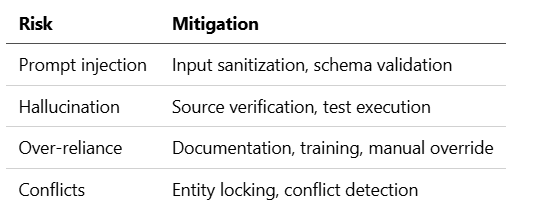
Guardrails
- Pre-flight validation — All changes validated before execution
- Human approval — Destructive operations require confirmation
- Rollback support — All changes can be reverted
- Audit logging — Full change history with reasoning
- Input sanitization — SQL injection prevention
- Schema validation — Inputs validated against JSON schemas
Risk Mitigation
Getting Started with MCP
Minimal MCP Server
Here’s a minimal MCP server to get started:
# mcp_server.py
from mcp.server import MCPServer
from mcp.types import Tool, TextContent
import duckdb
import json

server = MCPServer("my-mcp")
@server.list_tools()
async def list_tools():
    return [
        Tool(
            name="list_tables",
            description="List all tables in the database",
            inputSchema={"type": "object", "properties": {}}
        )
    ]
@server.call_tool()
async def call_tool(name: str, arguments: dict):
    if name == "list_tables":
        conn = duckdb.connect("my_database.duckdb")
        tables = conn.execute(
            "SELECT table_name FROM information_schema.tables"
        ).fetchall()
        conn.close()
        return [TextContent(
            type="text",
            text=json.dumps([t[0] for t in tables])
        )]
if __name__ == "__main__":
    import asyncio
    asyncio.run(server.run())
Configure Claude Code
{
  "mcpServers": {
    "my-server": {
      "command": "python",
      "args": ["mcp_server.py"]
    }
  }
}
Test It
You: What tables exist in the database?

Claude: [Executes list_tables tool]
The database contains the following tables:
- users
- orders
- products
- order_items
What’s Next
In Part 3, we’ll cover practical tips for AI-assisted development:
- Five actionable recommendations from building MDDE
- Common pitfalls and how to avoid them
- The test-driven approach to AI collaboration
- When to trust and when to verify
Resources
- Model Context Protocol — MCP specification
- MCP GitHub — Reference implementation
- MDDE MCP Server — Example implementation
- Claude Code Documentation — Official guide