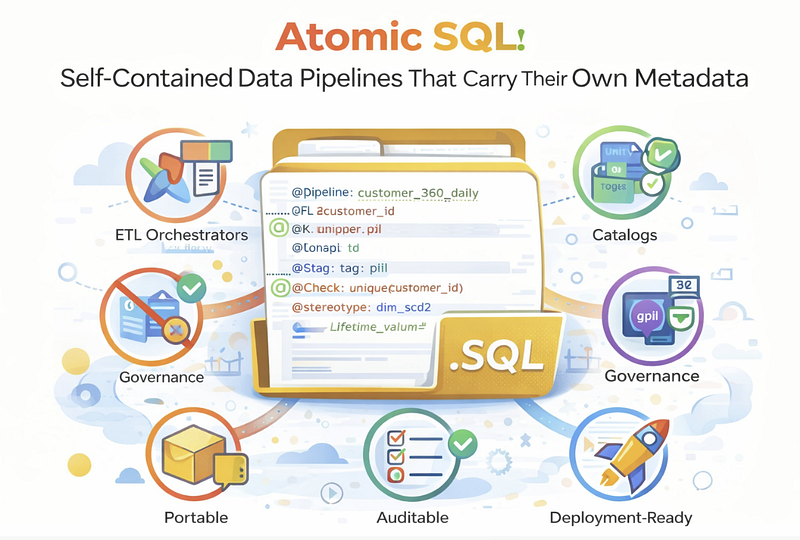
How to build data pipelines that are portable, auditable, and deployment-ready without external metadata dependencies
Atomic SQL: Self-Contained Data Pipelines That Carry Their Own Metadata
How to build data pipelines that are portable, auditable, and deployment-ready without external metadata dependencies
The Problem: Metadata Sprawl
In modern data platforms, metadata lives everywhere:
- ETL tools store pipeline schedules and dependencies
- Data catalogs store descriptions and classifications
- Governance platforms store PII tags and ownership
- Quality tools store validation rules
- BI tools store metric definitions
The result? Metadata sprawl. The same column gets described in five different places, and they inevitably contradict each other.
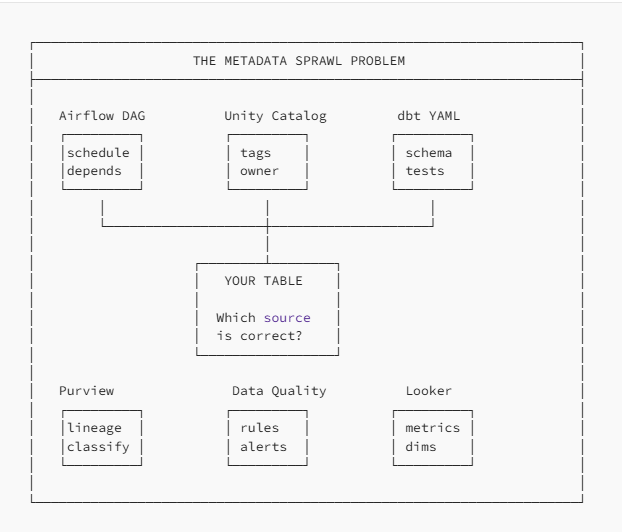
When a new team member asks “What does this column mean?”, they get six different answers.
The Solution: Atomic SQL
Atomic SQL is a design pattern where each SQL file is self-contained with all its metadata embedded as structured comments. The query can execute without any external metadata store, but during deployment, the metadata is extracted and published to whatever platforms need it.
Think of it like a shipping container for data transformations : everything needed travels together.
The Anatomy of an Atomic SQL File
-- ============================================================================
-- HEADER: Pipeline Identity
-- ============================================================================
-- @pipeline: customer_360_daily
-- @version: 2.1.0
-- @owner: data-platform@company.com
-- @schedule: 0 6 * * *
-- @target: gold.dim_customer
-- @stereotype: dim_scd2
-- @depends_on: silver.clean_customers, silver.fact_orders
-- ============================================================================

WITH
-- ============================================================================
-- CTE: What this transformation step does
-- @cte: deduplicated
-- @grain: one row per customer_id
-- @description: Remove duplicates, keep most recent record
-- ============================================================================
deduplicated AS (
    SELECT *,
        ROW_NUMBER() OVER (PARTITION BY customer_id ORDER BY updated_at DESC) as rn
    FROM silver.clean_customers
)
-- ============================================================================
-- OUTPUT: Target table with quality expectations
-- @output: gold.dim_customer
-- @pk: customer_key
-- @check: not_null(customer_id, email)
-- @check: unique(customer_id)
-- ============================================================================
SELECT
    customer_id,                    -- @nk: natural key
    email,                          -- @tag: pii, gdpr
    lifetime_value                  -- @tag: metric, currency_usd
FROM deduplicated
WHERE rn = 1;
This file can:
- Execute immediately in any SQL environment
- Be reviewed with full context in a PR
- Be deployed with automatic metadata extraction
- Be versioned with complete history in Git
Why “Atomic”?
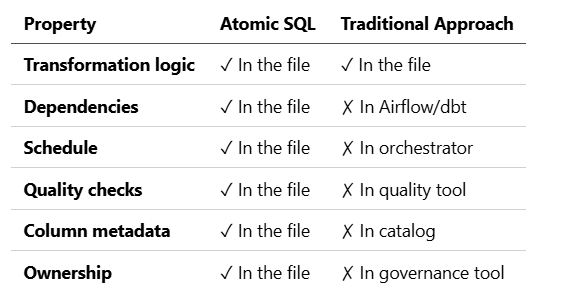
In chemistry, an atom is the smallest unit that retains the properties of an element. Similarly, an Atomic SQL file is the smallest deployable unit that retains all properties of a data pipeline:
The Three Zones of Annotation
Atomic SQL uses three annotation zones, each with a specific purpose:
Zone 1: Header (Pipeline-Level)
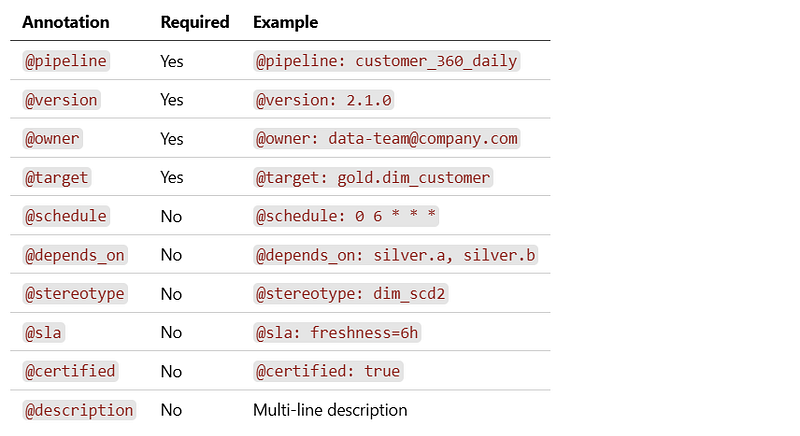
The header block contains metadata about the entire pipeline :
-- ============================================================================
-- @pipeline: customer_360_daily
-- @version: 2.1.0
-- @owner: data-platform@company.com
-- @schedule: 0 6 * * *
-- @target: gold.dim_customer
-- @stereotype: dim_scd2
-- @depends_on: silver.clean_customers, silver.fact_orders
-- @sla: freshness=6h, quality=99.5%
-- @certified: true
-- @description: |
--   Builds unified customer dimension from CRM and order data.
--   Implements SCD Type 2 for historical tracking.
--   Critical for customer analytics dashboards.
-- ============================================================================
Extractable to:
- Airflow/Databricks Workflows (schedule, dependencies)
- Data catalog (owner, description, certification)
- Monitoring (SLA expectations)
Zone 2: CTE Comments (Transformation-Level)
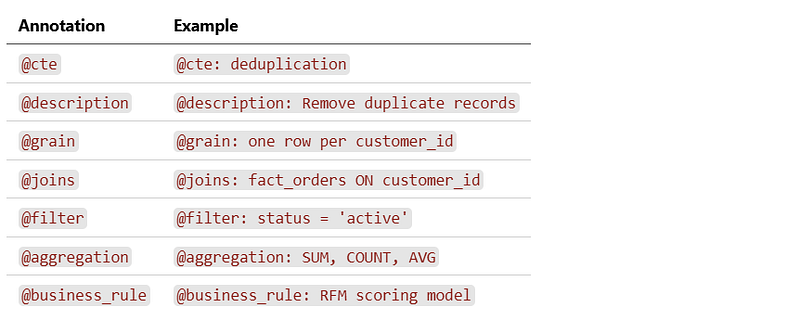
Each CTE gets a comment block explaining its purpose:
-- ============================================================================
-- @cte: order_enrichment
-- @description: Calculate customer lifetime metrics from order history
-- @grain: one row per customer_id
-- @joins: silver.fact_orders ON customer_id
-- @aggregation: SUM(order_total), COUNT(order_id)
-- @business_rule: Only include orders with status = 'completed'
-- ============================================================================
order_enrichment AS (
    SELECT
        customer_id,
        SUM(order_total) as lifetime_value,
        COUNT(order_id) as total_orders
    FROM silver.fact_orders
    WHERE status = 'completed'
    GROUP BY customer_id
)
Why this matters:
- Future maintainers understand the transformation logic
- Data lineage tools can infer column-level relationships
- AI assistants can explain what each step does
Zone 3: Column Annotations (Inline)
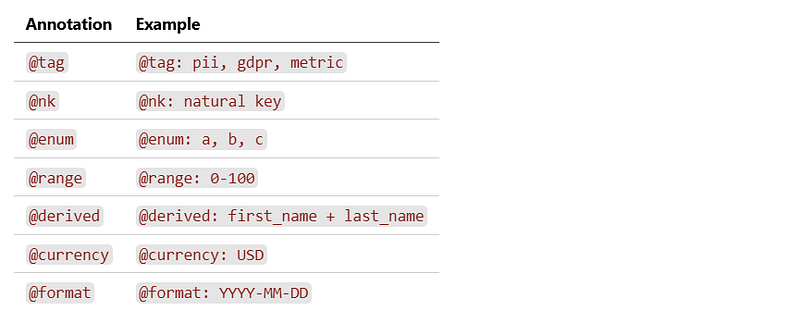
Column-level metadata sits right next to the column definition:
SELECT
    customer_id,                          -- @nk: natural key from CRM
    email,                                -- @tag: pii, gdpr, mask_on_export
    CONCAT(first_name, ' ', last_name)    -- @derived: concatenation
        as full_name,
    segment,                              -- @enum: enterprise, smb, consumer
    lifetime_value,                       -- @tag: metric, currency_usd
                                          -- @aggregation: sum
    health_score                          -- @tag: metric, derived
                                          -- @range: 0-100
                                          -- @business_context: enterprise_model
FROM enriched
Why inline?
- Metadata is immediately visible during code review
- Changes to columns and their metadata travel together
- No drift between code and documentation
The Deployment Pipeline
Atomic SQL files don’t require a metadata store to execute , but during deployment , metadata is extracted and published:
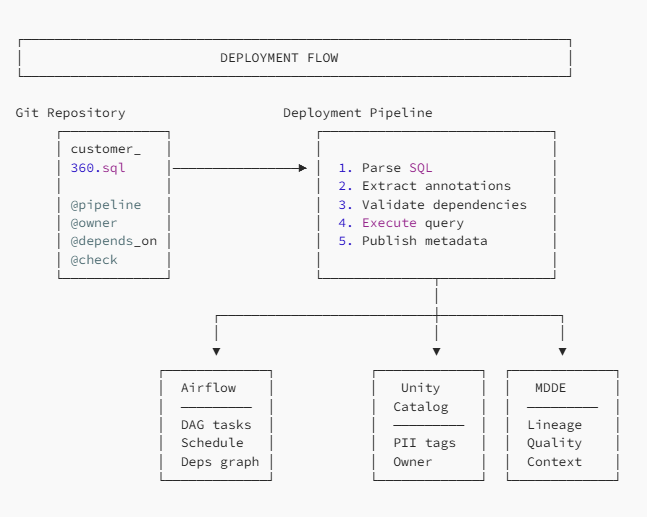
Example: mdde deploy
$ mdde deploy pipelines/customer_360.sql --env prod

Parsing atomic query...
✓ Pipeline: customer_360_daily v2.1.0
✓ Owner: data-platform@company.com
✓ Schedule: 0 6 * * * (Daily 06:00 UTC)
Extracting metadata...
✓ Dependencies: 2 tables
  - silver.clean_customers
  - silver.fact_orders
✓ Target: gold.dim_customer (dim_scd2)
✓ Quality checks: 3 defined
✓ Column tags: 6 columns annotated
Validating...
✓ Dependencies exist in catalog
✓ No circular dependencies
✓ Owner has deploy permissions
Deploying...
✓ Executed query (12.3s, 1.2M rows)
✓ Registered in Airflow DAG
✓ Published tags to Unity Catalog
✓ Updated lineage in MDDE
✓ Quality checks scheduled
Deployment complete!
View in catalog: https://catalog.company.com/gold/dim_customer
Handling Complex Transformations
Real-world pipelines aren’t simple. Here’s how Atomic SQL handles complexity:
Multi-CTE Pipelines
-- @pipeline: customer_360_daily
-- @target: gold.dim_customer

WITH
-- @cte: raw_dedupe | @grain: 1 row/customer_id
raw_dedupe AS (
    SELECT *, ROW_NUMBER() OVER (...) as rn
    FROM silver.clean_customers
),
-- @cte: order_metrics | @grain: 1 row/customer_id | @joins: fact_orders
order_metrics AS (
    SELECT customer_id, SUM(total) as ltv, COUNT(*) as orders
    FROM silver.fact_orders
    GROUP BY customer_id
),
-- @cte: segment_rules | @business_rule: RFM segmentation
segment_rules AS (
    SELECT
        customer_id,
        CASE
            WHEN ltv > 10000 AND orders > 10 THEN 'vip'
            WHEN ltv > 5000 THEN 'high_value'
            WHEN orders > 5 THEN 'frequent'
            ELSE 'standard'
        END as segment
    FROM order_metrics
),
-- @cte: final_join | Combines all CTEs
final AS (
    SELECT r.*, o.ltv, o.orders, s.segment
    FROM raw_dedupe r
    JOIN order_metrics o ON r.customer_id = o.customer_id
    JOIN segment_rules s ON r.customer_id = s.customer_id
    WHERE r.rn = 1
)
-- @output: gold.dim_customer
SELECT * FROM final;
Incremental Loads
-- @pipeline: orders_incremental
-- @target: silver.fact_orders
-- @mode: incremental
-- @watermark: order_date
-- @lookback: 3 days

-- @cte: new_orders | Fetch only new/updated records
WITH new_orders AS (
    SELECT *
    FROM bronze.raw_orders
    WHERE order_date >= '{{ watermark }}' - INTERVAL '3 days'
)
-- @output: silver.fact_orders
-- @merge_key: order_id
-- @update_columns: status, updated_at
SELECT * FROM new_orders;
Parameterized Queries
-- @pipeline: monthly_aggregation
-- @target: gold.monthly_metrics
-- @parameters:
--   - name: year_month
--     type: string
--     format: YYYY-MM
--     default: {{ current_month }}

WITH monthly AS (
    SELECT
        DATE_TRUNC('month', order_date) as month,
        SUM(total) as revenue
    FROM silver.fact_orders
    WHERE DATE_TRUNC('month', order_date) = '{{ year_month }}-01'
    GROUP BY 1
)
SELECT * FROM monthly;
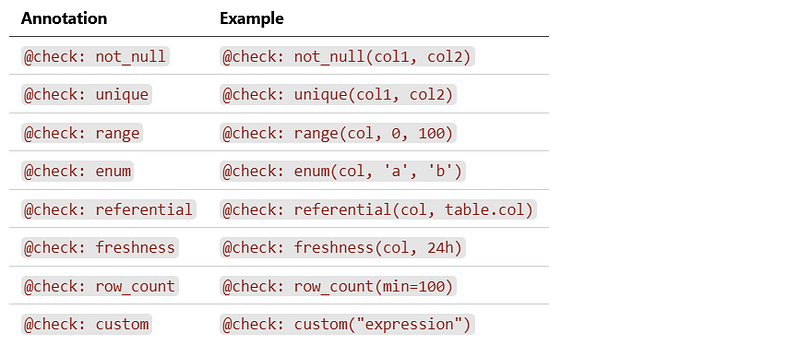
Quality Checks in Atomic SQL
Quality expectations are embedded directly in the SQL:
-- ============================================================================
-- QUALITY CHECKS
-- @check: not_null(customer_id, email)
-- @check: unique(customer_id)
-- @check: unique(customer_id, valid_from)  -- SCD2 uniqueness
-- @check: range(health_score, 0, 100)
-- @check: enum(segment, 'enterprise', 'smb', 'consumer', 'startup')
-- @check: referential(customer_id, silver.clean_customers.customer_id)
-- @check: freshness(updated_at, 24h)
-- @check: row_count(min=1000, max=10000000)
-- @check: custom("lifetime_value >= 0 OR status = 'inactive'")
-- ============================================================================
During deployment, these are extracted and:
- Scheduled to run after the pipeline
- Registered in the data quality platform
- Monitored with alerts on failure
The Benefits
1. Portability
Move a SQL file to another environment, and it brings everything with it:
# Copy from dev to prod
cp pipelines/customer_360.sql /prod/pipelines/

# Deploy - metadata travels with the file
mdde deploy /prod/pipelines/customer_360.sql --env prod
No need to recreate DAGs, re-tag columns, or re-enter quality rules.
2. Code Review = Metadata Review
When someone changes a column from VARCHAR to DECIMAL, the PR also shows:
SELECT
-     lifetime_value,                 -- @tag: metric, varchar
+     CAST(lifetime_value AS DECIMAL) -- @tag: metric, currency_usd
+         as lifetime_value,          -- @precision: 15,2
Reviewers see both the code change AND the metadata change.
3. No Drift
Traditional approach:
Code says:     email VARCHAR(255)
Catalog says:  email VARCHAR(100)
Quality says:  email NOT NULL
Governance:    email is PII (maybe?)
Atomic SQL:
email VARCHAR(255) -- @tag: pii, gdpr | @check: not_null
One source. No drift. Ever.
4. Git-Native History
$ git log --oneline pipelines/customer_360.sql

a1b2c3d Add health_score metric
d4e5f6g Mark email as GDPR-sensitive
g7h8i9j Change SLA from 12h to 6h
j0k1l2m Add referential integrity check
m3n4o5p Initial pipeline creation
Every metadata change is tracked, with author, timestamp, and commit message.
5. AI-Ready
When an AI assistant needs to understand your data:
User: "What does the health_score column mean?"

AI: Looking at customer_360.sql...
The health_score column:
- Is a derived metric (tagged: metric, derived)
- Ranges from 0-100 (check: range)
- Uses enterprise_model business context
- Is calculated in the 'scored' CTE using RFM formula:
  - Recency: 40% weight
  - Frequency: 30% weight
  - Monetary: 30% weight
All context is in one file.
Implementation Checklist
Ready to adopt Atomic SQL? Here’s your checklist:
Phase 1: Annotation Standard
- Define annotation syntax (
@tag,@check, etc.) - Document which annotations go where (header, CTE, column)
- Create linting rules to validate annotations
- Build annotation reference for your team
Phase 2: Parser
- Build SQL parser that extracts annotations
- Handle multi-line values (descriptions)
- Support all annotation types
- Unit test extensively
Phase 3: Deployment Integration
- Connect to your orchestrator (Airflow, Databricks, etc.)
- Connect to your catalog (Unity, Purview, etc.)
- Connect to quality platform (dbt, Great Expectations, etc.)
- Build
mdde deployCLI command
Phase 4: Migration
- Inventory existing pipelines
- Generate annotations from existing metadata sources
- Review and enhance generated annotations
- Deprecate external metadata sources
Conclusion
Atomic SQL is not a new language or framework. It’s a design pattern that treats SQL files as complete, self-documenting packages.
The principles are simple:
- Metadata belongs with code — not in separate tools
- One source of truth — the SQL file
- Extract, don’t duplicate — publish to platforms from the file
- Version everything — metadata changes are code changes
The result is data pipelines that are:
- Portable — move anywhere, metadata follows
- Auditable — Git history captures everything
- Reviewable — PRs show full context
- Trustworthy — no drift between code and catalog
Start with one pipeline. Add annotations. Extract to your platforms. Scale from there.
Appendix: Complete Annotation Reference
Header Annotations
CTE Annotations
Column Annotations
Quality Annotations