How enterprise teams are treating semantic models like production code
Semantic Model DevOps: CI/CD for Power BI
How enterprise teams are treating semantic models like production code
The days of Power BI as a “drag-and-drop reporting tool” are over.
At Power BI Gebruikersdagen 2026, session after session drove home the same message: modern Power BI development is software development.
PBIP (Power BI Project) format, TMDL, Git integration, and quality gates have transformed how enterprise teams build and deploy semantic models.
This article covers the CI/CD patterns emerging from the event, with a focus on how model-driven data engineering enables automated, governed deployments.
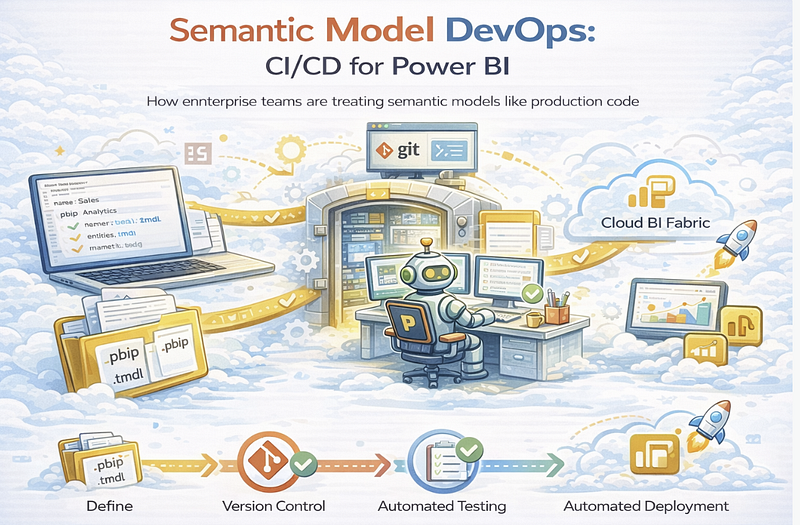
The New Stack
The 2026 Power BI development stack looks remarkably like application development:
┌──────────────────────────────────────────────────────────┐
│                    Development Flow                      │
├──────────────────────────────────────────────────────────┤
│  IDE           │  Tabular Editor 3 / VS Code             │
│  Format        │  PBIP (.pbip) + TMDL                    │
│  Version Ctrl  │  Git (GitHub, Azure DevOps)             │
│  Code Review   │  Pull Requests                          │
│  Quality       │  Best Practice Analyzer (BPA)           │
│  CI/CD         │  GitHub Actions / Azure Pipelines       │
│  Deployment    │  Fabric REST API / Deployment Pipelines │
└──────────────────────────────────────────────────────────┘
PBIP: Power BI Projects
PBIP decomposes Power BI content into text-based folders:
sales-analytics.pbip/
├── .pbip                       # Project manifest
├── sales-analytics.SemanticModel/
│   ├── definition/
│   │   ├── model.tmdl          # Tables, relationships
│   │   ├── tables/
│   │   │   ├── Sales.tmdl      # Table definition
│   │   │   ├── Customer.tmdl
│   │   │   └── Date.tmdl
│   │   ├── relationships.tmdl
│   │   └── expressions.tmdl    # M queries
│   └── .pbi/
│       └── localSettings.json
└── sales-analytics.Report/
    ├── definition/
    │   ├── report.json
    │   └── pages/
    │       ├── page1.json
    │       └── page2.json
    └── .pbi/
        └── localSettings.json
Why it matters:
- Git can diff individual tables and measures
- PRs show exactly what changed
- Merge conflicts are resolvable
- History is granular
TMDL: Human-Readable Model Definition
TMDL (Tabular Model Definition Language) replaced the binary .bim format:
table Sales
    lineageTag: 8f2c7b9d-1234-5678-90ab-cdef12345678

column Amount
    dataType: decimal
    formatString: \$#,0.00
    summarizeBy: sum
    sourceColumn: Amount

measure 'Total Revenue' = SUM(Sales[Amount])
    formatString: \$#,0.00
    description: "Sum of all sales amounts"
MDDE integration: MDDE generates TMDL directly from entity definitions:
# MDDE input
entities:
  - name: Sales
    attributes:
      - name: Amount
        type: decimal(18,2)
        format: currency
        measures:
          - name: Total Revenue
            expression: SUM([Amount])
            description: "Sum of all sales amounts"
Same information, different representations.
MDDE maintains the source of truth.
The CI/CD Pipeline
A production-grade pipeline for semantic models:
# .github/workflows/semantic-model-deploy.yml
name: Semantic Model CI/CD

on:
  push:
    branches: [main]
  pull_request:
    branches: [main]
jobs:
  validate:
    runs-on: ubuntu-latest
    steps:
      - uses: actions/checkout@v4
      - name: Install MDDE
        run: pip install mdde
      - name: Validate YAML Metadata
        run: mdde validate ./models/
      - name: Generate TMDL
        run: mdde export powerbi --format tmdl --output ./tmdl/
      - name: Run Best Practice Analyzer
        run: |
          npx @pbi-tools/bpa ./tmdl/ \
            --rules ./rules/bpa-rules.json \
            --fail-on-warning
      - name: Copilot Readiness Check
        run: mdde powerbi validate --copilot --fail-on-error
  test:
    needs: validate
    runs-on: ubuntu-latest
    steps:
      - name: Run DAX Unit Tests
        run: mdde dax test --model ./tmdl/
      - name: Validate Measures Against Golden Queries
        run: mdde validate query-pairs --pairs ./tests/golden-queries.yaml
  deploy-dev:
    needs: test
    if: github.event_name == 'pull_request'
    runs-on: ubuntu-latest
    environment: development
    steps:
      - name: Deploy to Dev Workspace
        run: |
          mdde fabric deploy \
            --workspace "Sales Analytics - Dev" \
            --model ./tmdl/
  deploy-prod:
    needs: test
    if: github.ref == 'refs/heads/main'
    runs-on: ubuntu-latest
    environment: production
    steps:
      - name: Deploy to Production
        run: |
          mdde fabric deploy \
            --workspace "Sales Analytics" \
            --model ./tmdl/ \
            --validate-before-publish
Quality Gates
Gate 1: Best Practice Analyzer (BPA)
Tabular Editor’s BPA checks for common issues:
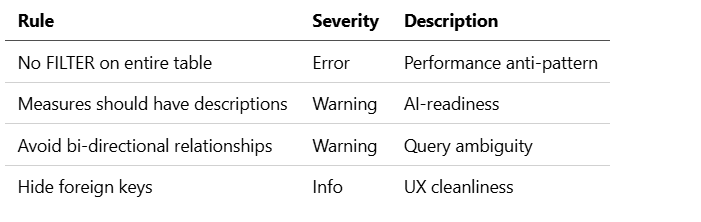
MDDE extension: Custom BPA rules from MDDE standards:
{
  "rules": [
    {
      "id": "MDDE_NAMING_001",
      "name": "Measure names must use business terminology",
      "expression": "Model.AllMeasures.Where(m => m.Name.Contains('_'))",
      "severity": "Error"
    },
    {
      "id": "MDDE_DESC_001",
      "name": "All measures must have descriptions under 200 chars",
      "expression": "Model.AllMeasures.Where(m => string.IsNullOrEmpty(m.Description) || m.Description.Length > 200)",
      "severity": "Error"
    }
  ]
}
Gate 2: Copilot Readiness
COPILOT READINESS CHECK
=======================
Status: FAILED

Failures:
  ✗ 5 measures missing descriptions
  ✗ 2 tables using abbreviations in names
  ✗ No AI Instructions configured

Warnings:
  ⚠ 12 columns without synonyms
  ⚠ Geographic columns missing data categories

Run: mdde powerbi fix --copilot to auto-remediate
Gate 3: DAX Validation
Test measures against expected outputs:
# tests/golden-queries.yaml
tests:
  - name: "Total Revenue matches sum of amounts"
    measure: "[Total Revenue]"
    filter:
      Date[Year]: 2025
    expected: 4250000.00
    tolerance: 0.01

  - name: "YoY calculation correct"
    measure: "[Revenue YoY]"
    filter:
      Date[Year]: 2025
    expected: 0.12  # 12% growth
    tolerance: 0.001
Gate 4: Lineage Validation
Ensure semantic model matches upstream sources:
LINEAGE CHECK
=============
Sales.Amount:
  Source: lakehouse.sales.fact_orders.total_amount ✓
  Type match: decimal(18,2) ✓

Customer.CustomerID:
  Source: lakehouse.crm.dim_customer.customer_id ✓
  Type match: int ✓

WARNING: 2 orphaned columns detected
  - Sales.LegacyCode (no source mapping)
  - Product.OldSKU (no source mapping)
Deployment Patterns
Pattern 1: Feature Branch per Change
main (production)
 │
 ├── feature/add-ytd-measures
 │     └── PR: Add YTD variants for revenue measures
 │
 ├── feature/new-customer-segments
 │     └── PR: Add Premium/Standard segmentation
 │
 └── fix/margin-calculation
       └── PR: Fix gross margin denominator
Each PR deploys to a feature workspace for testing:
Sales Analytics          (main)
Sales Analytics - Dev    (development)
Sales Analytics - PR-123 (feature/add-ytd-measures)
Sales Analytics - PR-124 (feature/new-customer-segments)
Pattern 2: Environment Promotion
MDDE YAML ─► TMDL Gen ─► Dev Deploy ─► Test Deploy ─► Prod Deploy
    │            │           │             │              │
    └── Git ─────┴── Validate ┴── Smoke ────┴── Regression ┴── Monitor
Fabric Deployment Pipelines orchestrate promotion:
# Deploy to development
mdde fabric deploy --workspace "Sales - Dev" --model ./tmdl/

# Promote to test (after approval)
mdde fabric promote --source "Sales - Dev" --target "Sales - Test"

# Promote to production
mdde fabric promote --source "Sales - Test" --target "Sales"
Pattern 3: Blue-Green Deployment
For zero-downtime updates to critical models:
Production Workspace
├── Sales Analytics (LIVE - serving users)
└── Sales Analytics v2 (STAGED - ready for cutover)


Cutover:
  1. Validate v2 with synthetic queries
  2. Switch connection strings
  3. Monitor for errors
  4. Rollback if needed
Rollback Strategy
Since TMDL is in Git, rollback is straightforward:
# Identify the last working commit
git log --oneline

# Revert to that commit
git revert HEAD~1

# Redeploy
mdde fabric deploy --workspace "Sales Analytics" --model ./tmdl/
For emergencies, use Fabric’s built-in restore:
# Restore from yesterday's backup
mdde fabric restore \
  --workspace "Sales Analytics" \
  --restore-point "2026-03-06T00:00:00Z"
The MDDE Advantage
Traditional CI/CD for Power BI:
Tabular Editor ─► TMDL ─► Git ─► BPA ─► Deploy
Model-driven CI/CD:
MDDE YAML ─► Validate ─► Generate TMDL ─► BPA ─► Copilot Check ─► Deploy
    │            │              │           │          │           │
    │     (schema rules)  (AI-ready)   (DAX)    (readiness)   (Fabric)
    │
    └── Also generates: SQL DDL, dbt models, documentation
Benefits:
- Single source of truth — YAML is authoritative
- Multi-target — Same metadata generates database AND semantic model
- Pre-validation — Catch issues before TMDL generation
- AI-readiness built-in — Copilot optimization is automatic
- Lineage — Track from source database to report visual
Governance at Scale
Enterprise governance patterns from Wurth Group and Arcadis:
Model Certification
certification:
  levels:
    - name: Experimental
      requirements: []
      badge: "🧪"
    - name: Validated
      requirements:
        - bpa_pass: true
        - copilot_ready: true
        - description_coverage: 0.8
      badge: "✓"
    - name: Certified
      requirements:
        - bpa_pass: true
        - copilot_ready: true
        - description_coverage: 1.0
        - lineage_complete: true
        - owner_assigned: true
        - reviewed_by: "data-governance-team"
      badge: "🏆"
Change Control
Changes to certified models require:
- Impact analysis — Who uses this model?
- Approval workflow — Owner + governance sign-off
- Communication — Notify downstream report owners
- Testing — Regression tests against golden queries
Audit Trail
Every deployment logged:
deployments:
  - id: deploy-2026-03-07-001
    model: Sales Analytics
    version: "2.4.1"
    commit: "abc123"
    deployed_by: "ci-service-account"
    deployed_at: "2026-03-07T14:30:00Z"
    environment: production
    status: success
    changes:
      - type: measure_added
        name: "Revenue YTD"
      - type: measure_modified
        name: "Gross Margin"
        diff: "Changed denominator from Revenue to Net Revenue"
Key Takeaways
- Treat semantic models as code — Version control, PR reviews, quality gates.
- PBIP + TMDL enable Git workflows — Text-based formats that diff and merge.
- Multiple quality gates — BPA, Copilot readiness, DAX tests, lineage validation.
- Environment promotion — Dev → Test → Prod with automated validation.
- Rollback is a Git revert — No black-box recovery procedures.
- MDDE adds validation upstream — Catch issues before TMDL generation.
- Governance scales with automation — Certification, change control, audit trails.
The semantic model is now part of your application architecture. It deserves the same rigor you apply to production code.
Based on sessions from Power BI Gebruikersdagen 2026, including “Power BI for Developers: PBIP and CI/CD Unleashed” by Rui Romano and Mathias Thierbach, and enterprise case studies from Wurth Group and Arcadis.
This completes the Power BI + MDDE integration series.