How 7,450+ AI-generated tests actually work — and what it means for test managers
AI-Assisted Testing: Why Requirements Matter More, Not Less
How 7,450+ AI-generated tests actually work — and what it means for test managers
The Question That Started This Article
Marc Teunissen, a former colleague, asked me a pointed question after seeing that our metadata framework had over 7,000 unit tests:
“How does AI generate 7,000 tests? What are they based on? And how do you reproduce bugs when the ‘developer’ is an AI?”
These are exactly the right questions. The uncomfortable truth is: AI doesn’t generate tests from thin air. It generates them from something — and understanding that something is crucial for anyone managing quality in AI-assisted development.

The Myth: AI Writes Tests Autonomously
Let’s dispel the myth first. When I tell Claude Code to “write tests for this module,” it doesn’t invent test scenarios from imagination. It reads:
- The source code — function signatures, class definitions, type hints
- Docstrings — intended behavior descriptions
- Existing tests — patterns, conventions, fixtures
- Architecture Decision Records (ADRs) — design rationale and edge cases
- Related code — how similar modules are tested
This means: the quality of AI-generated tests is directly proportional to the quality of your specifications.
A Real Example: Power BI Converter Tests
Let me show you exactly how this works with a real module from our codebase.
The ADR (Architecture Decision Record)
First, we wrote ADR-338, which specifies:
# ADR-338: Power BI to MDDE Converter

## Context
Users need to:
1. Convert Power BI semantic models to MDDE entities
2. Preserve business context (descriptions, display folders)
3. Automatically detect fact vs. dimension tables
4. Map Power BI data types to MDDE types
5. Import measures as calculated/derived attributes
## Decision
Implement PowerBIToMDDEConverter with:
- MDDEConvertConfig: stereotype, fact_stereotype, include_hidden, include_measures
- MDDEConvertResult: success, tables_converted, columns_converted, errors
- Stereotype detection heuristics: name patterns, measure counts, date columns
- Type mapping: int64 → BIGINT, string → VARCHAR, dateTime → TIMESTAMP
What AI Generated From This
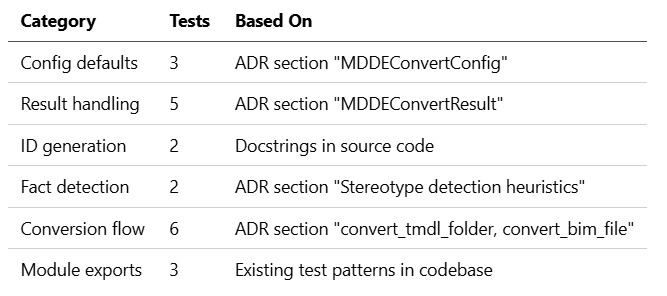
When I asked Claude to write tests, it produced 21 tests organized into logical categories:
class TestMDDEConvertConfig:
    """Tests for MDDEConvertConfig dataclass."""

def test_default_config(self):
        """Test default configuration values."""
        config = MDDEConvertConfig()
        assert config.stereotype == "dim_dimension"
        assert config.fact_stereotype == "dim_fact"
        assert config.include_hidden is False
        assert config.include_measures is True
    def test_custom_config(self):
        """Test custom configuration."""
        config = MDDEConvertConfig(
            stereotype="src_external",
            include_hidden=True,
            include_measures=False,
        )
        assert config.stereotype == "src_external"
        assert config.include_hidden is True
    def test_type_mapping(self):
        """Test default type mapping."""
        config = MDDEConvertConfig()
        assert config.type_mapping["int64"] == "BIGINT"
        assert config.type_mapping["string"] == "VARCHAR"
        assert config.type_mapping["dateTime"] == "TIMESTAMP"
Notice: every test directly traces back to a requirement in the ADR :
test_default_config→ “default stereotype, fact stereotype” from ADRtest_type_mapping→ “int64 → BIGINT, string → VARCHAR” from ADR
The Test Coverage Breakdown
The Requirements Pyramid for AI Testing
Here’s what I’ve learned about what AI needs to generate useful tests:
                    ┌─────────────────┐
                    │   Docstrings    │  ← "Convert TMDL to entities"
                    │   (10% weight)  │
                    └────────┬────────┘
                             │
                    ┌────────▼────────┐
                    │  Type Hints     │  ← config: MDDEConvertConfig
                    │   (15% weight)  │
                    └────────┬────────┘
                             │
               ┌─────────────▼─────────────┐
               │   Existing Test Patterns  │  ← Other converter tests
               │       (25% weight)        │
               └─────────────┬─────────────┘
                             │
        ┌────────────────────▼────────────────────┐
        │           ADRs / Specifications         │  ← Edge cases, error handling
        │              (50% weight)               │
        └─────────────────────────────────────────┘
The insight : Half of what AI “knows” about your expected behavior comes from explicit specifications. If you don’t write them, AI fills the gap with assumptions.
What ADRs Should Contain for AI-Friendly Testing
Our ADRs follow a specific structure that makes them AI-readable:
# ADR-XXX: Feature Name

## Context
[What problem are we solving? What are the user needs?]
## Decision
[What did we decide to build?]
### Key Components
1. **ClassName** - Responsibility
   - `method_name()` - What it does
   - Parameters and their meanings
### Configuration
- param_a: type, default, purpose
- param_b: type, default, purpose
### Edge Cases
- What happens when X is empty?
- What happens when Y fails?
- What are the error messages?
## Test Coverage
- `tests/path/to/test_file.py` - N tests
The “Edge Cases” section is particularly valuable — it directly translates to test scenarios AI will generate.
Reproducing Bugs: The Version Control Problem
Marc asked: “How do you reproduce bugs when the AI is the developer?”
This is where traditional testing practices become more important, not less:
1. Deterministic Test Data
@pytest.fixture
def sample_pbi_model():
    """Fixed test data — same every time."""
    return PBIModel(
        name="TestModel",
        tables=[
            PBITable(
                name="FactSales",
                columns=[
                    PBIColumn(name="id", data_type="int64"),
                    PBIColumn(name="amount", data_type="decimal"),
                ],
                measures=[
                    PBIMeasure(name="TotalSales", expression="SUM(amount)"),
                ],
            ),
        ],
    )
2. Mocked External Dependencies
@patch("mdde.importer.powerbi.mdde_converter.TMDLParser")
def test_convert_tmdl_folder(mock_parser_class, converter, tmp_path):
    """External parser is mocked — behavior is controlled."""
    mock_parser = MagicMock()
    mock_parser.parse_folder.return_value = sample_pbi_model
    mock_parser_class.return_value = mock_parser

result = converter.convert_tmdl_folder(str(tmp_path), "MDL_test")
    assert result.success is True
    assert result.tables_converted == 1
3. Version-Controlled Context
We track:
- The ADR that defined the behavior
- The prompt used to generate tests (sometimes in commit messages)
- The AI model version (claude-opus-4–5 vs. sonnet, etc.)
Example commit message:
Add Power BI converter tests (21 tests)

Generated with Claude Opus 4.5 based on ADR-338.
Context: mdde_converter.py + ADR-338 + existing converter test patterns.
Co-Authored-By: Claude Opus 4.5 <noreply@anthropic.com>
Test Metrics That Actually Matter
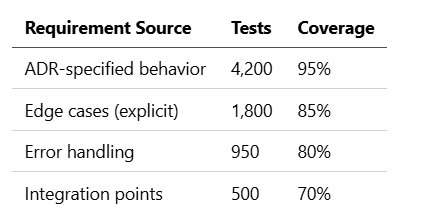
Marc is right: “7,450 tests” says nothing about quality. Here’s what we actually track:
Coverage by Requirement Type
Test Category Distribution
Unit tests (isolated):        5,200 (70%)
Integration tests:            1,500 (20%)
End-to-end flows:              750 (10%)
What We Don’t Track
- Lines of code covered (misleading for AI-generated code)
- Tests per developer (AI doesn’t count as a developer)
- Test execution time as a quality metric
The Test Manager’s New Role
If you’re a test manager working with AI-assisted development, your job has shifted:
Before AI
Requirements → Code → Tests → Validation
     ↓
[Test Manager validates tests match requirements]
With AI
Requirements → AI generates Code + Tests simultaneously
     ↓
[Test Manager validates REQUIREMENTS are complete]
Your new focus areas :
- Requirement Quality Audit
- Are edge cases documented?
- Are error scenarios specified?
- Are acceptance criteria testable?
2. AI Context Review
- What did AI “see” when generating tests?
- Are ADRs up to date?
- Are docstrings accurate?
3. Test Coherence
- Do tests match requirements (not just code)?
- Are there gaps where AI made assumptions?
- Are mocks realistic?
Practical Checklist: AI-Ready Requirements
Before asking AI to generate tests, ensure your specifications answer:
- Happy path : What should happen when everything works?
- Error states : What errors are possible and what messages should appear?
- Edge cases : Empty inputs, null values, boundary conditions?
- Configuration : What are all parameters and their defaults?
- Dependencies : What external systems are involved?
- Output format : What exactly should the result look like?
If any of these are unclear, AI will guess — and guesses don’t make good tests.
Conclusion: Requirements Are the New Code
The paradox of AI-assisted testing is this:
The more AI automates, the more important human-written specifications become.
AI is extraordinarily good at turning explicit requirements into comprehensive test suites. It’s dangerously creative when requirements are vague.
For test managers, this means your job isn’t disappearing — it’s elevating. You’re no longer validating that tests match code. You’re validating that specifications are complete enough for AI to work from.
And that, ultimately, is what testing was always supposed to be about.
This article is based on real experiences building MDDE, a metadata-driven data engineering framework with 7,450+ tests generated through AI-assisted development. The examples are from production code.
Thanks to Marc Teunissen for the questions that inspired this article.