How to integrate conversational AI into your metadata-driven workflow
Summary
After turning metadata into a knowledge graph and enabling semantic reasoning, the next logical step is to make it conversational.
Imagine being able to ask:“Which logical entities are missing lineage?”
“Generate a YAML model for the Finance domain.”
“Summarize the difference between Customer and Client models.”
“Add a quality rule for all attributes tagged as PII.”That’s the vision of the Metadata Copilot — an AI assistant that lives where your metadata lives, understands your YAML, and helps you think, model, and document faster.

1. Why Build a Metadata Copilot?
Traditional data catalogs and modeling tools focus on structure.
But they require human interpretation and manual upkeep.
A Metadata Copilot changes that by providing:
🧭 Guidance: Answers questions about your models, lineage, or rules.
⚙️ Generation: Creates new YAML files or documentation from prompts.
🧩 Validation: Detects inconsistencies or missing definitions.
📚 Learning: Learns from your metadata patterns and improves over time.
This turns metadata management from a chore into an interactive, intelligent experience.
2. Architecture Overview
A Metadata Copilot integrates five key components:
┌───────────────────────────────┐
│ User Interface │
│ (VSCode, Chat, Notion, CLI) │
└──────────────┬────────────────┘
│
┌──────────────┴────────────────┐
│ AI Assistant Layer │
│ – LLM reasoning │
│ – Semantic context retrieval │
└──────────────┬────────────────┘
│
┌──────────────┴────────────────┐
│ Metadata Knowledge Base │
│ – YAML files │
│ – DuckDB catalog │
│ – Semantic + quality rules │
└──────────────┬────────────────┘
│
┌──────────────┴────────────────┐
│ Integration & Automation │
│ – Git, CI/CD, Notion, APIs │
└───────────────────────────────┘
The assistant doesn’t replace your metadata — it orchestrates it.
3. Defining the Copilot’s Core Skills
Let’s define what your Metadata Copilot can do.
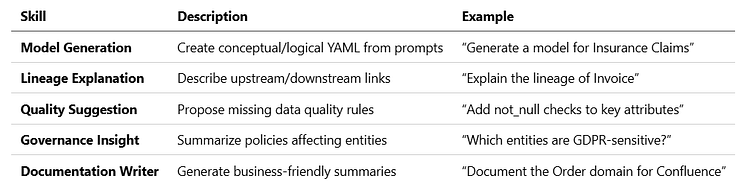
These skills can be composed into “actions” within your chat interface, VSCode plugin, or CI/CD workflow.
4. Integrating with VSCode
In your YAML-first environment, VSCode becomes the perfect UI.
The Copilot can:
- Autocomplete attribute names, datatypes, and derived_from links
- Highlight schema violations inline
- Generate relationships based on semantic patterns
- Open contextual lineage graphs on hover
Example YAML autocomplete prompt:
entity: Customer
attributes:
– name: Email
datatype: string
derived_from: conceptual.Customer.ContactPoint
rules: # Copilot suggests:
– valid_email_format
– not_null
This bridges metadata modeling with AI assistance directly in the developer’s workflow.
5. Conversational Metadata Queries
A chat-style Copilot (e.g. integrated via API or Notion) can interpret questions and translate them into metadata queries.
Example interactions:
You: “Show me all logical entities without a conceptual source.” Copilot:
SELECT entity
FROM metadata.entities
WHERE layer=’logical’ AND derived_from IS NULL;
You: “Explain the difference between Customer and Client.” Copilot: “Both derive from conceptual.Person, but Customer includes purchase history and Client includes contractual details.”
This creates a natural bridge between human language and metadata reasoning.
6. The Metadata Context Index
For accurate responses, the Copilot retrieves relevant context from your metadata catalog before reasoning.
You can build a context index using embeddings or keywords:
import chromadb, yaml, pathlib
index = chromadb.Client().get_or_create_collection(“metadata”)
for f in pathlib.Path(“models”).rglob(“*.yaml”):
text = open(f).read()
index.add(documents=[text], ids=[f.name])
When you ask a question, the assistant retrieves related YAML fragments to ground its answer — ensuring accuracy and reducing hallucination.
7. Automation Hooks
Your Copilot can also trigger actions automatically:
- Validate all YAML models nightly
- Rebuild lineage graphs on merge
- Regenerate Markdown docs after metadata updates
- Notify Notion or Slack of missing lineage or rules
Example CI/CD integration:
python tools/validate_metadata.py
python tools/generate_docs.py
python tools/notify_slack.py
The Copilot becomes both an interactive agent and a background process keeping your metadata ecosystem healthy.
8. Federated Intelligence Across Domains
In a metadata mesh, each domain can run its own local Copilot instance — specialized on local models, policies, and vocabularies.
At the same time, a central assistant aggregates context across domains, allowing:
- Cross-domain lineage reasoning
- Policy harmonization
- Shared glossary alignment
This balance of local context and global insight reflects the philosophy of the metadata mesh itself.
9. Example Use Case: Metadata Governance Dialog
You: “Which attributes across domains are tagged as PII?”Copilot: “I found 18 attributes across Customer, HR, and Marketing. 12 have masking rules; 6 do not.”You: “Add masking rules to the missing ones and regenerate documentation.”Copilot: “✅ Masking rules added. Documentation updated in Notion.”
This is metadata governance in conversation form — fully traceable and auditable.
10. In Summary
The Metadata Copilot turns your modeling framework into an intelligent metadata environment:
- It understands your models (semantic grounding)
- It acts on them (generation and validation)
- It learns from them (contextual improvement)
This is the natural endpoint of metadata-driven data architecture — when metadata itself becomes interactive, intelligent, and assistive.
11. Next in the Series
“The Road Ahead: Towards a Self-Adapting Metadata Ecosystem.”
We’ll explore how feedback loops between metadata, AI, and data quality can evolve into self-improving, adaptive data systems.