How to turn logical data models into executable database structures and visuals.
Summary
In the first three parts of this series, we covered the complete path from business understanding to logical precision:
1️⃣ From Business Concepts to Database Blueprint — the principles behind conceptual and logical modeling
2️⃣ Linking Conceptual and Logical Models in Metadata — keeping lineage with YAML and schema validation
3️⃣ Generating Logical Models Automatically from Conceptual Metadata — implementing normalization logic with Python
Now we’ll take the final step: generating physical database models and diagrams directly from logical YAML metadata.
The goal: transform metadata into SQL DDL, dbt models, or draw.io diagrams — all from the same declarative source.
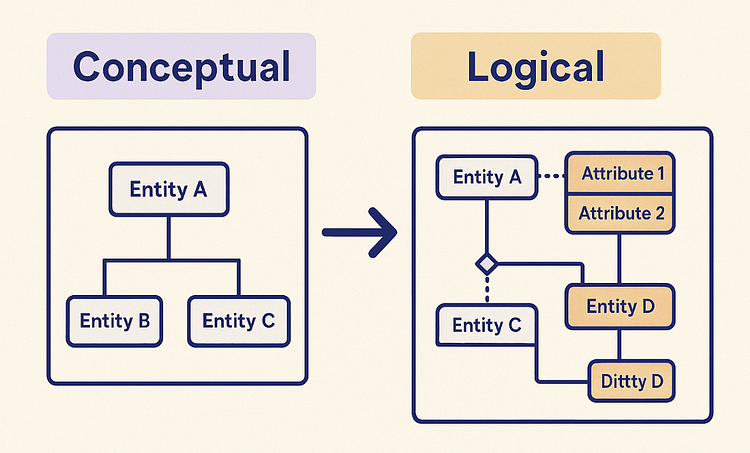
1. The Metadata-Driven Continuum
By this point, our modeling layers look like this:
Business Vocabulary → Conceptual Model → Logical Model → Physical Model
Each layer adds more precision:
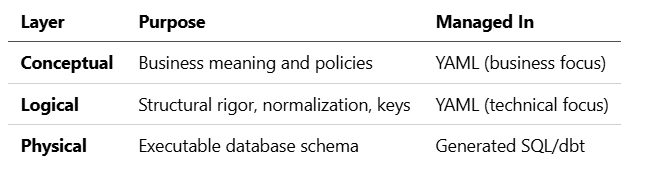
The beauty of this approach is consistency — every physical object has a lineage path back to a conceptual entity.
2. The Logical YAML as a Blueprint
Here’s an example of a logical entity we generated earlier:
layer: logical
entity: Customer
derived_from: conceptual.Customer
keys:
– name: CustomerID
type: surrogate
attributes:
– name: FirstName
datatype: string
atomic: true
derived_from: conceptual.Customer.FullName
– name: LastName
datatype: string
atomic: true
derived_from: conceptual.Customer.FullName
relationships:
– name: has_order
target: Order
type: 1:M
This is everything we need to generate a physical table definition.
3. Generating SQL DDL from YAML
Let’s look at a simple Python generator that transforms logical YAMLs into database-ready DDL scripts.
import yaml, pathlib
TYPE_MAP = {
“string”: “VARCHAR(255)”,
“int”: “INT”,
“float”: “FLOAT”,
“boolean”: “BOOLEAN”
}
def generate_sql(entity_def):
entity = entity_def[“entity”]
columns = []
for attr in entity_def[“attributes”]:
name = attr[“name”]
dtype = TYPE_MAP.get(attr.get(“datatype”, “string”))
columns.append(f” {name} {dtype}”)
pk = entity_def[“keys”][0][“name”]
ddl = f”CREATE TABLE {entity} (\n”
ddl += “,\n”.join(columns)
ddl += f”,\n PRIMARY KEY ({pk})\n);\n”
return ddl
def main():
logical_dir = pathlib.Path(“models/logical”)
sql_dir = pathlib.Path(“models/physical/sql”)
sql_dir.mkdir(parents=True, exist_ok=True)
for file in logical_dir.glob(“*.yaml”):
with open(file) as f:
entity_def = yaml.safe_load(f)
ddl = generate_sql(entity_def)
outfile = sql_dir / f”{entity_def[‘entity’]}.sql”
outfile.write_text(ddl)
print(f”Generated {outfile}”)
if name == “main”:
main()
This script maps each YAML file to a corresponding .sql file.
For example, the Customer entity produces:
CREATE TABLE Customer (
FirstName VARCHAR(255),
LastName VARCHAR(255),
PRIMARY KEY (CustomerID)
);
4. Generating dbt Models
If you use dbt, it’s even easier. You can generate model .sql files with Jinja templates that reference YAML metadata.
Example template generator:
def generate_dbt_model(entity_def):
entity = entity_def[“entity”]
cols = [attr[“name”] for attr in entity_def[“attributes”]]
select_list = “,\n “.join(cols)
sql = f”“”
– Auto-generated from {entity_def[‘derived_from’]}
SELECT
{select_list}
FROM source.{entity.lower()}_stg
“”“
return sql.strip()
This allows you to sync logical definitions directly into dbt models, while keeping the business-to-physical lineage intact.
5. Generating Diagrams (draw.io or Mermaid)
For visualization, you can generate ER diagrams automatically.
Here’s a minimal example using Mermaid syntax:
def generate_mermaid(entity_def):
lines = [f”classDiagram”, f” class {entity_def[‘entity’]} {{“]
for attr in entity_def[“attributes”]:
lines.append(f” +{attr[‘name’]} : {attr.get(‘datatype’, ‘string’)}”)
lines.append(” }”)
for rel in entity_def.get(“relationships”, []):
target = rel[“target”]
cardinality = rel[“type”].replace(“:”, “..”)
lines.append(f” {entity_def[‘entity’]} “{cardinality[0]}” –> “{cardinality[-1]}” {target}”)
return “\n”.join(lines)
Output example:
classDiagram
class Customer {
+FirstName : string
+LastName : string
}
Customer “1” –> “*” Order
You can then automatically embed this in documentation tools like Notion, Confluence, or MkDocs.
6. Folder Layout Recap
After generation, your structure might look like this:
models/
├── conceptual/
│ └── customer.yaml
├── logical/
│ └── customer.yaml
└── physical/
├── sql/
│ └── Customer.sql
└── diagrams/
└── Customer.mmd
Each layer is derived, not duplicated — keeping a single source of truth.
7. The Metadata-Driven Value Chain
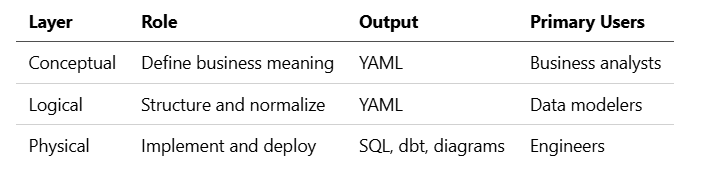
The real power comes from regeneration: Change one conceptual definition, re-run the generator, and your logical and physical models update automatically.
8. Why This Approach Scales
Traditional modeling tools often require manual synchronization between models and databases. With this metadata-driven approach:
- Every layer is declarative.
- Relationships and keys remain traceable.
- Models are version-controlled and regenerable.
This transforms your modeling process into a continuous data design pipeline — just like CI/CD for code.
9. In Summary
We’ve now built a fully automated, metadata-driven modeling architecture:
- Conceptual layer: captures business understanding
- Logical layer: adds structure and rules
- Physical layer: generates SQL and visuals
Together, they form a closed loop between business intent and data implementation — enabling traceable, reproducible data architectures.
10. Next in the Series
“Publishing Metadata Models to Notion and Confluence” — how to automatically synchronize conceptual, logical, and physical metadata to your documentation spaces with diagrams and lineage links.