Dual SCD2, Snapshots, and PIT Tables- A Technical Deep-Dive for Data Engineers
Understanding advanced temporal modeling patterns step by step.
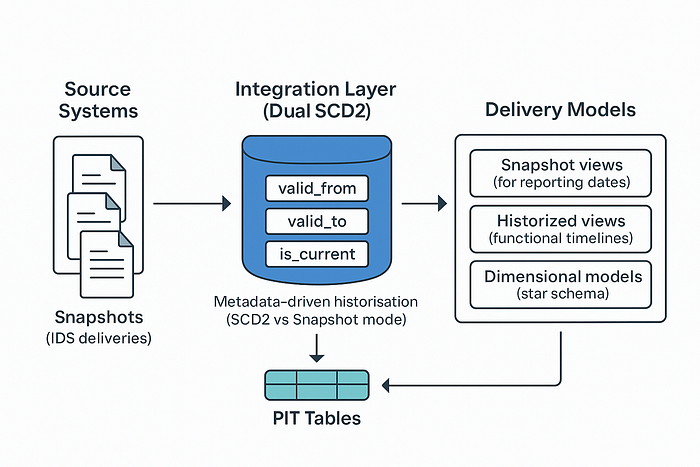
In my earlier article, I explained why we combine Slowly Changing Dimension Type 2 (SCD2) with Point-in-Time (PIT) tables instead of relying only on snapshots.
This piece is the technical deep dive: we’ll cover storage vs compute trade-offs, a metadata-driven approach, and the mechanics of implementation.
1. Introduction
In my earlier article, I explained why we combine Slowly Changing Dimension Type 2 (SCD2) with Point-in-Time (PIT) tables instead of relying only on snapshots.
This piece is the technical deep dive: we’ll cover storage vs compute trade-offs, a metadata-driven approach, and the mechanics of implementation.
2. The Storage vs Compute Trade-Off
It’s tempting to say snapshots are not expensive to use, because sources deliver snapshots and many consumers also expect snapshots. But the real cost shows up when you need to understand the functional history of data.
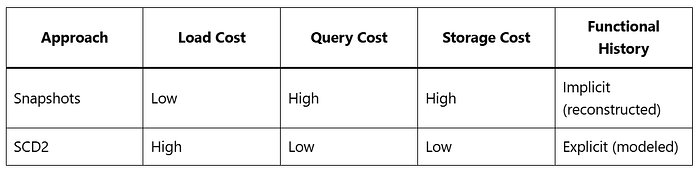
Snapshots
- Load: trivial →
INSERTeverything as delivered. - Storage: wasteful → the same record is copied into every snapshot, even if nothing changed.
- Query: inefficient → if you want to know when exactly a value changed (e.g., address, marital status), you have to diff across snapshots to reconstruct a timeline.
SCD2
- Load: expensive → requires diff detection.
- Storage: efficient → only changed records are stored, no duplicates.
- Query: efficient → the validity interval (
valid_from,valid_to) is explicit, aligned with the business Logical Data Model (LDM). You can query history directly.
📌 Comparison
Press enter or click to view image in full size
3. Why Not Pick Just One?
- Snapshots are convenient for delivery (inbound & outbound) and reporting. They mirror the “photo-style” way many source systems send data.
- But they are wasteful for integration. Duplicates explode, and reconstructing history from snapshots is cumbersome.
- SCD2 is ideal for integration. It captures the exact functional timeline of characteristics and associations (e.g., address validity, marital status, product attributes). This matches the logical data model, where history is an explicit part of the entity design.
- But SCD2 alone is costly for large, volatile datasets (balances, exchange rates) that always change.
👉 Solution: a dual approach
- Store all historized tables in a dual SCD2 structure aligned with the LDM.
- Use metadata to decide per table whether to run SCD2 diffing or snapshot-style inserts.
- Expose data to consumers through views and PIT tables, which can materialize snapshots or historized timelines as needed.
This way:
- The integration layer remains compact, logical, and aligned with business semantics.
- The delivery layer can expose snapshots, historized tables, or dimensional models — each optimized for its purpose.
4. Dual SCD2 Physical Structure
Every historized table follows the same schema:
Modes
- True SCD2 → open/closed intervals capture history.
- Snapshot-mode → records are “immediately closed” (
valid_to = valid_from).
This allows one framework to handle both slow- and fast-changing data.
5. Metadata-Driven Historisation
Rule engine
- If table flagged SCD2 → run diff logic against history.
- If table flagged Snapshot → load directly, no diffing.
Benefits
- Unified structure across all tables.
- Governance via metadata, not code.
- Flexibility to change historisation strategy per table.
6. Handling Redeliveries
Problem: a source system re-sends data for the same reporting date.
Strategy
- Restrict comparison to the relevant
valid_frompartition. - Compare against existing rows.
- Logically delete/replace if differences exist.
This avoids scanning the full table and keeps processing efficient.
7. Point-in-Time (PIT) Tables
Purpose
Deliver snapshot-shaped views without recomputing from raw history.
Mechanics
- For each reporting date, PIT maps a
business_key(orsurrogate_key) to the correct historized row. - Implemented as a join index or bridge table.
Benefits
- Fast snapshot reconstruction.
- Consistent handling of redeliveries.
- High query performance for BI, APIs, and data science workloads.
8. Partitioning Strategy
Partition historized tables by valid_from:
- Limits compute during redelivery checks.
- Improves pruning for PIT queries.
- Enables ETL parallelism at scale.
9. Cost Analysis
Storage
- Snapshots → linear growth.
- SCD2 → proportional to number of changes.
Compute
- SCD2 → diff detection dominates cost in fast-changing tables.
- Snapshot-mode → avoids diffing but duplicates rows.
Balanced approach
- Use SCD2 for stable data (customer profiles, reference data).
- Use snapshot-mode for volatile data (balances, exchange rates).
10. Conclusion
The dual SCD2 + PIT pattern provides a pragmatic balance:
- Cost efficiency (storage + compute).
- Performance (fast queries, manageable ETL).
- Flexibility (metadata-driven governance).
PIT tables close the loop by delivering snapshot-shaped datasets without the inefficiency of raw snapshots.
Here’s a simplified example of how you could implement a dual SCD2 framework in PySpark on Databricks.
from pyspark.sql import functions as F
from pyspark.sql.window import Window
Example incoming delivery (new snapshot of source data)
incoming = (
    spark.read.format("delta")
    .load("/mnt/source/delivery_table")
    .withColumn("valid_from", F.current_date())
)

# Load historized table (dual SCD2 structure)
history = spark.read.format("delta").load("/mnt/historized/table")

# Example metadata rule
table_mode = "SCD2"  # could also be "SNAPSHOT", driven by metadata

if table_mode == "SCD2":
    # Join on business key to detect changes
    join_cond = [incoming.business_key == history.business_key, history.is_current == True]
    comparison = incoming.join(history, join_cond, "left")

    # Detect new or changed records
    changes = comparison.filter(
        (history.business_key.isNull()) |
        (F.md5(F.concat_ws("||", *incoming.columns)) != history.hash_value)
    )

    # Close existing records
    updates = (
        history.join(changes, "business_key")
        .withColumn("valid_to", F.current_date())
        .withColumn("is_current", F.lit(False))
    )

    # New versions
    new_records = (
        changes
        .withColumn("surrogate_key", F.monotonically_increasing_id())
        .withColumn("valid_to", F.lit("9999-12-31"))
        .withColumn("is_current", F.lit(True))
    )

    final = history.union(updates).union(new_records)

elif table_mode == "SNAPSHOT":
    # All records close immediately (valid_from = valid_to)
    new_records = (
        incoming
        .withColumn("surrogate_key", F.monotonically_increasing_id())
        .withColumn("valid_to", F.col("valid_from"))
        .withColumn("is_current", F.lit(False))
    )
    final = history.union(new_records)

# Write back historized table
(final
 .write
 .format("delta")
 .mode("overwrite")
 .option("overwriteSchema", "true")
 .save("/mnt/historized/table"))
Key points in the code:
- Metadata-driven mode selects SCD2 or snapshot strategy.
- Hashing rows is a simple way to detect changes.
- Closing records (
valid_toupdate +is_current = False) maintains history. - Partitioning by valid_from can be applied when saving to Delta Lake.
Addendum (continued): Point-in-Time (PIT) Table Implementation
What a PIT table stores
A PIT table is a lookup/bridge that maps a business_key to the correct SCD2 row (its surrogate_key) for a given as_of_date (or snapshot_id). It is not a copy of data – just pointers.
PIT schema (example):
as_of_date(DATE) – the snapshot/reporting datebusiness_key(STRING)surrogate_key(BIGINT) – points to the SCD2 row valid onas_of_date- Optional audit fields:
build_ts,source_delivery_id
Partition PIT by as_of_date to keep it efficient.
1) PySpark (Databricks) — Build/Incremental Update
from pyspark.sql import functions as F
from pyspark.sql.window import Window

# Paths
SCD2_PATH = "/mnt/historized/table"        # Dual SCD2 table (current + history)
PIT_PATH  = "/mnt/pit/table"               # PIT bridge

# The "as_of_date" you are (re)building
`as_of_date = F.to_date(F.lit("2025-05-01"))`

# Read SCD2
`scd2 = spark.read.format("delta").load(SCD2_PATH)`

# SCD2 contract reminder:
# - business_key
# - surrogate_key
# - valid_from (DATE/TIMESTAMP)
# - valid_to   (DATE/TIMESTAMP; open-ended rows use '9999-12-31')
# - is_current (BOOLEAN)

# 1) Resolve the SCD2 row that is valid at as_of_date
resolved = (
    scd2
    .filter((F.col("valid_from") <= as_of_date) & (as_of_date <= F.col("valid_to")))
    .select(
        as_of_date.alias("as_of_date"),
        "business_key",
        "surrogate_key"
    )
)

# 2) Upsert into PIT (Delta MERGE)
from delta.tables import DeltaTable

if DeltaTable.isDeltaTable(spark, PIT_PATH):
    pit = DeltaTable.forPath(spark, PIT_PATH)
    (
        pit.alias("t")
        .merge(
            resolved.alias("s"),
            "t.as_of_date = s.as_of_date AND t.business_key = s.business_key"
        )
        .whenMatchedUpdate(set={"surrogate_key": "s.surrogate_key"})
        .whenNotMatchedInsert(values={
            "as_of_date":   "s.as_of_date",
            "business_key": "s.business_key",
            "surrogate_key":"s.surrogate_key"
        })
        .execute()
    )
else:
    (
        resolved
        .repartition("as_of_date")          # good partitioning leverage
        .write.format("delta")
        .partitionBy("as_of_date")
        .mode("overwrite")
        .save(PIT_PATH)
    )
Notes
– This builds (or re-builds) PIT only for a single as_of_date.
– For daily processing, call this per delivery date.
– For redeliveries, simply rerun for the affected as_of_date; MERGE overwrites the old pointers.
2) Delta SQL — Same logic with MERGE
-- Assuming:
--  SCD2 table: delta.`/mnt/historized/table`
--  PIT table:  delta.`/mnt/pit/table`

-- Create PIT if needed
CREATE TABLE IF NOT EXISTS pit_table
USING DELTA
PARTITIONED BY (as_of_date)
AS SELECT
  CAST(NULL AS DATE)  as_of_date,
  CAST(NULL AS STRING) business_key,
  CAST(NULL AS BIGINT) surrogate_key
WHERE 1 = 0;

-- Parameterize the date you want to (re)build
-- In Databricks SQL you can use widgets or replace manually:
-- SET as_of = '2025-05-01';

MERGE INTO pit_table t
USING (
  SELECT
    DATE('2025-05-01') AS as_of_date,
    business_key,
    surrogate_key
  FROM delta.`/mnt/historized/table`
  WHERE valid_from <= DATE('2025-05-01')
    AND DATE('2025-05-01') <= valid_to
) s
ON t.as_of_date   = s.as_of_date
AND t.business_key = s.business_key
WHEN MATCHED THEN UPDATE SET surrogate_key = s.surrogate_key
WHEN NOT MATCHED THEN INSERT (as_of_date, business_key, surrogate_key)
VALUES (s.as_of_date, s.business_key, s.surrogate_key);
3) Using the PIT to materialize a snapshot (on demand)
PySpark
# Read PIT for requested date + SCD2 base table
pit = spark.read.format("delta").load(PIT_PATH).filter(F.col("as_of_date") == F.to_date(F.lit("2025-05-01")))
scd2 = spark.read.format("delta").load(SCD2_PATH)

# Join via surrogate_key to fetch attributes as-of that day
snapshot_2025_05_01 = (
    pit.alias("p")
    .join(scd2.alias("h"), F.col("p.surrogate_key") == F.col("h.surrogate_key"), "inner")
    .select("p.as_of_date", "h.*")  # or pick a curated column list
)

snapshot_2025_05_01.createOrReplaceTempView("snapshot_2025_05_01")
Delta SQL
SELECT p.as_of_date, h.*
FROM   pit_table p
JOIN   delta.`/mnt/historized/table` h
  ON   p.surrogate_key = h.surrogate_key
WHERE  p.as_of_date = DATE('2025-05-01');
Tip: If downstream teams often request the same dates, you can materialize the joined result to a Delta table or view for faster access.
4) Fast multi-date analysis (rolling snapshots)
Sometimes you need many dates at once (e.g., month-end snapshots for a year). Build PIT for each date (daily job), then:
-- Example: month-end snapshots for 2024
WITH wanted_dates AS (
  SELECT last_day(seq_date) AS as_of_date
  FROM (
    SELECT explode(sequence(DATE('2024-01-01'), DATE('2024-12-31'), interval 1 month)) AS seq_date
  )
)

SELECT d.as_of_date, h.*
FROM   wanted_dates d
JOIN   pit_table p
  ON   p.as_of_date = d.as_of_date
JOIN   delta.`/mnt/historized/table` h
  ON   h.surrogate_key = p.surrogate_key;
5) Handling redeliveries with PIT
When a source resends data for a past as_of_date:
- Re-run SCD2 for that partitioned window (
valid_from = as_of_date). - Rebuild only that date in PIT (MERGE logic above).
- Any materialized snapshot for that date can be refreshed if you keep a derived table.
Because both SCD2 and PIT are partitioned on **valid_from** / **as_of_date**, compute stays localized.
6) Performance checklist
- Partitioning
- SCD2: partition by
valid_from; optionally cluster/order bybusiness_key. - PIT: partition by
as_of_date; Z-ORDER onbusiness_key(Databricks) if joins are frequent. - Indexes/Skipping
- Compaction
- Data types
- Columns
7) Minimal tests you can automate
- Uniqueness:
(as_of_date, business_key)is unique in PIT. - Completeness: PIT row count ≈ distinct
business_keycount for the date (after late-arriving filters). - Referential: All
surrogate_keyvalues in PIT exist in SCD2. - Correctness: For random samples, assert
valid_from <= as_of_date <= valid_to.
PySpark snippet for a quick check:
from pyspark.sql import functions as F

as_of = "2025-05-01"
pit = spark.read.format("delta").load(PIT_PATH).filter(F.col("as_of_date") == as_of)
scd2 = spark.read.format("delta").load(SCD2_PATH)

# Uniqueness
dupes = (pit.groupBy("as_of_date","business_key").count().filter("count > 1").count())
assert dupes == 0, f"Duplicate PIT keys for {as_of}"

# Referential integrity
missing = (
    pit.alias("p")
    .join(scd2.alias("h"), F.col("p.surrogate_key")==F.col("h.surrogate_key"), "left_anti")
    .count()
)
assert missing == 0, f"PIT has surrogate_keys not present in SCD2 for {as_of}"
8) Optional: “PIT-on-the-fly” view
If you don’t want to persist PIT (e.g., for small tables), you can resolve the valid row per key and date on-the-fly:
– Resolving a snapshot without a persisted PIT (slower, but simple)
SELECT DATE(‘2025-05-01’) AS as_of_date, h.*
FROM delta./mnt/historized/table h
WHERE h.valid_from <= DATE(‘2025-05-01’)
AND DATE(‘2025-05-01’) <= h.valid_to;
This is fine for small datasets; for scale, a persisted PIT is far faster and cheaper.
Wrap-up
- PIT is a thin, partitioned bridge that turns your SCD2 history into instant snapshots.
- It’s idempotent and redelivery-friendly: rebuild only the affected dates.
- With Delta Lake on Databricks, MERGE + partitioning + Z-ORDER keep both SCD2 and PIT fast and inexpensive.