1. Introduction
BFM is a structured way to capture business logic and translate it into SQL/ETL code.
It bridges business-friendly definitions with technical implementation through strict rules, reusable functions, and automated code generation.
This structured playbook can be used by the team (business users, data modelers, engineers) step-by-step.
2. Core Principles
- Separation of concerns
- Business defines what, system generates how.
- Logical building blocks
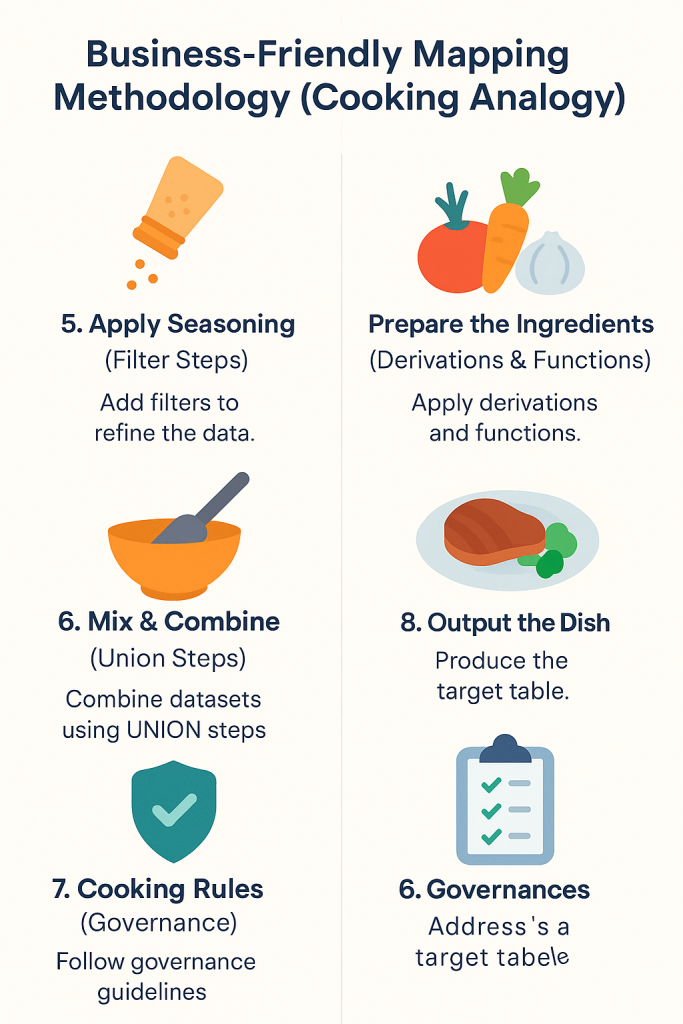
- Source → Select/Derive → Filter → Aggregate → Union → Output.
- Business-friendly naming
- Technical names are hidden until SQL generation.
- Reusable functions
- Functions documented, parameterized, tested.
- Metadata-driven
- Models, relationships, rules extracted and reused.
- Visual first
- Pipelines and models are communicated with diagrams.
3. Building Blocks and Rules
- Source
- Provides business-friendly names for columns.
- Auto-joins to related sources possible based on relationships.
- Select/Derive
- Add new derivations on a single source.
- No filtering allowed.
- Filter
- Only predicates or concept filters.
- No derivations inside.
- Aggregate
- Grouping only.
- No filters or derivations inside.
- Union
- Combine datasets with aligned schemas.
- Output
- Define final attributes for downstream targets.
Rule for derivations:
All derivations possible on a single source must be done before integration. Integration steps only contain derivations requiring multiple sources.
4. Function Library
- Logical functions
- Business names, descriptions, parameters.
- E.g.
normalize_surname(name).
- Test scenarios
- Business users provide examples + expected outputs.
- Technical macros
- SQL/Jinja implementation provided by engineers.
- Lifecycle
- Define → Test → Implement → Expand in SQL → Document → Validate.
5. Metadata & Data Models
- Source metadata export
- From tools like Erwin.
- Includes tables, columns, keys, datatypes, defaults, mandatory flags.
- Intermediate logical models
- Define relational models for transformation steps.
- Draw.io integration
- Auto-generate diagrams from metadata.
- Maintain diagrams manually where needed.
- Validate diagrams with Python scripts.
- Reuse relationships across diagrams (suggest joins from existing mappings).
- Shape library
- Auto-generated draw.io shapes for entities, attributes, keys.
6. Workflow
- Model Sources
- Export metadata from Erwin or define manually.
- Load into
source_model.yaml.
- Define Functions
- Business writes logical definition.
- Add test cases.
- Engineers provide SQL macros.
- Design Pipeline
- Use logical building blocks (YAML).
- Optionally design in draw.io first.
- Validate Pipeline
- Apply rules (no filters in aggregates, derivations in wrong steps, etc.).
- Run tests against function scenarios.
- Generate SQL
- Python + Jinja engine generates platform-specific SQL.
- Apply historization, auditing, policies.
- Review Outputs
- Generated SQL in
/models. - Lineage JSON in
/docs. - Diagrams in
/diagrams.
- Generated SQL in
7. Role of Draw.io
- Architecture view – communicate overall approach.
- Pipeline diagrams – show logical steps visually.
- Function lifecycle – document governance.
- Metadata validation – diagrams checked against metadata.
- Living documentation – version-controlled diagrams alongside code.
8. Benefits
- Transparency – business logic is clear, constrained, traceable.
- Automation – SQL generation reduces manual coding.
- Flexibility – adapters enable different platforms (Databricks, dbt, etc.).
- Governance – tests, lineage, documentation are generated.
- Collaboration – diagrams + YAML bridge business and IT.
9. Conclusion
BFM provides a sustainable way to translate business intent into technical reality.
It enforces rules, reuses metadata, generates SQL automatically, and produces documentation.
With draw.io as a visual front-end and Python/Jinja as a generation engine, BFM creates a full lifecycle for data transformation design, validation, and execution.