Where Data Modelers and Data Engineers Live Under One Roof
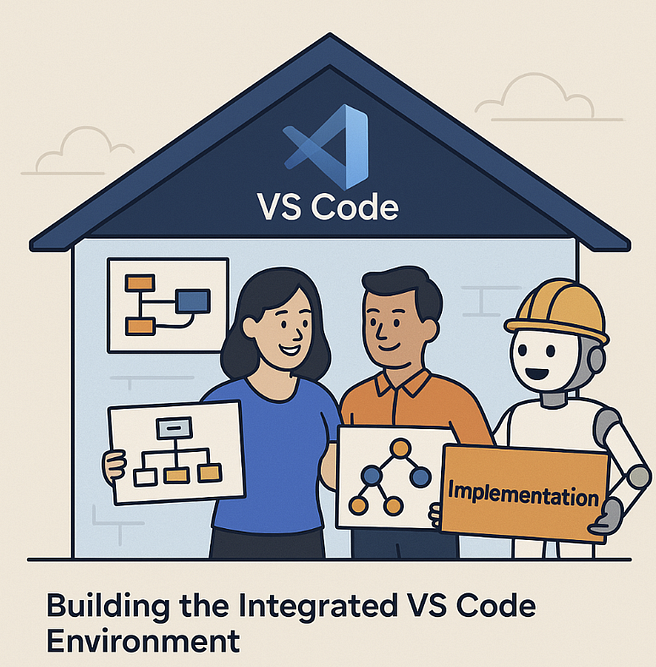
“VS Code is the house.
AI is the building crew you hire to help construct the (data)house.”In Part 1, we saw how structure (ERD) and movement (DAG) finally said “I do.” In Part 2, we revisited how this marriage was already modeled at De Volksbank / ASN — years before modern metadata platforms were born.
Now, it’s time to build the modern home for that marriage — a single environment where both modelers and engineers collaborate using open standards, version control, and AI assistance.
That home is Visual Studio Code.
🧩 1️⃣ The Vision — Everything in One House
In the old world:
- Data modelers worked in graphical tools.
- Engineers worked in pipeline frameworks.
- Business requirements lived in spreadsheets.
In the new world:
- Everything lives as code and metadata inside one repository.
- Everyone — modelers, engineers, analysts — works in VS Code.
- AI (like GitHub Copilot) assists across the stack.
🏠 Why VS Code?
- Cross-platform, lightweight, and extensible.
- Rich ecosystem for SQL, YAML, Markdown, Jinja, and diagramming.
- Seamless Git integration for versioning and review.
- A first-class home for Everything as Code — including metadata.
🗂️ 2️⃣ Project Layout — A Metadata-Driven Architecture
Here’s a proven directory structure that balances clarity, modularity, and automation:
/.metadata/ # Business & structural metadata
conceptual/ # Glossaries and domain definitions
logical/ # Logical entities (YAML)
physical/ # Warehouse-specific mappings
requirements/ # Linked RQM exports or Notion sync
lineage/ # Cross-model lineage and mappings
/models/ # Transformation logic (DAG)
source_access/ # Raw → logical source prep
business/ # Business entities + subtypes
intermediate/ # Stepwise joins & enrichments
aggregates/ # Rollups
delivery/ # Outputs, marts, APIs
/tests/ # Data & behavior tests (YAML, Gherkin)
/macros/ # Jinja SQL templates
/docs/ # Markdown docs + Mermaid diagrams
.vscode/ # Environment config
Each subfolder maps directly to one modeling layer from the Volksbank/ASN architecture — only now represented in YAML, SQL, and Markdown instead of PowerDesigner objects.
⚙️ 3️⃣ Core VS Code Setup
.vscode/settings.json
{
“editor.formatOnSave”: true,
“yaml.schemas”: {
“./.metadata/schemas/entity.schema.json”: “//logical//.yaml”,
“./.metadata/schemas/transform.schema.json”: “/models//.yaml”
},
“sqlfluff.dialect”: “snowflake”,
“files.exclude”: { “/.venv”: true, “/pycache”: true }
}
.vscode/tasks.json
{
“version”: “2.0.0”,
“tasks”: [
{ “label”: “lint:sql”, “type”: “shell”, “command”: “sqlfluff lint .” },
{ “label”: “gen:sql”, “type”: “shell”, “command”: “python tools/gen_sql.py” },
{ “label”: “test:data”, “type”: “shell”, “command”: “pytest -q tests” },
{ “label”: “docs”, “type”: “shell”, “command”: “python tools/gen_docs.py” }
]
}
🧱 4️⃣ Modeling Structure — Entities in YAML
Each logical entity becomes a small, readable YAML file.
.metadata/logical/party.entity.yaml
entity: PARTY
description: Represents a person or organization in the business domain.
attributes:
– name: party_id
type: string
key: true
– name: name
type: string
– name: party_type
type: string
subtypes: [PERSON, ORGANIZATION]
requirements: [RQM-101, RQM-115]
Functional subtypes extend the structure:
.metadata/logical/mortgage_agreement.entity.yaml
entity: MORTGAGE_AGREEMENT
supertype: AGREEMENT
subtypes: [MORTGAGE_AGREEMENT_SOURCE_A, MORTGAGE_AGREEMENT_SOURCE_B]
🔁 5️⃣ Modeling Movement — Transformations in YAML
Each transformation becomes a functional DAG node:
/models/intermediate/mortgage_clean.transform.yaml
model: mortgage_clean
depends_on: [source_access.mortgage_raw]
steps:
– select: [“agreement_id”, “customer_id”, “amount”, “start_date”]
– derive:
– name: amount_eur
expr: “amount * fx_rate(‘EUR’)”
– filter: “start_date >= ‘2018-01-01’”
tests:
– not_null: [“agreement_id”]
– valid_range: { column: “amount_eur”, min: 0 }
lineage:
agreement_id: source_access.mortgage_raw.id
When run through templates, this metadata generates SQL, lineage, and documentation simultaneously.
🧩 6️⃣ Reusable Jinja Templates
Example macro for combining multiple source subtypes — the modern equivalent of the Volksbank UNION generator:
– macros/union_subtypes.sql
{% macro union_subtypes(supertype, subtypes) -%}
{% for s in subtypes %}
SELECT *, ‘{{ s }}’ AS source_subtype
FROM {{ ref(s) }}
{% if not loop.last %}UNION ALL{% endif %}
{% endfor %}
Used inside a business model:
– models/business/mortgage_agreement.sql
{{ union_subtypes(‘MORTGAGE_AGREEMENT’, [
‘MORTGAGE_AGREEMENT_SOURCE_A’,
‘MORTGAGE_AGREEMENT_SOURCE_B’
]) }}
🧪 7️⃣ Tests and Validation
Every model can declare tests inline or reference reusable templates. Example:
tests:
– uniqueness: [“agreement_id”]
– valid_enum: { column: “status”, values: [“ACTIVE”, “CLOSED”, “CANCELLED”] }
These feed directly into a pytest or dbt test command.
You can even extend it with LLM-based validation to check for:
- Unused attributes
- Missing lineage links
- Violations of naming standards
📈 8️⃣ Documentation and Diagrams
VS Code supports Mermaid, Draw.io, and PlantUML natively.
You can generate ERDs and DAGs right inside Markdown docs.
Example:
flowchart LR
Source[“Source Entity”] –> Access[“Source Access”]
Access –> Biz[“Business Entity”]
Biz –> Int[“Intermediate”] –> Agg[“Aggregate”] –> Del[“Delivery”]
class Source,Access,Biz blue;
class Int,Agg,Del orange;
Build scripts then export these diagrams for publishing to Notion or Confluence.
🤖 9️⃣ AI — The Building Crew You Hire
In this new house, AI isn’t decoration — it’s construction support.
💡 Roles AI Can Play
- Blueprint Assistant: generate YAML entities or transformation skeletons from natural language.
- Inspector: detect inconsistent lineage, missing tests, or unlinked requirements.
- Decorator: auto-generate Mermaid diagrams and Markdown docs.
- Mentor: explain SQL logic or metadata structures in plain language.
Example prompt inside VS Code:
“Copilot, generate a YAML entity for AGREEMENT with attributes id, start_date, and amount, plus a derived subtype for MORTGAGE_AGREEMENT.”
AI drafts, you validate — the perfect teamwork.
🧱 10️⃣ From Model to Pipeline
All YAML and SQL metadata live in Git. The CI/CD pipeline runs these steps:
- Validate metadata (schema + custom rules).
- Generate SQL + docs.
- Run unit tests.
- Deploy to warehouse or lakehouse.
You’ve built a living metadata pipeline — just like Volksbank/ASN, but now open-source and portable.
💍 11️⃣ The Circle Closes
This modern architecture mirrors everything the Volksbank / ASN approach achieved — only now powered by open tools and AI.
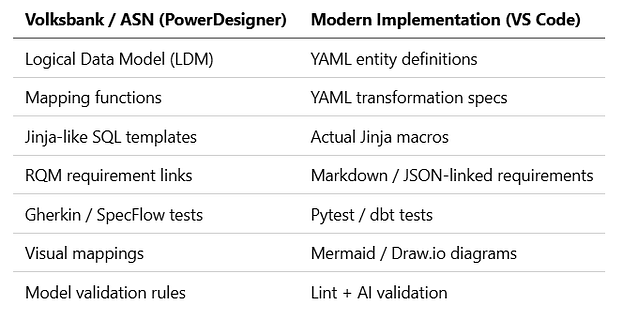
What was once modeled inside PowerDesigner now lives as metadata code in VS Code — open, versioned, and collaborative.
🎉 12️⃣ Living Happily Ever After
Modelers and engineers finally share a single home:
- Modelers define logic and semantics.
- Engineers automate and optimize.
- AI builds, validates, and explains.
Together, they build not only data products — but a sustainable metadata culture.
📅 Coming Next
This trilogy ends here — but the journey continues.
Next, we’ll dive into real-world use cases:
- Using DuckDB for metadata storage and synchronization
- Integrating Notion and Google Drive as metadata sources
- Automating lineage visualization and validation with AI
Stay tuned — because the metadata house will keep growing. 🧱✨